

XML technologies / CSS / CSS Cookbook / Design with CSS / Extremely large text
(Excerpt from “CSS Kochbuch” by Christopher Schmitt)
Problem
Exceptionally large text should draw the user’s attention to a web page (see the following figure).
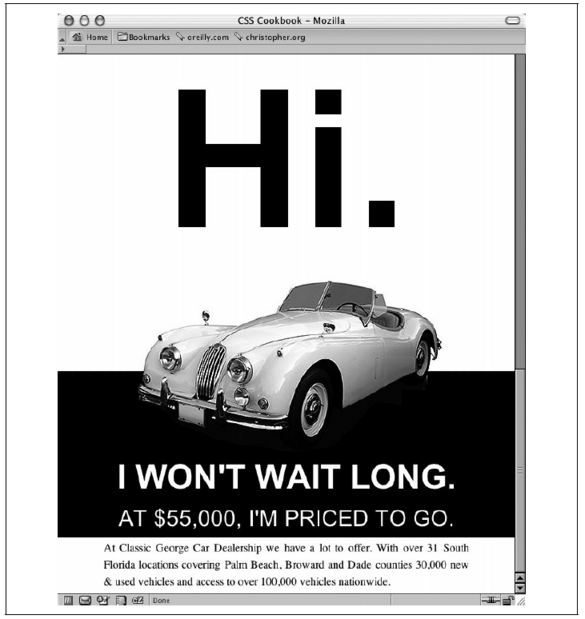
Figure: An example of extremely large text on a website.
Solution
Increase the heading’s text size until it is disproportionately large compared with the rest of the text. First, you need some HTML:
<h1>Hi.</h1>Then use the following CSS rule:
h1 {
 font-size: 17em;
 margin: 0;
 padding: 0;
 text-align: center;
 font-family: Arial, Verdana, Helvetica, sans-serif;
}
Discussion
Clearly, larger elements attract more attention than smaller ones. Pages designed this way feel more dynamic than pages whose elements are all the same size. Extremely large letters can direct attention to a particular part of a page.
In this example, the word “Hi” is given, through the property font-size, a size of 17em. One em corresponds to the default font size, so we have enlarged the text seventeenfold. In theory, there is no limit to font size. In practice, browsers give up beyond a certain upper limit. After all, not everyone has a monitor capable of displaying letters a mile (63,360 inches) tall:
h3 {
 font-size: 63360in;
}
See also
The recipe Specifying font sizes and measurements for defining font parameters,
“The Elements of Text and Message Design and Their Impact on Message Legibility: A Literature Review” from the Journal of Design Communication and
the CSS2 specification on length units (including em units).
Copyright of the German edition © 2007 by O’Reilly Verlag GmbH & Co. KG
You may print the online version for your private use.
Otherwise, this chapter from “CSS Kochbuch” is subject to the same conditions as the bound edition: the work, including all its parts, is protected by copyright. All rights reserved, including reproduction, translation, microfilming, and storage and processing in electronic systems.
O’Reilly Verlag GmbH & Co. KG, Balthasarstr. 81, 50670 Köln