

XML technologies / Regular expressions / Extended introductory examples / Modifying text with regular expressions / A small mail program
(Excerpt from "Regular expressions" by Jeffrey E. F. Friedl)
Another example: we want to reply to an email message stored in a file. In our reply, we want to quote the original text in the usual way. We want to remove all uninteresting header lines and build a new header from the remaining information.
Example email message |
|---|
|
|
This box shows a typical email message. Its headers contain some useful information—date, subject, and so on—but also much irrelevant material to be removed. Our script will be called mkreply and process the file king.in. The program should be invoked as follows:
% perl -w mkreply king.in > king.out(Remember: the option -w makes Perl issue additional warnings; see About the examples: a short introduction to Perl.)
The resulting file king.out should look roughly like this:
To: elvis@hh.tabloid.org (The King)
From: jfriedl@regex.info (Jeffrey Friedl)
Subject: Re: Be seein⟦U+001F⟧ ya around

On Fri, Jun 15 2007 11:15 The King wrote:
|> Sorry I haven⟦U+001F⟧t been around lately. A few years back I checked
|> into that ole heartbreak hotel in the sky, ifyaknowwhatImean.
|> The Duke says "hi".
|>      Elvis
Let us analyze this. For the reply’s headers, we need the address, here elvis@hh.tabloid.org, the recipient’s full name (The King), our own address, and the subject. For the reply’s first line, we also need the date of the received message.
We can divide the work into three steps:
Extract the relevant information from the old headers.
Write the new header.
Write the message, indented with ›
|>●‹.
I am getting a little ahead of myself: we can only process data once we know how to read it into a program. Perl makes this easy with its magical “<>” operator. When assigned to an ordinary $variable, this odd construct supplies the next input line. Input comes from the files specified on the command line after the Perl script’s filename—in this case, king.in.
Perl’s two-character <> operator must not be confused with the shell’s output redirection “> datei” or Perl’s greater-than and less-than operators. <> is simply Perl’s unusual equivalent of a getline() function.
Once every line has been read, <> conveniently returns the unde⟦U+0002⟧fined value (undef, treated as false in a condition). The following idiom reads a file line by line:
while ($zeile = <>) {
   ... verarbeite $zeile ...
}
We will use something like this, but our problem requires separate handling of the headers and the message body. The header includes everything up to the first blank line; everything after it is the body. To read only the header, we can use:
# Kopfzeilen verarbeiten

while ($zeile = <>) {
   if ($zeile =~ m/^\s*$/) {
       last; # springt hinter das Ende der while-Schleife
   }
    .
    .
    .
   ... Kopfzeile verarbeiten ...
    .
    .
    .
}
... Rest der Meldung verarbeiten ...
    .
    .
    .
We test for the end of the mail header with the regex ˹^\s*$˼. This checks that the string has a beginning, as every string does, followed by any amount of whitespace, though we do not expect any, and then reaches the end of the string. (Note: I use “string” rather than “line”, although here they mean the same thing. Perl can apply regexes to strings containing multiline text. The anchors care⟦U+0003⟧t and dollar normally refer to the beginning and end of that entire string, not its individual lines. We will see a counterexample later in this chapter. As noted, that is unimportant here, because we know that $zeile always contains exactly one actual line of the email.) The keyword last exits the enclosing while loop. This finishes header processing.
After checking for a blank line, we can now do what is needed with the header lines: extract information such as the date and subject.
To extract the subject, we use a technique we will encounter often:
if ($zeile =~ m/^Subject: (.*)/i) {
    $subject = $1;
}
This attempts to ⟦U+0002⟧find a string beginning with ›Subject:●‹, regardless of case. If that much of the regex matches, the rest, ˹.*˼, must match everything remaining on the line. Since ˹.*˼ is parenthesized, we can subsequently process the subject through $1. Here, we simply store the text in the variable $subject. If the regex does not match, as with most lines, it returns false; the condition is therefore false too, and the variable $subject is not assigned for that line.
Beware of ˹.*˼ |
|---|
The expression ˹ |
However, there are hidden traps that become dangerous when their effects inside larger expressions are not understood. We have already seen an example; How regex engines work discusses this in greater detail. |
Similarly, we test lines for Date and ReplyTo:
if ($zeile =~ m/^Date: (.*)/i) {
$datum = $1;
}
if ($zeile =~ m/^ReplyTo: (.*)/i) {
$reply_adresse = $1;
}The From: line requires more work. First, we want the line beginning with ›From:‹, not the cryptic ›From●‹ line without a colon at the beginning. We want:
From: elvis@tabloid.org (The King)
This header contains both the email address and the sender’s full name in parentheses. We want to extract that name.
˹^From:●(\S+)˼ matches up to and including the address. As you might guess, ˹\S˼ matches anything that is not whitespace. Thus, ˹\S+˼ matches characters up to the first whitespace character or the end of the string. Here, that is the sender’s address. Next, we want the full name in parentheses. We must therefore test for parentheses, using ˹\(...\)˼. The two backslashes remove the parentheses’ usual metacharacter meaning. Inside them, we want everything except further parentheses, achieved with ˹[^()]*˼. Remember: metacharacters inside character classes differ from ordinary regex metacharacters. Inside a character class, parentheses are not special and need no backslash.
Putting it all together gives:
˹
^From:l(\S+)●\(([^()]*)\)˼
All those parentheses look confusing, so the next figure shows them more clearly.
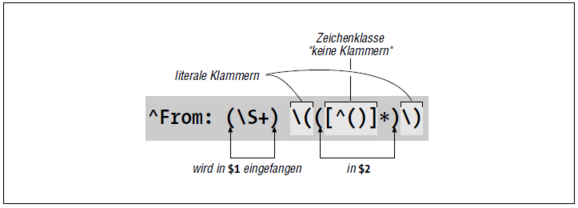
Figure: nested parentheses, $1 and $2.
If the regex in that figure matches, we have the sender’s full name in $2 and a possible reply address in $1:
if ($zeile =~ m/^From: (\S+) \(([^()]*)\)/i) {
    $reply_adresse = $1;
    $from_name = $2;
}
Since not every email message has a Reply-To header, we retain $1 as a provisional reply address. If a Reply-To line appears later in the file, we simply overwrite $reply_adresse with that address. The program now looks like this:
while ($zeile = <>)
{
if ($zeile =~ m/^\s*$/ ) { # bei einer Leerzeile ...
last; # ... springen wir sofort aus der while-Schleife heraus.
}
if ($zeile =~ m/^Subject: (.*)/i) {
$subject = $1;
}
if ($zeile =~ m/^Date: (.*)/i) {
$datum = $1;
}
if ($zeile =~ m/^ReplyTo: (\S+)/i) {
$reply_adresse = $1;
}
if ($zeile =~ m/^From: (\S+) \(([^()]*)\)/i) {
$reply_adresse = $1;
$from_name = $2;
}
}Each header line is compared with every regex; if it matches, the corresponding variable is assigned. Many lines match none of the regexes and are thus ignored.
After this while loop, we can print the reply’s header. (Note: in Perl, the @ character usually needs backslash protection in regexes and double-quoted strings.)
print "To: $reply_adresse ($from_name)\n";
print "From: jfriedl\@regex.info (Jeffrey Friedl)\n";
print "Subject: Re: $subject\n";
print "\n" ; # Eine Leerzeile trennt die Kopfzeilen vom Text der Nachricht.
Notice that the new Subject line includes a ›Re:●‹ to indicate a reply on the same subject. (Translator’s note: “Re” is not short for “Reply”, but comes from Latin “res”, concerning the matter; for that reason and under RFC 2822, the unfortunately common “Aw:” is doubly wrong.) As an introductory line, we print:
print "On $datum $from_name wrote:\n";We read and write the message itself line by line, adding ›|>●‹ at the beginning of each line:
while ($zeile = <>) {
    print "|> $zeile";
}
No newline needs to be printed here, because we know each line read already contains one.
Indenting and quoting lines with print "|> $zeile" could also be done with a regex construct:
$zeile =~ s/^/|> /;
print $zeile;
The substitution looks for ˹^˼ and ⟦U+0002⟧finds it, of course, at the beginning of the string. The regex succeeds but consumes no characters, so the substitution replaces the “nothing” at the beginning with ›|>●‹. In other words, ›|>●‹ is prepended. This is an unseemly abuse of regexes for a trivial purpose, but we will see something quite similar again at the chapter’s end.
Real-world problems, practical solutions
When discussing real-world problems, I must also show their limitations. First, though, I must stress that the aim here is to demonstrate regex use, which Perl makes easy. The Perl code is not necessarily the most effi⟦U+0002⟧cient or elegant, but I hope it is easy to understand.
The real world is far more complicated than our simple example assumes. A From: line can have various formats, but our program recognizes only one. If it fails to recognize a From:line, the variable $from_name is never assigned. It retains the unde⟦U+0002⟧fined value, a kind of “no value” value, when we try to print it. A correct solution would extend the regex to recognize every possible address/name format; as a first step, however, we can add the following check after reading the header and before printing the body:
if (   not defined($reply_adresse)
    or not defined($from_name)
    or not defined($subject)
    or not defined($datum) )
{
    die "Kann nicht alle nötigen Informationen finden!\n";
}
Perl’s defined function reports whether its argument has a valid value; die (“die!”) prints an error message and terminates the program.
Our program also assumes that a From: line precedes the Reply-To: line when both exist. If the From: line comes later, $reply_adresse, already containing the correct reply address, is overwritten with a possibly incorrect address.
The real world
Email messages are produced by many different programs, each with its own ideas about proper headers and how to interpret standards. Email processing can therefore be extremely tricky. I encountered this problem while working on a Pascal program and realized that handling it without regexes is extremely difficult. So difficult that writing a small Perl-like regex package for Pascal was easier than tackling the problem in plain Pascal. I had taken the power and flexibility of regexes for granted until confronted with a world without them! I quickly es⟦U+0003⟧caped from that world.
German edition copyright © 2008 by O’Reilly Verlag GmbH & Co. KG
You may print the online version for private use.
Otherwise, this chapter from "Reguläre Ausdrücke" is subject to the same terms as the bound edition: the work and all its parts are protected by copyright. All rights reserved, including reproduction, translation, microfilming, storage and processing in electronic systems.
O’Reilly Verlag GmbH & Co. KG, Balthasarstr. 81, 50670 Köln