

XML technologies / CSS / CSS Cookbook / Design with CSS / Emphasizing quotations
(Excerpt from “CSS Kochbuch” by Christopher Schmitt)
Problem
Emphasize a quotation with large, bold quotation marks, as shown in the following figure.
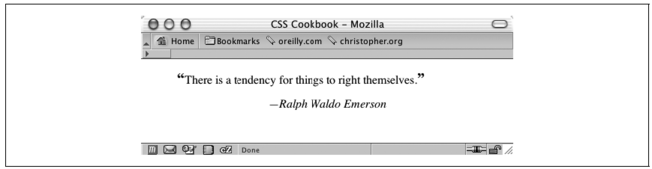
Figure: The styled quotation.
Solution
First mark up the quotation correctly (see the next figure):
<blockquote>
  <p>There is a tendency for things to right themselves.</p>
  <cite>Ralph Waldo Emerson</cite>
</blockquote>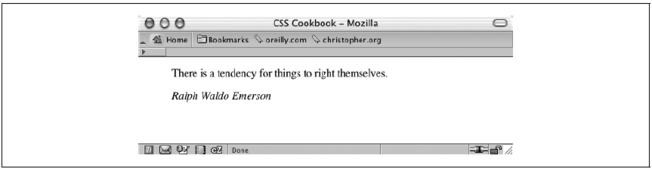
Figure: The quotation’s default appearance.
Then define the CSS rules required to display the quotation:
blockquote {
 padding: 0;
 margin: 0;
 text-align: center;
}
p {
 font-size: 1em;
 padding-bottom: 3em;
 text-transform: lowercase;
 font-family: Georgia, Times, "Times New Roman", serif;
 margin: 0;
 padding: 0;
}
cite {
 display: block;
 text-align: center;
}
Finally, use the pseudo-elements :before and :after to insert the quotation marks and an em dash before the quoted source’s name:
blockquote p:before {
 content: "\201C";
 font-size: 1.2em;
 font-weight: bold;
 font-family: Georgia, Times, "Times New Roman", serif;
}
blockquote p:after {
 content: "\201D";
 font-size: 1.2em;
 font-weight: bold;
 font-family: Georgia, Times, "Times New Roman", serif;
}
cite:before {
 content: "\2014 ";
}
cite {
 display: block;
 text-align: center;
}
Discussion
Using pseudo-elements, browsers can apply styles to parts of a page that standard HTML cannot reach. For example, pseudo-elements can target a paragraph’s first line or, as here, insert automatically generated content before and after a particular element.
This solution surrounds the quotation with typographic curly quotation marks. For example, the opening mark is declared as follows:
content: "\201C ";Content inserted into a document through the property content must be enclosed in single or double quotation marks. To use single quotation marks for the quotation, we could also write:
content: " ' ";For ordinary double quotation marks, the rule would look like this; spaces have been added before and after the inserted character for readability:
content: ' " ';However, the curly quotation marks used here are not part of the standard ASCII character set, so we use their hexadecimal equivalents to avoid browser misunderstandings.
Because everything between the quotation marks is generated automatically, we must escape the hexadecimal value with a backslash.
Another way to insert quotation marks is to give the property content the keyword open-quote or close-quote as its value:
content: open-quote;Note that the keywords open-quote and close-quote are currently supported only by Mozilla and Opera. Internet Explorer for Windows and Macintosh also does not support the pseudo-elements :before and :after.
See also
The recipe Displaying the URI after a link for adding URLs to printed web pages using pseudo-elements, and the CSS2 specification on quotation marks and generated content.
Copyright of the German edition © 2007 by O’Reilly Verlag GmbH & Co. KG
You may print the online version for your private use.
Otherwise, this chapter from “CSS Kochbuch” is subject to the same conditions as the bound edition: the work, including all its parts, is protected by copyright. All rights reserved, including reproduction, translation, microfilming, and storage and processing in electronic systems.
O’Reilly Verlag GmbH & Co. KG, Balthasarstr. 81, 50670 Köln