

XML technologies / XSLT / Java and XSLT / Java-based web technologies / The universal design
(Excerpt from “Java und XSLT” by Eric M. Burke)
Although APIs, frameworks and template engines keep multiplying, most designs seem to share the model-view-controller (MVC) approach. Its goal is clear separation of data, presentation and application logic. Most web frameworks implement this pattern, as does the JSP/servlet hybrid. XSLT implementations use it too, suggesting that model-view-controller is universal in web-tier development.
Web frameworks
A framework is a class library with special features simplifying particular application development. An image-processing framework might provide APIs for reading, writing and displaying image formats. This eases application creation because someone has already designed its structure.
Servlet frameworks are similar. After years of servlets, JSP and hybrids, recurring architectures emerge as optimal: separating Java code from HTML generation, combining servlets with JSP, and variations. Once patterns are understood, general frameworks can automate routine web development tasks.
The main disadvantage is vendor dependence at the expense of open standards. There are currently no open framework standards. Many frameworks are open source, but none is backed by a standards body or Sun’s Java Community Process. Low-level servlet and JSP APIs are well-defined, widely implemented standard Java extensions. Frameworks offer more advanced features such as error checking, database connection pooling and custom tag libraries. The more framework-specific features you use, the harder switching frameworks or vendors becomes.
A typical framework is Turbine, one of many supported by Apache. It is a large framework with features such as:
Database connection pooling, object-relational mapping tool integration and more abstract relational database interaction
Integration with multiple template engines
Role-based security and access control
Browser detection
JavaMail integration
This is only a short feature list. The compelling reason to use Turbine is its underlying object model, clearly separating validation logic, the servlet and page generation into modules. Turbine uses a single servlet, so validation and page generation belong elsewhere, ideally in helper classes called Actions, which validate incoming requests. Once an action validates a request, classes such as Layout, Page and Navigation send the presentation back to the browser.
Frameworks offer added features compared with pure XML/XSLT. Strip away nonweb features such as connection pooling and object-relational tools, and MVC itself is easy to implement. Beware frameworks offering too many nonweb features: many belong on an application server rather than the web server. The rest of this chapter shows how to structure a complex web application without adopting a particular framework.
Model-view-controller
Separating data and presentation logic is important, but what are the practical benefits? Above all, fully separating data from the UI lets the application’s appearance change without affecting its underlying data. This is crucial when supporting incompatible browsers or WML, XHTML Basic and/or HTML. Mixing data and presentation makes adapting to new UI requirements harder.
Application logic should also be separate from data and presentation logic. Some dependencies are inevitable, but generally data-dependent application logic can be separated from UI-dependent presentation logic. The following figure shows these dependencies.
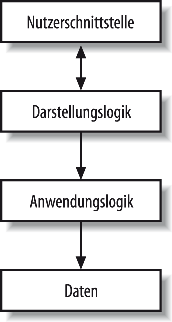
Figure: Dependencies
Arrows show dependencies. Changing underlying data probably requires changing application logic, but not necessarily presentation. Broad changes may force adjustments at higher levels, while small changes can usually be encapsulated. Changing application logic need not change data, and presentation changes should not break application logic. Later we show how Java, XML and XSLT satisfy these dependencies.
The dominant pattern for scalable websites is Model-View-Controller. MVC originated in Smalltalk-80 for object-oriented GUI development. Views display information through GUI components; the model holds application data. The controller coordinates them, catches view events, queries and modifies the model and notifies the view of changes. The following figure shows their interaction.
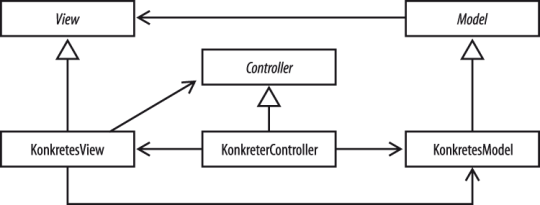
Figure: Model-view-controller
As shown, Model, View and Controller are abstract classes or interfaces; concrete classes are application-specific. Open arrows show connection direction. For example, the abstract Model sends notifications only to the abstract View, while KonkretesView also knows about KonkretesModel. This makes sense: building a specific view, such as a customer entry form, is difficult without knowing its specific data model, such as Kunde. But because the Model knows View instances only abstractly, it can send general change notifications, allowing new views to be attached later.
This is only a pattern: implementations may vary and use different class names. One variation removes explicit references from KonkretesView to KonkretesModel and from Model to View. The Controller then plays a larger role. Java often removes the explicit controller using models and presentation components sending notifications to event listeners. Although usually discussed for GUIs, MVC is not limited to them. Web applications commonly use it in:
The servlet/JSP hybrid approach
Most servlet frameworks
The XSLT approach
In the hybrid approach the servlet is controller and JSP is view; database or Enterprise JavaBeans (EJB) data act as model. A framework may separate MVC more explicitly. Often a single servlet delegates work to helper controller classes, each equivalent to KonkreterController in figure Model-view-controller and aware of specific pages and data.
Originating in Smalltalk GUIs, MVC has remained common across GUIs from Motif to Java. It also dominates the web, with some different mechanisms. Web environments are constrained by the stateless HTTP protocol. Each hyperlink click opens a new browser/server connection, closed after delivering the page. The server cannot initiate a conversation and merely waits for the next request.
MVC in this stateless architecture loosely couples controller and view. In a GUI the controller immediately notifies the view of model changes. On the web, it must retain state while waiting for a browser request. It then validates the request, forwards commands to the model and returns results to the view.
This may sound academic and vague. The next sections provide detailed diagrams showing exactly how MVC works in an XSLT-powered website.
XSLT implementations
All earlier approaches lead naturally to XSLT, often the most powerful and understandable approach. For a single page it is harder to configure than a servlet or JSP. Parser and processor configuration can be difficult, especially with CLASSPATH problems. This is frustrating if a servlet container bundles an old XML parser with DOM or SAX version 1. Most processors need version 2 parsers or later. As applications grow more complex, XSLT’s benefits become clear. Managing that complexity is this chapter’s real goal.
XSLT maps directly to MVC: XML is model, servlet is controller, and XSLT produces the HTML view. A stylesheet may contain minimal logic, slightly blurring view/controller boundaries. The following figure shows this conceptual mapping.
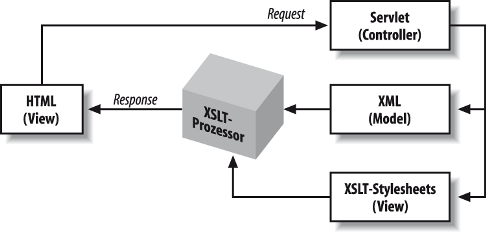
Figure: Conceptual XSLT model
All other methods share an HTML-centered weakness. Every earlier example assumed HTML output. What if phones must suddenly be supported? They will use WML, XHTML Basic or a future technology rather than HTML. Traditional approaches require entirely new servlets. Logic in JSP pages must be duplicated or moved into helpers; hard-coded HTML generation in servlets must be rewritten.
XSLT solves this elegantly: create a second stylesheet transforming XML to WML instead of HTML. Different browsers can likewise use different stylesheets. Since stylesheets import or include others, most code can be shared and reused.
Whatever XSLT produces, begin with XML data. The TV listings application needs dynamically generated XML. The following JDOM code creates these data.
Example: ProgrammuebersichtJDOM.java
package kapitel4;

import java.text.SimpleDateFormat;
import org.jdom.*;
import org.jdom.output.*;

/**
 * Erzeugt ein JDOM-Dokument für die TV-Programmübersicht.
 */
public class ProgrammuebersichtJDOM {
  private SimpleDateFormat datumFmt = new SimpleDateFormat("HH:mm");

  /**
   * Einfache main( )-Methode zur Ausgabe des XML-Dokuments an System.out,
   * was für Tests nützlich ist.
   */
  public static void main(String[] args) throws Exception {
    Document doc = new ProgrammuebersichtJDOM().getHeutigeSendungen( );
    new XMLOutputter(" ", true, "ISO-8859-1").output(doc, System.out);
  }

  /**
   * @return ein neues JDOM-Dokument mit allen heutigen TV-Shows.
   */
  public Document getHeutigeSendungen( ) {
    Programmuebersicht progr = Programmuebersicht.getInstance( );
    Sendung[] sendungen = progr.getHeutigeSendungen( );

    Element wurzelElem = new Element("programmuebersicht");

    for (int i=0; i<sendungen.length; i++) {
      wurzelElem.addContent(erzeugeSendungElement(sendungen[i]));
    }
    return new Document(wurzelElem);
  }

  /**
   * Eine Hilfsmethode zur Konvertierung eines Sendung-Objekts in ein JDOM-Element.
   */
  public Element erzeugeSendungElement(Sendung sendung) {
    Element e = new Element("sendung");
    e.addContent(new Element("kanal").setText(
      Integer.toString(sendung.getKanal( ))));
    e.addContent(new Element("von").setText(
      this.datumFmt.format(sendung.getAnfangUhrzeit( ))));
    e.addContent(new Element("bis").setText(
      this.datumFmt.format(sendung.getEndeUhrzeit( ))));
    e.addContent(new Element("titel").setText(sendung.getTitel( )));
    return e;
  }
}
Why is this JDOM code better than the servlet’s Java-generated output? The difference is fundamental: this JDOM example uses no println( ) statements. It builds a data structure representing TV listings, with JDOM guaranteeing well-formed XML. We could add a DTD and a unit test verifying the generated structure’s integrity.
Besides ensuring integrity, JDOM code is usually much smaller than servlet or JSP code. Here both were small because the HTML had little formatting or layout. On realistic pages, more advanced HTML makes servlet/JSP code complex while JDOM stays unchanged.
The stylesheet grows with HTML complexity, but this matters less because presentation is wholly separate from XML data. Once tested, XSLT can be deployed without recompiling Java or restarting the servlet. The next example shows JDOM’s XML output.
Example: XML for the TV listings page
<?xml version="1.0" encoding="ISO-8859-1"?>
<programmuebersicht>
    <sendung>
        <kanal>2</kanal>
        <von>06:00</von>
        <bis>06:30</bis>
        <titel>Morgenmagazin</titel>
    </sendung>
    <sendung>
        <kanal>3</kanal>
        <von>06:00</von>
        <bis>08:00</bis>
        <titel>Leichtathletik</titel>
    </sendung>
    ...der Rest der XML-Daten wird ausgelassen
</programmuebersicht>
The next stylesheet produces exactly the same output as the JSP page and servlet.
Example: TVProgrammuebersicht.xslt
<?xml version="1.0" encoding="ISO-8859-1"?>
<xsl:stylesheet version="1.0" xmlns:xsl="http://www.w3.org/1999/XSL/Transform">
    <xsl:output method="html"/>
    <!-- ========== Ab hier wird das HTML-Dokument erzeugt ========== -->
    <xsl:template match="/">
        <html>
            <head><title>Die heutigen Sendungen</title></head>
            <body>
                <h1>Die heutigen Sendungen</h1>
                <table cellpadding="3" border="1" cellspacing="0">
                    <tr>
                        <th>Kanal</th>
                        <th>Von</th>
                        <th>Bis</th>
                        <th>Titel</th>
                    </tr>
                    <!-- ===== hier werden die Sendungen ausgewählt ===== -->
                    <xsl:apply-templates select="programmuebersicht/sendung"/>
                </table>
            </body>
        </html>
    </xsl:template>
    <!-- ======== Jede Sendung wird als eine Tabellenzeile angezeigt ======== -->
    <xsl:template match="sendung">
        <tr>
            <td><xsl:value-of select="kanal"/></td>
            <td><xsl:value-of select="von"/></td>
            <td><xsl:value-of select="bis"/></td>
            <td><xsl:value-of select="titel"/></td>
        </tr>
    </xsl:template>
</xsl:stylesheet>
The last piece is a servlet combining everything and returning the transformation result to the client (see Servlet basics and XSLT). It acts as controller among components and does little actual work. It intercepts the request, then tells ProgrammuebersichtJDOM to generate XML. The XML and TVProgrammuebersicht.xslt go to an XSLT processor such as Xalan. Finally, HTML, XHTML, WML or any other output goes back to the browser.
Note:
This architecture also lets clients request raw XML without transformation, supporting nonbrowser clients needing data for their own processing.
After examining other approaches critically, we should also assess XSLT. First, developers or editors must learn another language. Despite unusual syntax, XSLT may be easier to learn than Java, but unfamiliar technology still meets resistance.
Second, transformations always add runtime overhead. Fortunately, many optimizations exist, most commonly caching stylesheets instead of reparsing each request. Later chapters cover these techniques.
Since stylesheets are XML documents, any XML editor can edit them. Specialized XSLT editors may also become more common, hiding implementation details from nonprogrammers. Like early Java GUI builders, they may produce less clean stylesheets than hand coding.
XSLT benefits for development and maintenance
JSP testing is difficult: pages run only in a JSP container, so automated unit tests must start a server and issue HTTP requests to verify output. The XSLT web approach avoids this problem.
Looking back at figure Conceptual XSLT model, the model is XML generated independently of the servlet container. A unit test can simply create it and validate it against a DTD or XML Schema. Tools such as XMLSpy make creating stylesheets and interactively testing them against sample XML easy, long before deployment in a servlet container.
The XSLT processor is also independent of the servlet. Further unit tests can transform XML using stylesheets without a server or container. XHTML output can be validated against a W3C XHTML DTD. The open source JUnit tool supports all these tests and is available at junit.org.
Copyright © 2002 O'Reilly Verlag GmbH & Co. KG
You may print the online version for your private use.
Otherwise, this chapter from “Java und XSLT” is subject to the same conditions as the bound edition. The work, including all its parts, is protected by copyright. All rights reserved, including reproduction, translation, microfilming, and storage and processing in electronic systems.
O’Reilly Verlag GmbH & Co. KG, Balthasarstraße 81, 50670 Köln, kommentar(at)oreilly.de