

XML technologies / XSLT / Java and XSLT / Java-based web technologies / Traditional approaches
(Excerpt from “Java und XSLT” by Eric M. Burke)
Before complex options, consider basic Java web development approaches. They suffice for small applications or limited dynamic content, but cannot match XML/XSLT as sites grow complex.
CGI
The Common Gateway Interface (CGI) connects external applications written in almost any language to a web server. Common CGI languages are C and Perl. Communication varies with request type. For a HTTP GET request, parameters go through environment variable QUERY_STRING to the CGI script. HTTP POST data instead go to the CGI script’s standard input. CGI normally returns results through standard output to the server.
Ordinary CGI programs run as external programs, unlike servlets. Each browser request starts a new process, reducing performance and complicating retention of state information across requests. A web shopping cart is a perfect example. The figure illustrates CGI processing.
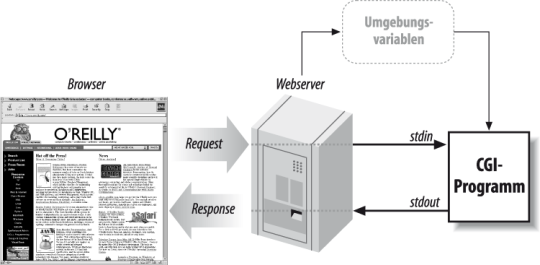
Figure: CGI process
Note:
FastCGI differs in two ways: processes survive request/response cycles, and TCP connections replace environment variables and pipe I/O, allowing distribution across servers. This removes CGI’s worst drawbacks and supports reuse of existing programs.
Java CGI is technically possible but a terrible idea: starting a JVM for every request is painfully slow. Startup is not Java’s strength. Servlets addressed this by starting the JVM once and keeping it running between requests. The term servlet engine means this servlet-hosting JVM, often also acting as HTTP server.
Servlets replacing CGI
Sun released the Servlet API in 1997, when Java mainly targeted clients. Servlets were marketed and used as CGI replacements and quickly adopted for their advantages.
The engine runs as long as the server, so servlets load once and remain for later requests. They are simply Java classes: the JVM loads their objects and retains references while the application runs.
Persistence brings two more advantages. State can remain in memory between disconnected browser requests. Multiple clients can also share an instance through Java threads, much more efficient than creating processes and providing excellent performance.
Early Servlet APIs lacked deployment mechanisms for server installation. Despite a consistent API, installation was vendor-specific. Version 2.2 replaced proprietary engines with a compatible servlet container specification, formally defining servlet/environment relationships and enabling unchanged deployment across vendors.
The container also introduced the web application, a set of servlets, static documents, images and other resources. Applications deploy as WAR web application archives: JAR archives with a standard directory structure and the extension .war. The jar command creates them. The WAR includes a deployment descriptor, an XML file configuring every application aspect. Details of WARs and descriptors are outlined in Servlet basics and XSLT.
Servlets are easy to implement, portable, consistently deployed and fast, so they underpin every approach here. Used alone, however, their limitations emerge as applications become complex.
The screenshot shows today’s TV listings, first implemented as a servlet. A JSP implementation follows later.
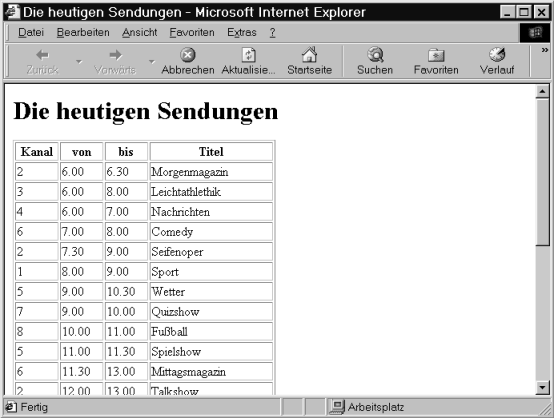
Figure: TVProgrammServlet output
The Java class Programmuebersicht has a method getHeutigeSendungen( ) returning an array of Sendung objects already sorted, reducing page-generation work. The classes Programmuebersicht and Sendung recur in later examples, showing how separating application/database code from the servlet eases technology changes without rewriting everything. The next example shows TVProgrammServlet.java. A series of println( ) statements generating output typifies first-generation servlets.
Example: TVProgrammServlet.java
package kapitel4;

import java.io.*;
import java.text.SimpleDateFormat;
import javax.servlet.*;
import javax.servlet.http.*;

public class TVProgrammServlet extends HttpServlet {
  public void doGet(HttpServletRequest request,
      HttpServletResponse response) throws IOException,
      ServletException {

    SimpleDateFormat datumFmt = new SimpleDateFormat("HH:mm");

    Sendung[] sendungen = Programmuebersicht.getInstance().getHeutigeSendungen( );

    response.setContentType("text/html");
    PrintWriter pw = response.getWriter( );
    pw.println("<html><head><title>Die heutigen Sendungen</title></head><body>");
    pw.println("<h1>Die heutigen Sendungen</h1>");
    pw.println("<table border=\"1\" cellpadding=\"3\"");
    pw.println(" cellspacing=\"0\">");

    pw.println("<tr><th>Kanal</th><th>von</th>");
    pw.println("<th>bis</th><th>Titel</th></tr>");

    for (int i=0; i<sendungen.length; i++) {
      pw.println("<tr>");
      pw.print("<td>");
      pw.print(sendungen[i].getKanal( ));
      pw.println("</td>");
      pw.print("<td>");
      pw.print(datumFmt.format(sendungen[i].getAnfangUhrzeit( )));
      pw.println("</td>");
      pw.print("<td>");
      pw.print(dateFmt.format(sendungen[i].getEndeUhrzeit( )));
      pw.println("</td>");
      pw.print("<td>");
      pw.print(sendungen[i].getTitel( ));
      pw.println("</td>");
      pw.println("</tr>");
    }
    pw.println("</table>");
    pw.println("</body>");
    pw.println("</html>");
  }
}
For servlet details, read Servlet basics and XSLT. Here we focus on HTML generation. These few println( ) statements look harmless, but real pages have thousands of println( ) statements, complicating maintenance. Splitting HTML generation among methods and objects remains tedious and error-prone.
Development scalability and maintenance are the main problems. Complex pages make coding and HTML changes harder. Designers and editors are excluded because only programmers can modify code. Every small change requires recompiling, testing and redeploying.
First-generation servlets also do too much, with unclear placement of error handling, form processing, application logic and HTML generation. Two helpers suffice here but complex applications need stricter organization. Every later technology addresses some of these issues.
JSP
You have probably heard of JSP (JavaServer Pages), currently popular for productivity claims. Rather than embedding HTML in Java servlets, requiring Java programmers, start with static HTML and add special tags expanded dynamically by the JSP engine. The next simple example produces the same output as TVProgrammServlet.
Example: TVProgramm.jsp
<%@ page import="kapitel4.*,java.text.*" %>
<%! SimpleDateFormat datumFmt = new SimpleDateFormat("HH:mm"); %>
<html>
    <head>
        <title>Die heutigen Sendungen</title>
    </head>
    <body>
        <h1>Die heutigen Sendungen</h1>
        <% Sendung[] sendungen = Programmuebersicht.getInstance().getHeutigeSendungen( ); %>
        <table border="1" cellpadding="3" cellspacing="0">
            <tr><th>Kanal</th><th>Von</th><th>Bis</th><th>Titel</th></tr>
            <% for (int i=0; i<sendungen.length; i++) { %>
            <tr>
                <td><%= sendungen[i].getKanal( ) %></td>
                <td><%= datumFmt.format(sendungen[i].getAnfangUhrzeit( )) %></td>
                <td><%= datumFmt.format(sendungen[i].getEndeUhrzeit( )) %></td>
                <td><%= sendungen[i].getTitel( ) %></td>
            </tr>
            <% } %>
        </table>
    </body>
</html>
As TVProgramm.jsp shows, most of the page is static HTML with JSP tags for dynamic content. The first client request translates the page to servlet source, then compiles and loads it for later requests. Tags produce dynamic content, making the HTML look like an entirely static page.
JSP runtime performance resembles hand-written servlets, since static content becomes println( ) statements in generated code. The first request can be slower because translation and compilation are needed; most containers offer precompilation.
Debugging JSP is challenging. Generated Java class names and signatures are not always intuitive, and errors can show alarming stack traces in the browser. An optional error page is friendlier but offers little diagnostic help.
Apache Tomcat shows output like this if the closing brace (}) is omitted from the for loop in the earlier example:
A Servlet Exception Has Occurred
org.apache.jasper.JasperException: Unable to compile class for
JSP..\work\localhost\kapitel4\_0002fTVProgramm_0002ejspTVProgramm_jsp_2.java:104:
'catch' without 'try'.
     } catch (Throwable t) {
      ^
..\work\localhost\kapitel4\_0002fTVProgramm_0002ejspTVProgramm_jsp_2.java:112:
'try' without 'catch' or 'finally'.
}
^
..\work\localhost\kapitel4\_0002fTVProgramm_0002ejspTVProgramm_jsp_2.java:112:
'}' expected.
}
^
3 errors

at org.apache.jasper.compiler.Compiler.compile(Compiler.java:294)
at org.apache.jasper.servlet.JspServlet.doLoadJSP(JspServlet.java:478)
... der Rest des Stack-Trace wird hier ausgelassen
The rest of the stack trace merely lists Tomcat internals and is not helpful. _0002fTVProgramm_0002ejspTVProgramm_jsp_2 names the generated servlet class. Line numbers refer to generated code, not the JSP page.
Embedding HTML in servlets restricts maintenance to programmers. JSP often reverses this by embedding Java in HTML, still failing to separate generation and application logic. With logic spanning pages, do you want hundreds of Java lines mixed with HTML and surrounded by <% %> tags? Unfortunately many JSP pages embed most Java code directly in HTML.
Early JSP versions lacked robust separation. Although JavaBeans tags removed some Java code through JavaBeans-compliant helpers, complexity was limited. Newer specification trends improved this, especially custom tags: programmer-created actions finally remove Java from pages. An example follows.
Example: JSP with custom tags
<%@ taglib uri="/meine_taglib" prefix="abc" %>
<html>
    <head>
        <title>JSP Tag-Library Demonstration</title>
    </head>
    <body>
        <abc:standardKopfzeile/>
        <abc:firmenLogo/>
        <h1>aktuelle Mitteilungen</h1>
        <abc:mitteilungen filter="aktuell"/>
        <h1>Jobangebote</h1>
        <abc:jobAngebote abteilung="alle"/>
        <abc:standardFusszeile/>
    </body>
</html>
Custom tags are ordinary XML tags with a namespace-prefix. Prefixes give tags unique names; choosing one per library avoids conflicts across providers. Tags map to Java classes called tag handlers doing the work. The specification does not restrict the underlying Java implementation; containers may support other languages. Programmers can create tested tags for logos, search forms, navigation and footers, while designers ignore handlers. The main drawback is missing standardized tags: open source libraries are under development, but cannot cover every need.
Complex validation remains a problem. JSP custom tags suit display-only pages, but not validating complex HTML forms. Substantial Java code almost inevitably creeps in. A JSP/servlet hybrid, discussed next, is preferable.
JSP requires more effort than XML/XSLT to separate presentation from data and logic. Mostly static sites are easy for nonprogrammers, but dynamic content requires embedded Java, custom tags or beans outputting HTML. Embedded code has ugly syntax and poor maintainability. Other options hide code from authors but still generate HTML from Java.
JSP is also hard to test outside a server/container. Automated tests must start a server and issue HTTP requests. With XML/XSLT, generate XML programmatically without browser or server and validate it against a DTD or schema. Command-line stylesheet tests need no server or container. Using XHTML instead of HTML also allows validating transformation output with a DTD.
Template engines
Before continuing, consider template engines. Many claim advantages over JSP. They mostly resemble JSP restricted to custom tags, with some differences:
Template engines usually forbid embedded Java. JSP allows it, but mixing Java and HTML is poor practice.
Most engines are interpreted, avoiding JSP’s error-message problem and starting faster on first use, easing development. Users notice little difference. Like JSP, engines require a Java compiler on the server.
Engines supply tag libraries or scripting languages. JSP has no standard tags, but many external and open source libraries exist. Its open API eases custom tags; engines have their own Java integration mechanisms.
JSP has Sun’s support and works with any servlet container. Standardization offers abundant documentation, experts, examples and implementation choices.
The hybrid approach
Custom tags can remove, or hide, Java during page generation, but complex form submissions still need field presence/range checks and null/whitespace cleanup. This is tedious and requires custom code that should stay outside JSP for debugging and maintenance.
Combine a servlet with JSP. The Servlet API’s class RequestDispatcher enables server-side forwarding and inclusion, the normal servlet/JSP interaction mechanism. The figure shows this approach.
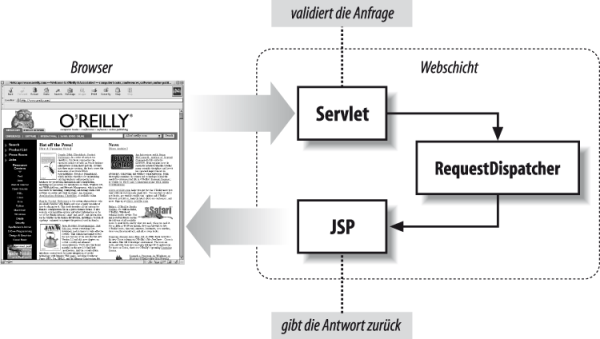
Figure: Hybrid JSP/servlet approach
This combines both technologies’ strengths. Arrows show request control flow. The servlet intercepts and validates form data, then delegates to a suitable JSP through javax.servlet.RequestDispatcher, part of the standard API. The JSP only renders, ideally with custom tags and no Java mixed into HTML.
As a site grows, decide between one servlet for every request, one per page or helper classes for individual pages. This is an organizational consistency problem rather than a technical challenge; frameworks can help.
Copyright © 2002 O'Reilly Verlag GmbH & Co. KG
You may print the online version for your private use.
Otherwise, this chapter from “Java und XSLT” is subject to the same conditions as the bound edition. The work, including all its parts, is protected by copyright. All rights reserved, including reproduction, translation, microfilming, and storage and processing in electronic systems.
O’Reilly Verlag GmbH & Co. KG, Balthasarstraße 81, 50670 Köln, kommentar(at)oreilly.de