

XML technologies / SVG / Filters, transformations and gradients / Defining and using fill patterns
(Excerpt from “Das Einsteigerseminar SVG — Webgrafiken mit XML” by Helma Spona)
Colors and gradients cannot achieve everything. Sometimes a fill pattern is the only way to obtain the desired appearance. SVG supports this too.
What are fill patterns?
Fill patterns are elements used to fill other objects in an SVG graphic. Like background images, they tile to cover the entire object.
Use patterns wherever colors or gradients work, namely the fill and stroke properties. Create dotted lines or fill elements with complex patterns.
Defining and using fill patterns
Define patterns with the <pattern> tag, placed like gradients in the page’s <defs> section. The <pattern> tag has, besides the id attribute, these attributes:
patternUnitsspecifies whether the coordinatesx/yrefer to the object or parent group. Possible values areuserSpaceOnUseandobjectBoundingBox. It corresponds to the attributegradientUnits.patternTransformdefines transformations adjusting the pattern. All transformations supported by thetransformattribute of the<g>tag are allowed, for example rotation.
x and y together with the attributes width and height determine tiling. The attributes x and y set the starting coordinate.
widthsets pattern and tile width. A width larger than the pattern creates a gap.heightsimilarly sets tile height.xlink:hrefreferences an existing pattern.viewboxinitializes a coordinate system for the pattern. All positions are relative to it. Set its size with values of the form(x y Breite Höhe).
Inside the <pattern> tag, define the pattern with paths, basic shapes or external raster images (see “Using raster graphics as fill patterns” below).
The example defines a dotted-line pattern, then a line and rectangle filled with it. Choose the attributes width and height carefully. Both are 3 here, but the pattern is a 1-pixel square, leaving gaps of two pixels below and right.
<?xml version="1.0" standalone="no"?>
...
<svg width="600" height="600" style="font-stretch:condensed;font-size:12">
  <defs>
    <pattern id="gepunktet" patternUnits="userSpaceOnUse" x="0" y="0" width="3" height="3">
      <rect x="0" y="0" width="1" height="1"/>
    </pattern>
  </defs>
  <path d="M 10 10 L 100 100" style="stroke:url(#gepunktet);fill:none"/>
  <rect x="80" y="10" width="50" height="50" style="fill:url(#gepunktet)"/>
</svg>
The browser shows:
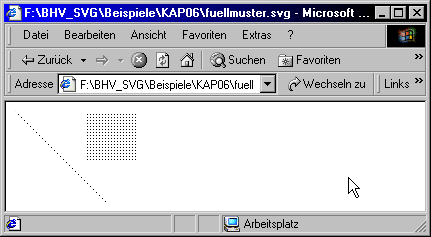
Figure: Fill pattern result.
More complex patterns can also fill objects: use any number of SVG elements inside the <pattern> tag.
Using raster graphics as fill patterns
External GIF, JPEG or PNG images can serve as patterns. Insert them with the <image> tag inside the <pattern> tag. Specify the image’s attributes width and height to set its size. Without them, no image appears: although optional, both default to zero, making it invisible.
The listing defines a pattern from a 90 x 90 pixel GIF to fill a rectangle, producing the following figure.
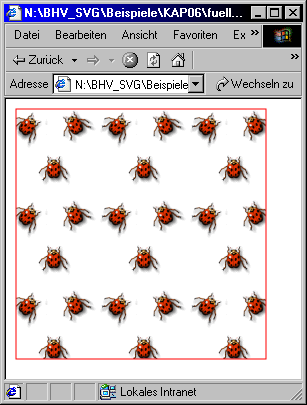
Figure: Rectangle filled with a GIF pattern.
<?xml version="1.0" standalone="no"?>
...
<svg width="600" height="600">
  <defs>
    <pattern id="Kaefer" patternUnits="userSpaceOnUse" x="0" y="0" width="90" height="90">
      <image xlink:href="kaefer.gif" width="90" height="90"/>
    </pattern>
  </defs>
  <rect x="10" y="10" width="250" height="250" style="fill:url(#Kaefer);stroke-width:1;stroke:red"/>
</svg>
Note:
Upload or distribute external files with published SVG files, or they will not be found. They are linked rather than embedded in SVG.
Copyright © verlag moderne industrie GmbH 2001
You may print the online version for your private use.
Otherwise, this chapter from “Das Einsteigerseminar SVG — Webgrafiken mit XML” is subject to the same conditions as the bound edition. The work, including all its parts, is protected by copyright. All rights reserved, including reproduction, translation, microfilming, and storage and processing in electronic systems.
verlag moderne industrie GmbH, Justus-von-Liebig-Straße 1, D-86899 Landsberg/Lech, fon ++49 (0) 81 91 / 125 – 0, leserservice(at)mi-verlag.de