

XML technologies / SVG / Using complex graphic elements and formatting / Using paths correctly / Creating Bézier curves
(Excerpt from “Das Einsteigerseminar SVG — Webgrafiken mit XML” by Helma Spona)
If you know a vector graphics program, you may have encountered Bézier curves: curves drawn between two points and then bent. In Paint Shop Pro, for example, this looks as follows.
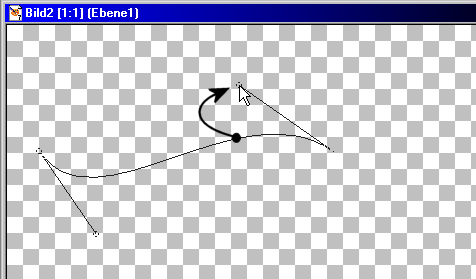
Figure: Bending a Bézier curve.
This method makes smooth curves easy to draw. SVG also offers several types of these curves.
C(Curveto) draws a cubic Bézier curve.S(Shorthand/Smooth Curveto) draws a cubic Bézier curve.Q(Quadratic Bézier Curveto) creates a quadratic Bézier curve.T(Shorthand/smooth quadratic Bézier curveto) creates a quadratic Bézier curve.
Their syntax is not always simple and usually needs several parameters. SVG therefore provides shorthand forms of the main commands. The command S is shorthand for the C command, and T is shorthand for Q. Some command parameters are omitted to shorten the input.
Copyright © verlag moderne industrie GmbH 2001
You may print the online version for your private use.
Otherwise, this chapter from “Das Einsteigerseminar SVG — Webgrafiken mit XML” is subject to the same conditions as the bound edition. The work, including all its parts, is protected by copyright. All rights reserved, including reproduction, translation, microfilming, and storage and processing in electronic systems.
verlag moderne industrie GmbH, Justus-von-Liebig-Straße 1, D-86899 Landsberg/Lech, fon ++49 (0) 81 91 / 125 – 0, leserservice(at)mi-verlag.de
back to top