

XML technologies / SVG / Using complex graphic elements and formatting / Using paths correctly / Closing paths automatically
(Excerpt from “Das Einsteigerseminar SVG — Webgrafiken mit XML” by Helma Spona)
In previous examples creating a complete closed object, such as the crown in Drawing more complex objects, the path was closed manually: the last command ended at the path’s starting point.
There is a very simple way to close a path automatically: end it with z. The following example creates a triangle with only two lines by closing the path after the last line with z.
<path d="M200 200 L300 150 L50 50 z" style="stroke-miterlimit:4;stroke-linejoin:miter;stroke-linecap:round;stroke-width:1;stroke-opacity:1;stroke:rgb(0,0,0);fill-opacity:1;fill:none;opacity:1"/>
The browser displays this result:
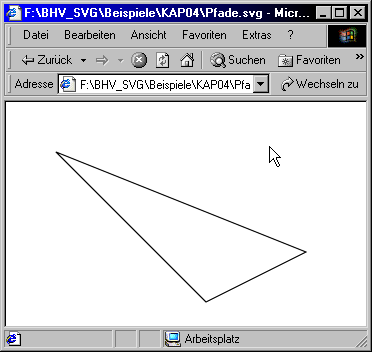
Figure: An automatically closed path.
Copyright © verlag moderne industrie GmbH 2001
You may print the online version for your private use.
Otherwise, this chapter from “Das Einsteigerseminar SVG — Webgrafiken mit XML” is subject to the same conditions as the bound edition. The work, including all its parts, is protected by copyright. All rights reserved, including reproduction, translation, microfilming, and storage and processing in electronic systems.
verlag moderne industrie GmbH, Justus-von-Liebig-Straße 1, D-86899 Landsberg/Lech, fon ++49 (0) 81 91 / 125 – 0, leserservice(at)mi-verlag.de
back to top