

XML technologies / SVG / Adding hyperlinks and external files / Defining hyperlinks
(Excerpt from “Das Einsteigerseminar SVG — Webgrafiken mit XML” by Helma Spona)
SVG graphics can replace image maps or Flash animations only if hyperlinks can be defined. SVG provides the <a> tag for this. It roughly corresponds to HTML’s <a> tag and defines a hyperlink’s destination.
Note:
If the graphic is in a frameset, the hyperlink’s destination page opens in the current frame by default.
The hyperlink destination is defined by the attribute xlink:href, as the following example shows. An external image and its caption together form the hyperlink label, so both are enclosed in the <a> tag.
<?xml version="1.0" standalone="no"?>
...
<svg width="1000" height="800">
  <g transform="translate(0,0)">
    <a xlink:href="http://www.browser-bugs.de">
      <image x="10" y="10" xlink:href="mk.png" width="32" height="24" />
      <text x="40" y="30" style="font-size:12px;font-family:Arial;font-weight:bold">Browser-Bugs.de</text>
    </a>
  </g>
  <g transform="translate(0,30)">
    <a xlink:href="http://www.vmi-buch.de">
      <image x="10" y="10" xlink:href="mk.png" width="32" height="24" />
      <text x="40" y="30" style="font-size:12px;font-family:Arial;font-weight:bold">vmi-buch AG</text>
    </a>
  </g>
...
</svg>
Hyperlinks in SVG graphics are visually highlighted just like those in HTML pages. The following graphic, produced by the preceding listing, shows this.
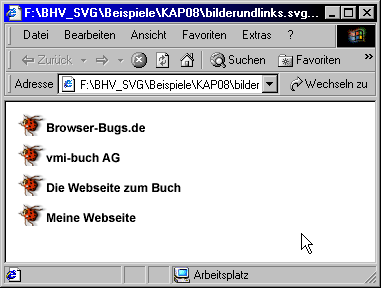
Figure: Hyperlinks in SVG graphics.
Copyright © verlag moderne industrie GmbH 2001
You may print the online version for your private use.
Otherwise, this chapter from “Das Einsteigerseminar SVG — Webgrafiken mit XML” is subject to the same conditions as the bound edition. The work, including all its parts, is protected by copyright. All rights reserved, including reproduction, translation, microfilming, and storage and processing in electronic systems.
verlag moderne industrie GmbH, Justus-von-Liebig-Straße 1, D-86899 Landsberg/Lech, fon ++49 (0) 81 91 / 125 – 0, leserservice(at)mi-verlag.de
back to top