

XML technologies / SVG / Using text elements / Spacing and stretching text
(Excerpt from “Das Einsteigerseminar SVG — Webgrafiken mit XML” by Helma Spona)
SVG offers many ways to change text without constructing complex paths, thanks to its numerous text-specific formatting options.
Creating stretched text
To stretch or compress text, use the property font-stretch in the style attribute of the <text> tag. The following values can be assigned: normal, wider, narrower, ultra-condensed, extra-condensed, condensed, semi-condensed, semi-expanded, expanded, extra-expanded, ultra-expanded and inherit. The following graphic illustrates each setting’s meaning.
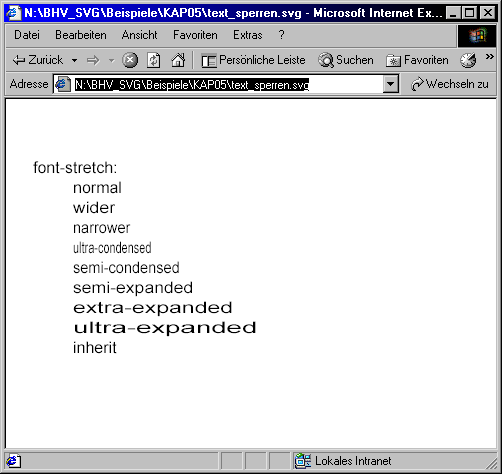
Figure: Effects of the settings for font-stretch.
Increasing character spacing
Text can also be spaced out by increasing the gaps between letters, using the property kerning. It accepts the values auto, inherit or any numeric value specifying character spacing. auto is the default. The instructions
<text x="20" y="370">Text mit Kerning 2: <tref xlink:href="#titel" style="kerning:2"/></text>
<text x="20" y="400">Text mit Kerning -2: <tref xlink:href="#titel" style="kerning:-2"/></text>
produce this output:

Figure: Result of the kerning setting.
You can also change word spacing with the word-spacing property. It accepts the value auto or a number specifying the gaps between words.

Figure: Result of the word-spacing property with the value 5.
Copyright © verlag moderne industrie GmbH 2001
You may print the online version for your private use.
Otherwise, this chapter from “Das Einsteigerseminar SVG — Webgrafiken mit XML” is subject to the same conditions as the bound edition. The work, including all its parts, is protected by copyright. All rights reserved, including reproduction, translation, microfilming, and storage and processing in electronic systems.
verlag moderne industrie GmbH, Justus-von-Liebig-Straße 1, D-86899 Landsberg/Lech, fon ++49 (0) 81 91 / 125 – 0, leserservice(at)mi-verlag.de