

XML technologies / DocBook / Generating (X)HTML / Formatting headings / Formatting structural elements
(Excerpt from "DocBook-XML: Media-neutral and platform-independent publishing" by Thomas Schraitle)
Titles of chapters, appendices and other structural elements are formatted by the template named component.title. It includes the name, such as chapter or appendix, the number and the title. To format number and title separately, customize this template as follows:
Create a customization file as shown in Creating a customization file for (X)HTML. In this file, set the parameter
html.stylesheetto your CSS file (see Adding a reference to a CSS file).Copy the template named
component.titleto your customization file. Depending on the output format, it is inhtml/component.xslorxhtml/component.xsl.Find the following code inside the template:
<xsl:apply-templates select="$node" mode="object.title.markup">
    <xsl:with-param name="allow-anchors" select="1"/>
</xsl:apply-templates>
Replace the code from step 3 with these lines:
<div class="component-title">
  <h1 class="label">
    <xsl:apply-templates select="$node" mode="label.markup"/>
  </h1>
  <h1 class="title">
    <xsl:apply-templates select="$node" mode="title.markup"/>
  </h1>
</div>
Line 1: Groups number and title in a
div, allowing the whole group to be formatted.
Lines 2 and 5: Create anh1element for the number and title respectively. The additionalclassattribute allows individual CSS formatting.
Line 3: Gets the current component’s number.
Line 6: Gets the current component’s title.
Create a CSS file. These rules were taken from the DocBook website and slightly modified. They move the number and title to the right edge, making the number very large:
div.component-title {
  text-align: right;
}
h1.label {
  font-size: 900%;
  font-weight: normal;
  font-family: sans-serif;
  margin-bottom: 0px;
  padding-bottom: 0px;
  margin-top: 0px;
  padding-top: 0px;
}
div.component-title h1.title {
  font-family: sans-serif;
  font-size: 200%;
  margin-top: 0px;
  padding-top: 0px;
  margin-right: 20px;
}
The following figure shows the result (text from Wikipedia).
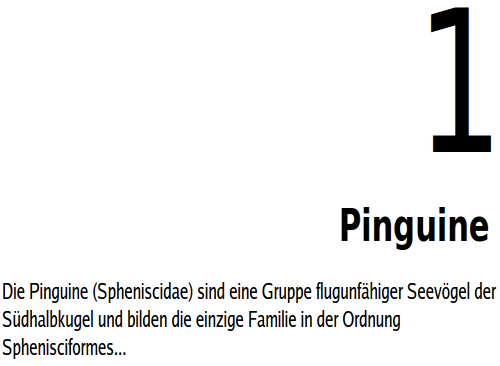
Figure: Separating number and title
Copyright © 2009 Millin Verlag
You may print the online version for your private use.
Otherwise, this chapter from "DocBook-XML: Medienneutrales und plattformunabhängiges Publizieren" is subject to the same provisions as the printed edition: the work, including all its parts, is protected by copyright. All rights are reserved, including reproduction, translation, microfilming, and storage and processing in electronic systems.
Millin Verlag, Siebengebirgsring 36, 53797 Lohmar, info(at)millin.de
back to top