

XML technologies / ePUB / ePub für (In)Designer / Creating and editing hyperlinks / Creating text anchors and links
(Excerpt from “ePub für (In)Designer — Mit InDesign Schritt für Schritt zum E-Book” by Sascha Heck & Yves Apel)
Creating anchors, hyperlinks and references in InDesign was covered under Cross-references and links. In HTML too, first create an anchor and then a hyperlink to it.
Setting text anchors
Go to the desired text position, for example a chapter title:
<h1 class="Titel">1) Geschichte der Entwicklung</h1>Add id="Textanker" to set the anchor:
<h1 class="Titel" id="IhrTextankername">1) Geschichte der Entwicklung</h1>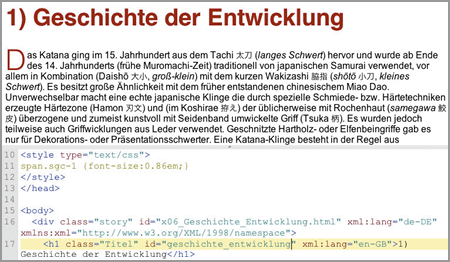
Figure: Setting anchors in HTML.
Creating HTML hyperlinks
Hyperlinks use this syntax:
<a href="MeinLinkziel">Mein Hyperlink-Text</a>Reference the XHTML file, then the anchor after the hash sign (#), without spaces. The anchor must match its original spelling exactly.
<a href="../Text/Datei.xhtml#IhrTextankername">Hier kommt der Text Ihres Hyperlinks hin</a>
Copyright © dpunkt.verlag GmbH 2012
You may print the online version for your private use.
Otherwise, this chapter from “ePub für (In)Designer” is subject to the same terms as the printed edition: the work and all its parts are protected by copyright. All rights reserved, including reproduction, translation, microfilming, and storage and processing in electronic systems.
dpunkt.verlag GmbH, Wieblinger Weg 17, 69123 Heidelberg, fon 06221-14830, fax 06221-148399, hallo(at)dpunkt.de