

XML technologies / SVG / Manipulating graphics with external scripts / Interaction between SVG and the HTML page
(Excerpt from “Das Einsteigerseminar SVG — Webgrafiken mit XML” by Helma Spona)
SVG lacks some features familiar from JavaScript in HTML, such as the timer implemented by the methods setInterval and setTimeout of the window object. This prevents programming animations or clocks requiring an interval directly. There is still a solution: inside an SVG graphic you can also use the methods and properties of the browser’s window object.
Note:
This requires displaying SVG in a browser. In a VB application using an ActiveX control, for example, the window object and its methods are unavailable.
An analog clock illustrates how this works.
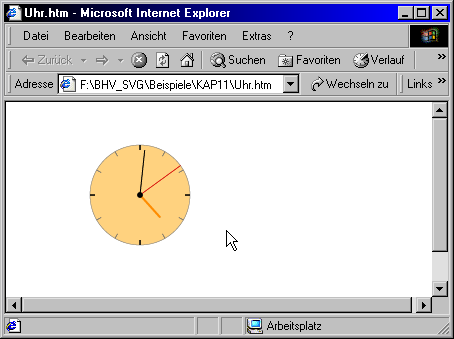
Figure: An analog clock using a timer.
Clock structure
The clock consists of two circles, an outer one 200 pixels in diameter and an inner one 10 pixels in diameter. Marks and hands are vertical lines rotated using the rotate instruction of the transform attribute.
<?xml version="1.0" encoding="iso-8859-1"?>
<!DOCTYPE svg PUBLIC "-//W3C//DTD SVG 20001102//EN" "http://www.w3.org/TR/2000/CR-SVG-20001102/DTD/svg-20001102.dtd">
<svg width="200px" height="200px">
  <g transform="scale(0.5)">
    <g transform="translate(200,200)">
      <circle cx="0" cy="0" r="100" style="stroke:black;fill:orange;opacity:0.5"/>
      <line transform="rotate(0)" id="12uhr" x1="0" y1="-90" x2="0" y2="-100" style="stroke:black;stroke-width:3px"/>
      ...
      <line transform="rotate(90)" id="15uhr" x1="0" y1="-90" x2="0" y2="-100" style="stroke:black;stroke-width:3px"/>
      ...
      <line transform="rotate(180)" id="18uhr" x1="0" y1="-90" x2="0" y2="-100" style="stroke:black;stroke-width:3px"/>
      ...
      <line transform="rotate(270)" id="21uhr" x1="0" y1="-90" x2="0" y2="-100" style="stroke:black;stroke-width:3px"/>
      ...
      <line transform="rotate(0)" id="sekzeiger" x1="0" y1="0" x2="0" y2="-100" style="stroke:red;stroke-width:1px"/>
      <line transform="rotate(0)" id="minzeiger" x1="0" y1="0" x2="0" y2="-90" style="stroke:black;stroke-width:2px"/>
      <line transform="rotate(0)" id="stdzeiger" x1="0" y1="0" x2="0" y2="-60" style="stroke:darkorange;stroke-width:4px"/>
      <circle cx="0" cy="0" r="5" style="stroke:black;fill:black"/>
    </g>
  </g>
</svg>
Moving the hands with the timer
Moving the hands is straightforward. A minute has 60 seconds and an hour 60 minutes. A circle has 360°, so the minute and second hands rotate 6° per minute or second respectively. A 12-hour clock’s hour hand rotates 30° per hour. Move it 0.5° each minute so movement is visible before a full hour passes.
The hands must start at the coordinate origin. Put them in a group translated to 200/200.
Now add the code in a <script> tag. Define the required variables outside the functions: elem and svgdok. Also make the setInterval method available outside the functions.
Add the instruction
window.neueZeitanal=neueZeitanal;
. It exposes to the window object the function neueZeitanal, defined inside SVG but to be called by a method of the external window object. Scripts can then call the function neueZeitanal through the setInterval method. The example does this every 1000 milliseconds, once per second. The initial call after initializing the variable svgdok sets the time immediately after loading, avoiding an unattractive one-second delay. Inside the function, move the hands by giving the rotate instruction new parameters.
<svg width="200px" height="200px" onload="initUhr(evt)">
  <script type="text/ecmascript">
    <![CDATA[
      var svgdok;
      var elem;
      window.neueZeitanal=neueZeitanal;

      function initUhr(evt)
      {
        svgdok=evt.getTarget().getOwnerDocument();
        neueZeitanal();
        setInterval('neueZeitanal()',1000);
      }

      function neueZeitanal()
      {
        var zeit= new Date();
        var stunden=zeit.getHours();
        var minuten=zeit.getMinutes();
        var sekunden=zeit.getSeconds();
        var stundengrad;
        if (stunden>=12){stunden=stunden-12};
        elem=svgdok.getElementById("sekzeiger");
        elem.setAttribute("transform","rotate("+6*sekunden+")");
        elem=svgdok.getElementById("minzeiger");
        elem.setAttribute("transform","rotate("+6*minuten+")");
        elem=svgdok.getElementById("stdzeiger");
        stundengrad=(30*stunden)+(0.5*minuten);
        elem.setAttribute("transform","rotate("+stundengrad+")");
      }
    ]]>
  </script>
Note:
If several SVG graphics on one HTML page use timers this way, give their timer functions different names so the browser can distinguish them.
Copyright © verlag moderne industrie GmbH 2001
You may print the online version for your private use.
Otherwise, this chapter from “Das Einsteigerseminar SVG — Webgrafiken mit XML” is subject to the same conditions as the bound edition. The work, including all its parts, is protected by copyright. All rights reserved, including reproduction, translation, microfilming, and storage and processing in electronic systems.
verlag moderne industrie GmbH, Justus-von-Liebig-Straße 1, D-86899 Landsberg/Lech, fon ++49 (0) 81 91 / 125 – 0, leserservice(at)mi-verlag.de