

XML technologies / XSLT / XSLT 2.0 processors / AltovaXML 2008 / Command-line options
(Excerpt from “XSLT 2.0 & XPath 2.0” by Frank Bongers)
The AltovaXML processor can either test an XML file or perform XSLT transformations. A transformation must explicitly be started in either XSLT 1.0 or XSLT 2.0 mode, using command-line options.
-?, -help, -h
Option | Purpose |
|---|---|
| Syntax help |
Help:
Options -?, -help and -h (see the following figure) describe AltovaXML’s command-line syntax, including the available options. Since no transformation is started, no further information, such as a source document or stylesheet, is required.
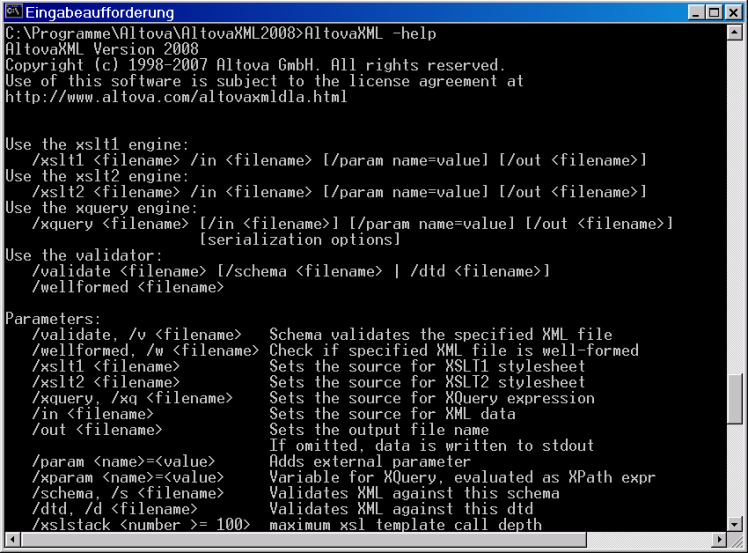
Figure: AltovaXML on the command line with option -help
-version, -ver
Option | Purpose |
|---|---|
| Display version number |
Information:
Displays the processor version.
-wellformed, -w
Option | Purpose |
|---|---|
| Checks well-formedness |
Checking:
This option tells AltovaXML to check whether the supplied XML file is well formed.
Example:
AltovaXML -wellformed beispiel.xml
-validate, -v
Option | Purpose |
|---|---|
| Enable validation |
Validation:
This option starts AltovaXML as a validating XML parser and validates the supplied XML file.
Example:
AltovaXML -validate beispiel.xml
Note:
If the XML file has no internal schema or internal DTD, either option -dtd or option -schema must specify the DTD or XML Schema file used for validation.
-schema, -s
Option | Purpose |
|---|---|
| Validate against a schema |
Validation:
This option starts AltovaXML as a validating XML parser and validates the supplied XML file. Either option -dtd or option -schema must also be used with the DTD or XML Schema on which validation is based.
Example:
AltovaXML -validate beispiel.xml -schema beispiel.xsd
Note:
If the XML file also has an internal schema reference, the schema file specified by the option takes precedence.
-dtd, -d
Option | Purpose |
|---|---|
| Validate against a DTD |
Validation:
This option starts AltovaXML as a validating XML parser and validates the supplied XML file. Either option -dtd or option -schema must also be used with the DTD or XML Schema on which validation is based.
Example:
AltovaXML -validate beispiel.xml -dtd beispiel.dtd
Note:
If the XML file also has an internal DTD, the DTD specified by the option takes precedence.
-in
Option | Purpose |
|---|---|
| Transformation source document |
Processing control:
Option -in supplies the required source document for the transformation, by path and filename.
Example:
AltovaXML -xslt2 beispiel.xslt -in eingabe.xml -out ergebnis.xml
-out
Option | Purpose |
|---|---|
| Transformation result document |
Processing control:
Option -out optionally supplies the path and filename for the transformation result. Otherwise output goes to standard output.
Example:
AltovaXML -xslt2 beispiel.xslt -in eingabe.xml -out ergebnis.xml
-xslt1
Option | Purpose |
|---|---|
| XSLT 1.0 transformation |
Processing control:
Switches AltovaXML to XSLT 1.0 transformation mode and supplies an XSLT stylesheet. Option -in must specify a source document.
Example:
AltovaXML -xslt1 beispiel.xslt -in eingabe.xml -out ergebnis.xml
Note:
Supplying a result-document path with -out is optional. If omitted, output goes to standard output.
-xslt2
Option | Purpose |
|---|---|
| XSLT 2.0 transformation |
Processing control:
Switches AltovaXML to XSLT 2.0 transformation mode and supplies an XSLT stylesheet. Option -in must specify a source document.
Example:
AltovaXML -xslt2 beispiel.xslt -in eingabe.xml -out ergebnis.xml
Note:
Supplying a result-document path with -out is optional. Output then goes to standard output (see the following figure).
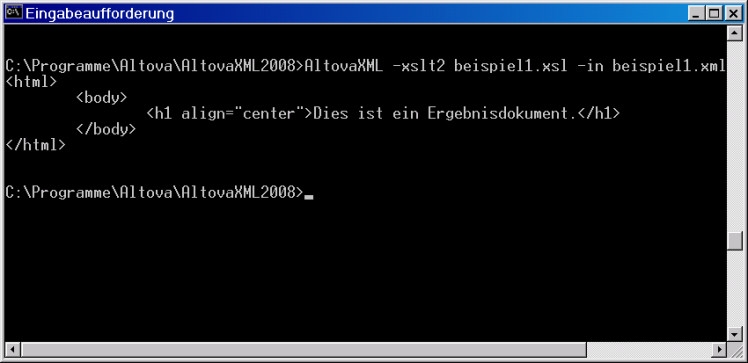
Figure: AltovaXML writes to standard output
-param
Option | Purpose |
|---|---|
| Introduce a parameter argument |
Processing control:
Switch -param must precede every parameter passed to the stylesheet. It must be followed by the parameter name and value.
Example:
-param test='beispielzeichenkette'
Note:
String values are generally enclosed in single quotes, but must additionally be enclosed in double quotes if they contain spaces.
Example:
-param test="'beispiel einer anderen zeichenkette'"
XPath expressions containing spaces are also enclosed in double quotes:
Example:
-param date="//node/@att1 | //node/@att2"
-xslstack
Option | Purpose |
|---|---|
| Limit the processing stack |
Processing control:
Switch -xslstack controls transformation depth by limiting stack size. The default is 1000 and the minimum is 100. Exceeding the stack size produces an error message.
Copyright © Galileo Press, Bonn 2008
You may print the online version for your private use.
Otherwise, this chapter from “XSLT 2.0 & XPath 2.0 ― Das umfassende Handbuch” is subject to the same conditions as the bound edition. The work, including all its parts, is protected by copyright. All rights reserved, including reproduction, translation, microfilming, and storage and processing in electronic systems.
Galileo Press, Rheinwerkallee 4, 53227 Bonn