

XML technologies / XSLT / XSLT 2.0 processors / AltovaXML 2008 / Installation
(Excerpt from "XSLT 2.0 & XPath 2.0" by Frank Bongers)
AltovaXML consists of the self-extracting file AltovaXML2008.exe or AltovaXML2008_DE.exe for the German version (each file is about 9.5 MB). It installs the suite under Windows and performs all necessary registrations.
By default, AltovaXML is installed in the folder C:\Programme and its subfolder Altova/AltovaXML2008. However, the custom setup option lets you choose any other location. To a certain extent you can also change the selection of components (see the following figure). A complete installation requires about 17 MB of disk space.
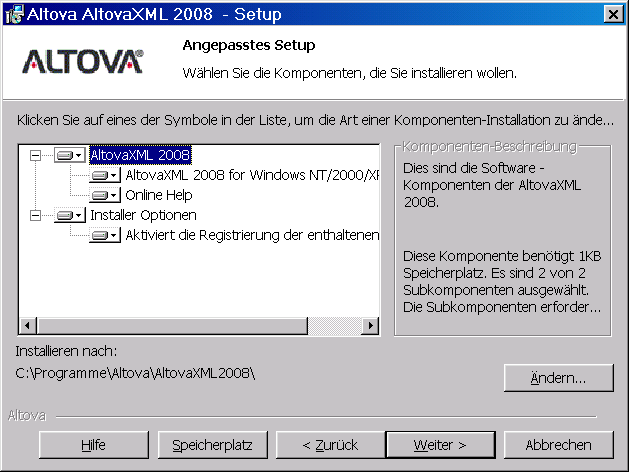
Figure: Installing AltovaXML
A convenient feature is that all registrations for access through the COM or Java interface or a .NET environment are performed automatically by the installer.
This includes registering the AltovaXML.exe file as a COM server object, placing the file AltovaXMLLib.dll in the directory WINDIR\system32\ for the Java interface, and adding the file AltovaAltovaXML.dll to the .NET reference library. You can download the installer from Altova’s website.
Accessing a server-side AltovaXML installation through PHP
If the Altova processor is registered as a COM component on a Windows server, the open-source add-in XML_XSLT2Processor also provides access through PHP, enabling XSLT 2.0 transformations to run on the server in a PHP environment.
Copyright © Galileo Press, Bonn 2008
You may print the online version for your private use.
Otherwise, this chapter from "XSLT 2.0 & XPath 2.0 ― Das umfassende Handbuch" is subject to the same terms as the printed edition: the work and all its parts are protected by copyright. All rights are reserved, including reproduction, translation, microfilming, and storage and processing in electronic systems.
Galileo Press, Rheinwerkallee 4, 53227 Bonn