

XML technologies / ePUB / Open Publication Structure / Integrating layout with CSS / Breaking in E-Book
(Excerpt from “E-Books mit ePUB ─ Von Word zum E-Book mit XML” by Dr. Victor Wang)
Traditional book typesetting invests considerable effort in readable pages. Break behavior is important: where pages may start or end, lines wrap, and words divide. We compare these three areas with the possibilities of CSS.
Page breaks
The best-known page-break rules concern orphans and widows, avoiding awkward paragraph splits: the first paragraph line left at a page or column bottom is an orphan (English: orphan); the last paragraph line at the top of the next page or column is a widow (English: widow). Typesetting rules prescribe minimum line counts on either side. Most typesetting, DTP and even office applications now allow these rules to be preset.
In flowing ePUB, widows and orphans arise quickly, especially after changing reader font or size. CSS 2.0 therefore provides the properties orphans and widows to control ordinary paragraphs:
p {
  orphans: 2;
  widows 3;
}
That is the theory; most readers unfortunately do not support this CSS property. A small workaround exists for content without very long paragraphs: assign a property keeping an entire paragraph together. One such CSS property is display: block-inline. The reader checks whether the whole paragraph fits at the page bottom; otherwise, it moves to the next page’s start.
Headings should generally appear near page starts, or at least with their paragraph’s first lines. CSS offers the property page-break-before: always, unfortunately not supported by all readers either.
A third case concerns related elements whose separation would hinder understanding, notably figures and captions. Put both in a block container and keep them together with the property display: block-inline.
Line breaks and hyphenation
<div class="Abbildung" style="display: block-inline;">
  <img src="img/laokoon.jpg" alt="Laokoongruppe"/>
  <p class="Beschriftung">Die Laokoon-Gruppe, eine römische Marmorkopie des verschollenen Originals, die heute in den Vatikanischen Museen steht.</p>
</div>
Printed books demand carefully controlled word spacing and correct hyphenation. Hyphenation rules control how open a line may appear. Typesetting systems, however, rely on a language-specific hyphenation dictionary.
E-book readers currently lack this. Hyphenation can at most be prompted with soft hyphens embedded in XML: when the word breaks, a hyphen appears at line end. A paragraph would look like this:
<p>Vielmehr rät uns schon die Ver­nunft, bei An­sichten, die nicht durch­aus ge­wiß und un­zwei­fel­haft sind, uns eben­so sorg­fäl­tig der Zu­stim­mung zu ent­hal­ten, als bei sol­chen, die ganz sicher falsch sind, und so wird es, um alle von uns ab­zu­weisen, ge­nügen, dass ich in jeder ein­zel­nen einen Grund zum Zwei­feln finde. Auch braucht man sie da­rum nicht ein­zeln durch­zu­gehen; das wäre eine end­lose Ar­beit! Viel­mehr wer­de ich – da ja bei Unter­gra­bung der Fun­da­mente alles, was da­rauf ge­baut ist, von selbst zu­sam­men­stürzt – so­gleich die Grund­lagen selbst an­grei­fen, auf die alles sich stütz­te, was ich frü­her für wahr hielt.</p>
The source text is visibly harder to read, and inserting soft hyphens requires substantial preparation work. This is rarely practical. Adobe Digital Editions recognizes soft hyphens but shows no hyphen; Apple iBooks does show it.
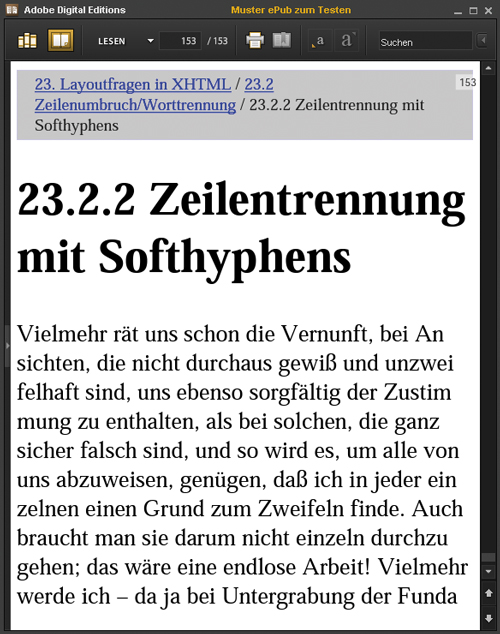
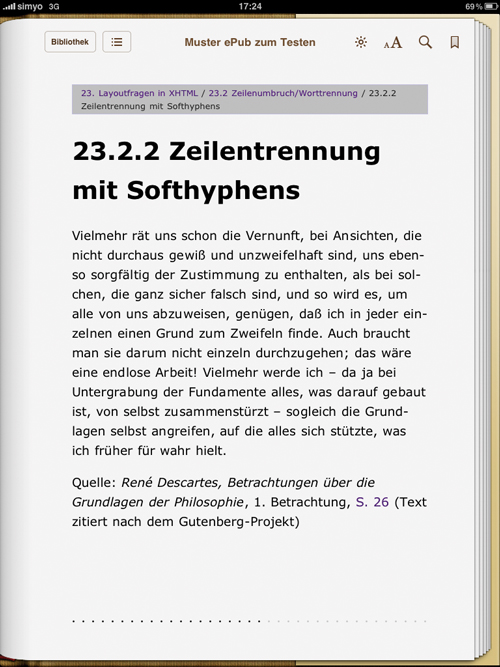
Figures: Soft hyphens (Adobe Digital Editions and iBooks).
The only remaining way to avoid excessive word spacing is to abandon justified text. Otherwise, await more mature readers or CSS 3.
Copyright © mitp 2011
You may print the online version for your private use.
Otherwise, this chapter from “E-Books mit ePUB” is subject to the same terms as the printed edition: the work and all its parts are protected by copyright. All rights reserved, including reproduction, translation, microfilming, and storage and processing in electronic systems.
Verlagsgruppe Hüthig Jehle Rehm GmbH, Im Weiher 10, 69121 Heidelberg, kundenbetreuung(at)hjr-verlag.de