

XML technologies / CSS / Advanced websites with CSS / Text effects and cascading / Styling lists with CSS / The property list-style-type
(Excerpt from “CSS − Advanced websites with Cascading Stylesheets” by Rachel Andrew & Dan Shafer)
The property list-style-type determines which markers list items use. The next two tables show all available values:
Table: Values of list-style-type for unordered lists
Value | Appearance |
|---|---|
| Hollow circle |
| Filled circle |
| Filled square |
There are actually many more values for list-style-type, including ones for Hebrew, Armenian, Japanese and Chinese. Few readers will use these languages, let alone speak them, so we can leave them aside here.
Table: Values of list-style-type for ordered lists
Value | Appearance |
|---|---|
| 1, 2, 3, 4, 5 |
| 01, 02, 03, 04, 05 |
| a, b, c, d, e |
| i, ii, iii, iv, v |
| A, B, C, D, E |
| I, II, III, IV, V |
Table: Values of list-style-type for ordered lists
Lists use filled-circle markers by default. At the first nested level, a filled square is used, as the following figure shows.
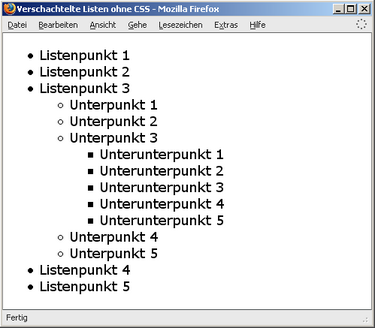
Figure: Nested unordered lists without CSS.
So far, so good. CSS also lets you choose different markers at each level. These rules use a filled square at the top level, a filled circle at the second and a hollow circle at the third:
ul {
  list-style-type: square;
}
ul ul {
  list-style-type: disc;
}
ul ul ul {
  list-style-type: circle;
}
Note that we use descendant selectors for the three nested levels and their styles. This is the simplest, most efficient way to assign rules here. The next figure shows the result.
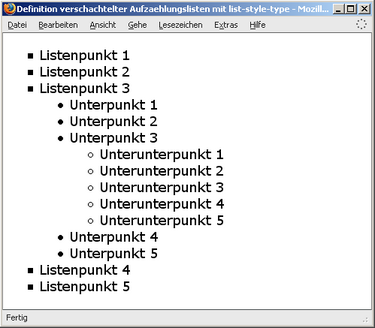
Figure: Defining nested unordered lists with list-style-type.
Ordered lists may look harder to style, but the principle is the same. A marker type assigned to the top level is inherited by nested lists. The following figure shows what happens when the parent list receives uppercase Roman numerals through the value upper-roman. The nested lists use the same markers.
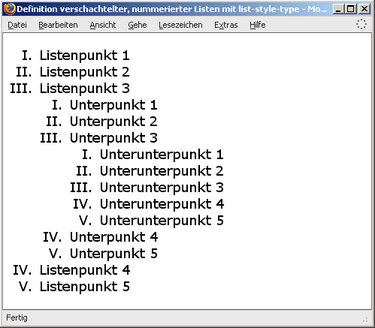
Figure: Nested ordered list with list-style-type set to upper-roman.
The result still looks neither attractive nor clear. Assigning each list a different marker improves it considerably. The figure below shows the next rule’s result.
ol {
  list-style-type: upper-roman;
}
ol ol {
  list-style-type: upper-alpha;
}
ol ol ol {
  list-style-type: decimal;
}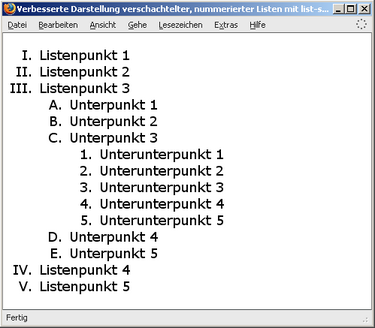
Figure: Improved nested ordered lists with list-style-type.
Copyright © 2006 of the German translation, dpunkt.verlag GmbH
You may print the online version for your private use.
Otherwise, this chapter from “CSS − Anspruchsvolle Websites mit Cascading Stylesheets” is subject to the same conditions as the bound edition: the work, including all its parts, is protected by copyright. All rights reserved, including reproduction, translation, microfilming, and storage and processing in electronic systems.
dpunkt.verlag GmbH, Ringstraße 19, 69115 Heidelberg
back to top