

XML technologies / CSS / Advanced websites with CSS / Text effects and cascading / Styling lists with CSS / The list-style-position property
(Excerpt from “CSS − Advanced websites with Cascading Stylesheets” by Rachel Andrew & Dan Shafer)
In both ordered and unordered lists, markers are aligned vertically and the corresponding text is indented. This produces a neat, tidy layout and clearly structured content.
CSS can also define a list so that each multiline item wraps not merely to the indented line start but beneath the marker itself. We use the property list-style-position and assign it the value inside. The following figure shows two lists with the property’s two valid values outside and inside.
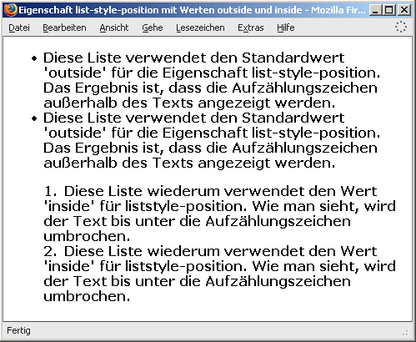
Figure: The property list-style-position with outside and inside values.
The following HTML code creates the lists in this figure:
<ul style="list-style-position: outside;">
  <li>Diese Liste verwendet den Standardwert 'outside' für die Eigenschaft list-style-position. Das Ergebnis ist, dass die Aufzählungszeichen außerhalb des Texts angezeigt werden.</li>
  <li>Diese Liste verwendet den Standardwert 'outside' für die Eigenschaft list-style-position. Das Ergebnis ist, dass die Aufzählungszeichen außerhalb des Texts angezeigt werden.</li>
</ul>
<ol style="list-style-position: inside;">
  <li>Diese Liste wiederum verwendet den Wert 'inside' für list-style-position. Wie man sieht, wird der Text bis unter die Aufzählungszeichen umbrochen.</li>
  <li>Diese Liste wiederum verwendet den Wert 'inside' für list-style-position. Wie man sieht, wird der Text bis unter die Aufzählungszeichen umbrochen.</li>
</ol>
Copyright © 2006 of the German translation, dpunkt.verlag GmbH
You may print the online version for your private use.
Otherwise, this chapter from “CSS − Anspruchsvolle Websites mit Cascading Stylesheets” is subject to the same conditions as the bound edition: the work, including all its parts, is protected by copyright. All rights reserved, including reproduction, translation, microfilming, and storage and processing in electronic systems.
dpunkt.verlag GmbH, Ringstraße 19, 69115 Heidelberg
back to top