

XML technologies / ePUB / ePub für (In)Designer / Validating the ePub file / Sigil and oXygen XML
(Excerpt from “ePub für (In)Designer — Mit InDesign Schritt für Schritt zum E-Book” by Sascha Heck & Yves Apel)
Sigil
Sigil already integrates EpubCheck, making it easy to use. Click the button  in the menu bar. Sigil displays detected errors at the bottom of the screen.

Figure: ePub validation in Sigil.
Note:
If you did not edit the ePub in Sigil, do not check it with Sigil either: Sigil changes the folder structure. Manually added files, for example during video processing, may not be transferred correctly into the new structure, and references in the content.opf file or the individual HTML files may not be updated correctly. Even if you do not save the checked, restructured ePub, the reported structural errors may be spurious.
oXygen XML
With oXygen XML version 12 or later, you can check the ePub directly in oXygen XML. The vendor has integrated EpubCheck. Simply click the icon Validate and Check for Completeness to check the file.
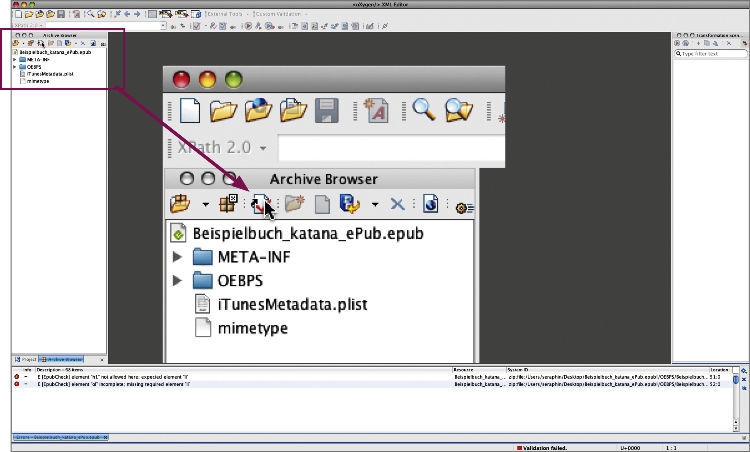
Figure: ePub validation is also built into oXygen XML.
Copyright © dpunkt.verlag GmbH 2012
You may print the online version for your private use.
Otherwise, this chapter from “ePub für (In)Designer” is subject to the same terms as the printed edition: the work and all its parts are protected by copyright. All rights reserved, including reproduction, translation, microfilming, and storage and processing in electronic systems.
dpunkt.verlag GmbH, Wieblinger Weg 17, 69123 Heidelberg, fon 06221-14830, fax 06221-148399, hallo(at)dpunkt.de