

XML technologies / SVG / SVG and XML / Foreign namespaces and objects in SVG files
(Excerpt from “Das Einsteigerseminar SVG — Webgrafiken mit XML” by Helma Spona)
An XML file’s namespace defines the commands producing valid XML. SVG commands require an SVG namespace. Several namespaces can coexist, mixing for example XHTML and SVG. This helps with two problems:
Croczilla does not yet support the
<text>tag, andmultiline SVG text is inconvenient.
Add another namespace and use it in XML. XHTML allows <div> tags or HTML paragraphs such as headings and lists.
Declaring the XHTML namespace
To use HTML or XHTML in SVG, declare both namespaces by adding another attribute to the <svg> tag as follows:
<svg xmlns="http://www.w3.org/2000/svg" xmlns:html="http://www.w3.org/1999/xhtml">
Why is the second namespace declared with xmlns:html but the first only with xmlns? XML allows a default namespace whose commands need no explicit prefix. All commands without an explicit namespace belong to it. The example’s default is SVG, declared with xmlns="http://www.w3.org/2000/svg". Assign every other namespace a prefix and use it on its commands. The part after the colon is the name used in code. Thus xmlns:html requires all XHTML commands to use html:Befehlsname.
Inserting an object from another namespace
Once other namespaces are declared, insert their commands. For example, <html:p>normaler Absatz</html:p> creates a standard paragraph with XHTML’s <p> tag.
This is valid XML, but browsers cannot use it directly. SVG restricts foreign namespaces only by requiring their contents inside the tag <foreignObject>. The listing creates a circle and XHTML text.
<?xml version="1.0" encoding="iso-8859-1"?>
<svg xmlns="http://www.w3.org/2000/svg" xmlns:html="http://www.w3.org/1999/xhtml">
  <circle cx="50" cy="50" r="20" style="fill:yellow;stroke:black"/>
  <foreignObject>
    <html:h1>Überschrift</html:h1>
    <html:p>normaler Absatz</html:p>
  </foreignObject>
</svg>
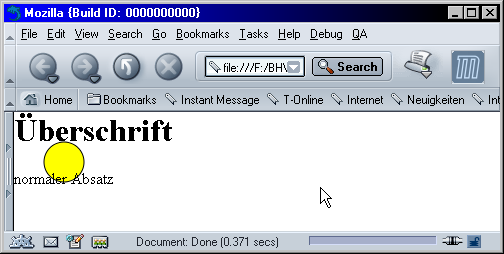
Figure: Output using SVG and XHTML (circle with text).
Formatting foreign objects
Improve the output’s formatting. Contents inserted with <foreignObject> can be positioned and sized as usual using x, y, width and height attributes. Format XHTML tags with the style tag or stylesheets.
Note:
If the size of the tag <foreignObject> is insufficient for the text, a line break occurs only if possible; otherwise the text is clipped. Insert an XHTML <div> tag inside it with a suitable size to enable wrapping.
When using style attributes, use properties for the relevant namespace rather than the CSS properties familiar from SVG. For text color, for example, use the property color instead of fill. The listing extends the text with a list and formats all XHTML tags with the <style> attribute.
<?xml version="1.0" encoding="iso-8859-1"?>
<svg xmlns="http://www.w3.org/2000/svg" xmlns:html="http://www.w3.org/1999/xhtml">
  <circle cx="50" cy="50" r="20" style="fill:yellow;stroke:black"/>
  <text x="10" y="30" style="fill:black;font-size:10px">test</text>
  <foreignObject x="80" y="20" height="150px" width="100%">
    <html:div style="background-color:silver;border:solid 1px;width:250px;height:148px">
      <html:h1 style="font-family:Arial;font-size:18px">Überschrift</html:h1>
      <html:p style="font-family:Arial;font-size:12px;color:blue">Dies ist ein normaler Absatz, der auch automatische Umbrüche enthalten kann.</html:p>
      <html:ul style="font-family:Arial;font-size:10px;color:blue">
        <html:li>listeneintrag 1</html:li>
        <html:li>listeneintrag 2</html:li>
        <html:li>listeneintrag 3</html:li>
      </html:ul>
    </html:div>
  </foreignObject>
</svg>
The result looks very different, and viewers cannot distinguish SVG from HTML or XHTML.
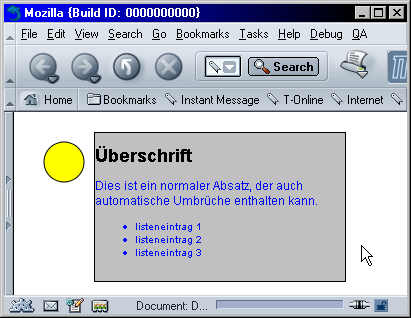
Figure: Formatted XHTML text.
Copyright © verlag moderne industrie GmbH 2001
You may print the online version for your private use.
Otherwise, this chapter from “Das Einsteigerseminar SVG — Webgrafiken mit XML” is subject to the same conditions as the bound edition. The work, including all its parts, is protected by copyright. All rights reserved, including reproduction, translation, microfilming, and storage and processing in electronic systems.
verlag moderne industrie GmbH, Justus-von-Liebig-Straße 1, D-86899 Landsberg/Lech, fon ++49 (0) 81 91 / 125 – 0, leserservice(at)mi-verlag.de