

XML technologies / SVG / SVG and XML / SVG graphics in XML files
(Excerpt from “Das Einsteigerseminar SVG — Webgrafiken mit XML” by Helma Spona)
SVG files are essentially XML files and can be opened by any XML-capable browser. The simplest way to turn SVG into XML is to rename the file with the extension .xml. The following file initially looks like an ordinary SVG file. Save it as kreis.xml instead of kreis.svg and Internet Explorer displays it as an ordinary XML file.
<?xml version="1.0" encoding="iso-8859-1"?>
<!DOCTYPE svg PUBLIC "-//W3C//DTD SVG 20001102//EN" "http://www.w3.org/TR/2000/CR-SVG-20001102/DTD/svg-20001102.dtd">
<svg>
  <circle cx="50" cy="50" r="20" style="fill:yellow;stroke:black"/>
</svg>
Running SVG files with Croczilla
This simple way of converting SVG files into XML also helps when using Croczilla to display them.
Note:
Croczilla is an unofficial Mozilla 0.9.x release with integrated SVG support. Its developer chose the name, used here to distinguish it from ordinary Mozilla and Netscape 6 releases without SVG support.
Opening an SVG file in Croczilla produces only a download dialog despite SVG support, because the browser cannot handle the extension SVG. Rename it to XML instead. The browser then finds the defined XML namespace and displays the file correctly. To set the namespace, add to the <svg> tag the attribute xmlns.
<?xml version="1.0" encoding="iso-8859-1"?>
<!DOCTYPE svg PUBLIC "-//W3C//DTD SVG 20001102//EN" "http://www.w3.org/TR/2000/CR-SVG-20001102/DTD/svg-20001102.dtd">
<svg xmlns="http://www.w3.org/2000/svg">
  <circle cx="50" cy="50" r="20" style="fill:yellow;stroke:black"/>
</svg>
Such a file with the extension .xml is then displayed by Croczilla as an SVG graphic.
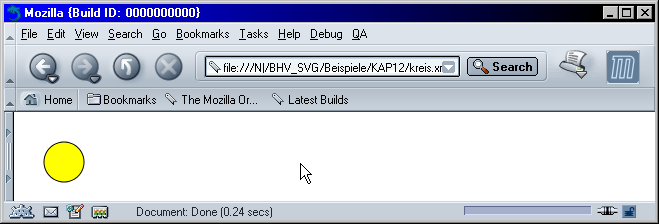
Figure: Displaying the XML file with the SVG namespace in Croczilla.
Note:
Even without explicitly declaring the namespace, the file is valid XML. Without knowing the namespace, however, the browser cannot identify the data. You can also declare the namespace in ordinary SVG files in the <svg> tag. This simplifies creating an XML version for Croczilla because only renaming remains.
The <!DOCTYPE> declaration is unnecessary for Croczilla but harmless in the XML file. In Internet Explorer, however, an XML file containing a <!DOCTYPE> declaration makes the browser list some undefined attributes.
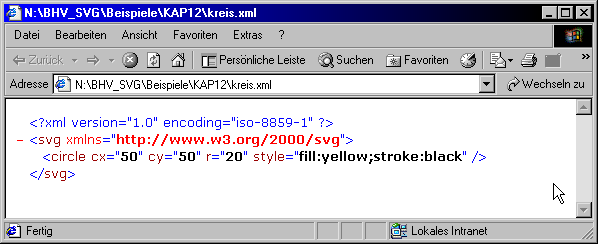
Figure: Same XML file in Internet Explorer (without DOCTYPE).
Note:
Remember that Croczilla supports only a fraction of SVG elements and is still under development. Expect restrictions; for example the <text> tag is not supported yet. The next section explains how to output text anyway.
Copyright © verlag moderne industrie GmbH 2001
You may print the online version for your private use.
Otherwise, this chapter from “Das Einsteigerseminar SVG — Webgrafiken mit XML” is subject to the same conditions as the bound edition. The work, including all its parts, is protected by copyright. All rights reserved, including reproduction, translation, microfilming, and storage and processing in electronic systems.
verlag moderne industrie GmbH, Justus-von-Liebig-Straße 1, D-86899 Landsberg/Lech, fon ++49 (0) 81 91 / 125 – 0, leserservice(at)mi-verlag.de