

XML technologies / XSLT / Introduction to XSLT 2.0 / XSLT and XPath – round three / Multiple result documents
(Excerpt from “XSLT 2.0 & XPath 2.0” by Frank Bongers, chapter 3.)
Producing many result documents from one or more XML sources in one transformation, for example to generate a complete static website, previously required extensions such as saxon:output, xt:document, exsl:document or similar. XSLT 2.0 introduces instruction xsl:result-document with comparable functionality.
XSLT 2.0 distinguishes a primary result sequence, the transformation’s principal result, and any number of secondary result sequences, each generated by a xsl:result-dokument instruction. Each document node can have a URI giving its filename and location, and attribute name can select a named output-format definition xsl:output.
Creating an HTML frameset with xsl:result-document
A large XML document, potentially much larger than this example, is to be split into several HTML documents displayed in a frameset.
The stylesheet has three tasks:
Creating the frameset document
The frameset is the primary result document. The unnamedxsl:outputdeclaration must therefore be configured for an XHTML frameset document.
Creating frameset navigation
Navigation is a secondary result generated with xsl:result-document in a named template invoked exactly once. Template modes are also used. Thexsl:result-documentinstruction, like those creating content pages, must reference a named output declaration.
Creating content pages
Content pages are also generated with xsl:result-document. Filenames derive from source positions and are generated through AVTs.
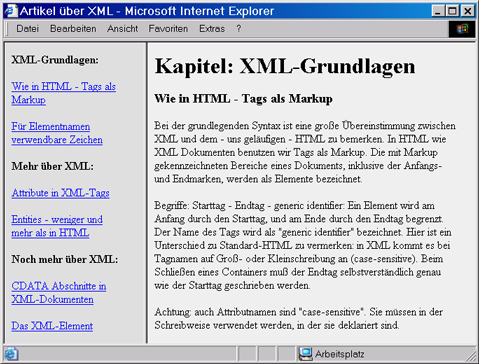
Figure: The frameset in a browser (frameset-artikel.html).
The source document
Its structure is:
<?xml version="1.0" encoding="ISO-8859-1" ?>
<artikel>
  <kapitel>
    <titel>XML-Grundlagen</titel>
    <abschnitt>
      <ueberschrift>...</ueberschrift>
      <absatz>...</absatz>
      <absatz>...</absatz>
    </abschnitt>
    <!-- mehr Abschnitte -->
  </kapitel>
  <!-- mehr Kapitel -->
</artikel>
Code example: kap03/3.09/artikel.xml (excerpt).
The article has chapters divided into sections, each with a heading. Every section should have a separate content page.
The frameset document
Generating the frameset is simple: it merely outputs literal result elements. The template with match processes the document node:
<xsl:template match="/">
  <!-- Frameset schreiben: -->
  <html>
    <head><title>Artikel über XML</title></head>
    <frameset cols="200,*">
      <frame name="navigation" src="navigation.html" />
      <frame name="inhalt" src="kapitel1.html" />
    </frameset>
  </html>
  <!-- Navigation erzeugen -->
  <xsl:call-template name="navigation"/>
  <!-- Inhalte verarbeiten -->
  <xsl:apply-templates select="abschnitt"/>
</xsl:template>
Code example: kap03/3.09/frameset_erzeugen.xsl (excerpt).
This defines the frameset structure, frame identifiers and initial configuration. The named files must also be generated during this transformation.
The unnamed output declaration, always used by the primary result, must be configured for XHTML framesets as follows:
<xsl:output method="xhtml" encoding="ISO-8859-1" indent="yes" doctype-public="-//W3C//DTD XHTML 1.0 Frameset//EN" doctype-system="http://www.w3.org/TR/xhtml1/DTD/xhtml1-frameset.dtd"/>
Code example: kap03/3.09/frameset_erzeugen.xsl (excerpt).
Note the two instructions after the frameset output. Without them, processing would not continue.
The navigation document
A named template starts navigation generation. This is preferable here to calling content through xsl:apply-templates and deciding later. Template modes add navigation content because some content also has default-mode rules:
<xsl:template name="navigation">
  <!-- Navigation schreiben: -->
  <xsl:result-document href="navigation.html" format="inhalt">
    <html>
      <body bgcolor="#DDDDDD">
        <xsl:apply-templates mode="navigation"/>
      </body>
    </html>
  </xsl:result-document>
</xsl:template>
Code example: kap03/3.09/frameset_erzeugen.xsl (excerpt).
First note instruction xsl:result-document. It creates a document node to receive this content, excluding it from the primary result sequence. Its href attribute supplies the filename for serialization, interpreted as a relative URI string resolved against the stylesheet’s base URI. Only a filename is given here, so document navigation.html is stored alongside the frameset and stylesheet.
Navigation also needs chapter headings for orientation and section headings linking to content. These elements are processed differently in content pages, so navigation has separate rules identified by a mode "navigation":
<xsl:template match="titel" mode="navigation">
  <p><b><xsl:value-of select="."/>:</b></p>
</xsl:template>
Code example: kap03/3.09/frameset_erzeugen.xsl (excerpt).
Chapter titles are simply read and output as HTML paragraphs. No template exists for parent element <kapitel>, with or without mode. Consequently, the default template for element nodes is invoked. This is harmless because the current template mode is passed on transparently; all further calls from the default template also use mode="navigation", preserving the chain.
The section template is more interesting:
<xsl:template match="abschnitt" mode="navigation">
  <p><a target="inhalt" href="kapitel{count(preceding::abschnitt)+1}.html"><xsl:value-of select="ueberschrift"/></a></p>
</xsl:template>
Code example: kap03/3.09/frameset_erzeugen.xsl (excerpt).
This template retrieves the section heading and forms the link to the frame content. The link therefore needs a target attribute matching the frame identifier. The generated filename must match the corresponding content document. The convention is string "kapitel" followed by the section’s position in the document.
The reliable method counts preceding elements of the same name. Function position() fails here because no explicit sequence of <abschnitt> elements was formed. Otherwise it would be an alternative. Add 1 to the count for the actual position.
Content documents
Content documents work like navigation, but use the node sequence produced by xsl:apply-templates from the primary template. This creates a sequence of <abschnitt> elements without a template mode:
<xsl:template match="abschnitt">
  <xsl:result-document format="inhalt" href="kapitel{count(preceding::abschnitt)+1}.html">
    <html>
      <body bgcolor="#EEEEEE">
        <h1>Kapitel: <xsl:value-of select="preceding-sibling::titel"/></h1>
        <!-- Inhalte verarbeiten -->
        <xsl:apply-templates/>
      </body>
    </html>
  </xsl:result-document>
</xsl:template>
Code example: kap03/3.09/frameset_erzeugen.xsl (excerpt).
Navigation needs only one fixed filename, whereas content needs many distinct filenames. Use the same technique as for navigation links: attribute href on xsl:result-document accepts an attribute value template. Two further rules format the remaining content:
<xsl:template match="ueberschrift">
  <h3><xsl:apply-templates/></h3>
</xsl:template>
<xsl:template match="absatz">
  <p><xsl:apply-templates/></p>
</xsl:template>
Code example: kap03/3.09/frameset_erzeugen.xsl (excerpt).
Output declarations for xsl:result-document
Another attribute of xsl:result-document appeared somewhat inconspicuously above: format- attribute. It is optional and references a declaration created with xsl:output, namely an output-format declaration.
<xsl:result-document format="inhalt" ...>
  ...
</xsl:result-document>
Unlike the declarations in chapter 1, this differs importantly: attribute format references a named output declaration. A matching declaration must therefore exist with the specified identifier in a name attribute. (Note: Attribute name on xsl:output, like instruction xsl:result-document referencing it, is unavailable in XSLT 1.0.)
<xsl:output name="inhalt" method="xhtml" encoding="ISO-8859-1" indent="no" doctype-public="-//W3C//DTD XHTML 1.0 Strict//EN" doctype-system="http://www.w3.org/TR/xhtml1/DTD/xhtml1-strict.dtd"/>
Code example: kap03/3.09/frameset_erzeugen.xsl (excerpt).
The primary result ignores this declaration and always uses the unnamed output declaration. The same applies to xsl:result-document unless attribute format is used.
Summary
Instructions xsl:result-document generate multiple result documents in one transformation: eight here, comprising frameset, navigation and six content pages. A larger source could produce arbitrarily many more.
Copyright © Galileo Press, Bonn 2008
You may print the online version for your private use.
Otherwise, this chapter from “XSLT 2.0 & XPath 2.0 ― Das umfassende Handbuch” is subject to the same conditions as the bound edition. The work, including all its parts, is protected by copyright. All rights reserved, including reproduction, translation, microfilming, and storage and processing in electronic systems.
Galileo Press, Rheinwerkallee 4, 53227 Bonn