

XML technologies / XSLT / Introduction to XSLT 2.0 / XSLT and XPath – round three / External sources: documents and entities / The XSLT function unparsed-text()
(Excerpt from “XSLT 2.0 & XPath 2.0” by Frank Bongers, chapter 3.)
External text resources can also be read and processed, such as CSV files from a database dump or other formats. If the resource need not or should not be parsed, use XSLT function unparsed-text().
Suppose a resource contains one line per book, with comma-separated fields. Fields without information, or to receive defaults, may be empty:
Java für Anfänger, Tiger, Theobald, Java Verlag, 45.00, , 3-899-77618-4
 Java für Praktiker, Jobst, Julius, EDV Verlag, 42.95, ,
 Another Dog's Guide, Murr, Kater, Miau Publishing, 23.95, Dollar, ,
 Java für Theoretiker Bd.1, Jobst, Julius, EDV Verlag, 42.95, ,
 Java für Theoretiker Bd.2, Jobst, Julius, EDV Verlag, 42.95, ,
 Siddhartha, Hesse, Hermann, Suhrkamp, 11.80, , 3-518-36682-3
Code example: kap03/3.07/buchliste.txt (excerpt).
Store the file in a global or local variable for processing. This example uses a local variable:
<xsl:variable name="text" select="unparsed-text('buchliste.txt','ISO-8859-1')"/>Code example: kap03/3.07/buchliste_txt.xsl (excerpt).
Attribute select retrieves the resource. Function unparsed-text() expects a path and filename string as its first argument. The optional second argument specifies the resource’s encoding, also as a string.
The initial template splits the text into individual lines and outputs them using a loop. XPath function fn:tokenize() and a regex recognizing line breaks produce a sequence of string items, the lines, processed by an xsl:for-each- instruction:
<xsl:template match="/">
  <html>
    ...
    <body>
      <h1>Buchliste aus externer Textressource</h1>
      <xsl:for-each select="fn:tokenize($text,'(\r)|(\n)|(\r\n)')">
        <xsl:if test="fn:string-length(fn:normalize-space(.)) gt 0">
          <p><xsl:value-of select="."/></p>
        </xsl:if>
      </xsl:for-each>
    </body>
  </html>
</xsl:template>
Code example: kap03/3.07/buchliste_txt.xsl (excerpt).
Each line is output in a p container. To avoid an empty <p> container for an empty source line, the inner instruction xsl:if tests whether output is needed. Rather than only comparing the line with the empty string, it first applies fn:normalize-space(). This catches apparently empty lines containing spaces or tabs, possible because the resource is not parsed first:
<xsl:if test="fn:string-length(fn:normalize-space(.)) gt 0">
The output works but is not very attractive; see the following figure.
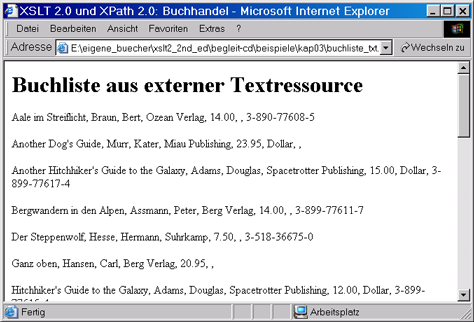
Figure: Book list from an external text resource.
Each field should be captured and formatted separately. Use fn:tokenize() to exploit comma separation and create a sequence for further processing. Here that is a detour: directly access an item created by fn:tokenize() instead.
A simple filter predicate suffices, for example fn:tokenize(., ',')[1] for the first item. The dot represents the current item in the xsl:for-each- loop, here a line string. Proceed as follows:
<xsl:for-each select="fn:tokenize($text,'(\r)|(\n)|(\r\n)')">
  <xsl:if test="fn:string-length(.) gt 0">
    <p><b><xsl:value-of select="fn:tokenize(.,',')[1]"/></b> von <i><xsl:value-of select="fn:tokenize(.,',')[2]"/>, <xsl:value-of select="fn:tokenize(.,',')[3]"/></i><br/> <xsl:value-of select="fn:tokenize(.,',')[4]"/>; Preis: <xsl:value-of select="fn:tokenize(.,',')[5]"/>
    ...
    </p>
  </xsl:if>
</xsl:for-each>
Code example: kap03/3.07/buchliste_txt2.xsl (excerpt).
Up to the price, this is simple because all fields are required. Two fields may be empty: currency, defaulting to 'Euro' when absent, and ISBN.
As with empty lines, extend the test with an XPath condition:
<xsl:value-of select="if(fn:normalize-space(fn:tokenize(.,',')[6]) eq '') then ' Euro' else fn:tokenize(.,',')[6]"/>
Code example: kap03/3.07/buchliste_txt2.xsl (excerpt).
ISBN output, or default text, works similarly:
<xsl:value-of select="if (fn:normalize-space(fn:tokenize(.,',')[7]) eq '') then '(ISBN-Nr. liegt nicht vor)' else fn:concat(' (ISBN: ',fn:tokenize(.,',')[7],')')"/>
Code example: kap03/3.07/buchliste_txt2.xsl (excerpt).
Here additional strings must accompany the field information, requiring function fn:concat(), which concatenates any number of string arguments into one output string.
The result now looks reasonable:
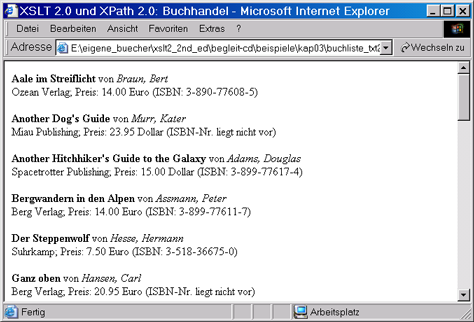
Figure: Formatted book list from an external text resource.
The next section produces several result documents rather than just one.
Copyright © Galileo Press, Bonn 2008
You may print the online version for your private use.
Otherwise, this chapter from “XSLT 2.0 & XPath 2.0 ― Das umfassende Handbuch” is subject to the same conditions as the bound edition. The work, including all its parts, is protected by copyright. All rights reserved, including reproduction, translation, microfilming, and storage and processing in electronic systems.
Galileo Press, Rheinwerkallee 4, 53227 Bonn