

XML technologies / XSLT / XSLT Cookbook / Numbers and calculations / Formatting numbers
(Excerpt from “XSLT Kochbuch” by Sal Mangano)
Problem
You need to display numbers in various formats.
Solution
There are two general solutions to this problem.
Use xsl:decimal-format with format-number( )
The top-level element xsl:decimal-format defines a named formatting rule that the function format-number() can reference when that rule is needed. xsl:decimal-format has several attributes describing the formatting rules. The following table explains them and gives their default values in parentheses.
Table: Attributes of element xsl:decimal-format.
Attribute | Purpose |
|---|---|
Name | An optional name for the rule. Without it, this becomes the default rule. There can be only one default and all names must be unique, even with different import precedence. |
| The character separating the integer and fractional parts of a number. |
| The character separating groups of digits. |
| The string representing infinity. |
| The character used as the minus sign. |
| The string representing the numeric value “not a number”. |
| The percent sign. |
| The per-mille sign. |
| The character in a formatting pattern indicating where to put a leading or trailing zero. Setting it also resets the origin of the numeral system (see the later example Input). |
| The character in a formatting pattern indicating where a digit should appear if significant. |
| The character separating the positive and negative subpatterns. |
The function format-number( ) takes the arguments shown in the following table.
Table: Arguments for format-number( ).
Argument | Purpose |
|---|---|
Value | The value to format. |
Format | A format string, e.g. #,###.00. |
Name (optional) | The name of an |
Use xsl:number
The most common use of xsl:number is numbering nodes, but it can also format numbers. The following attributes are available for that purpose.
Table: Attributes of xsl:number.
Name | Purpose |
|---|---|
| The number to format. |
| A format string, described in the discussion. |
| A language code as defined by attribute |
| Must be either |
| A single character separating groups. For example, the US default is the comma ( |
| The number of digits in each group. |
The following table shows formatting tokens used with a format attribute.
Table: Sample behavior of formatting tokens used with a format attribute.
Format token | Example value | Resulting output |
|---|---|---|
1 | 1 | 1 |
1 | 99 | 99 |
01 | 1 | 01 |
001 | 1 | 001 |
a | 1 | A |
a | 10 | J |
a | 27 | Aa |
A | 1 | A |
A | 27 | AA |
i | 1 | I |
i | 10 | X |
I | 1 | I |
I | 11 | XI |
The format string alternates formatting and punctuation tokens. Multiple formatting tokens are useful only when the value contains a group of numbers.
Discussion
The defined formatting facilities handle almost every number-formatting task.
Formatting numbers in columns with a fixed number of decimal places
Pad with leading and trailing zeros, then map leading zeros to spaces and put the minus sign at the end. This produces neatly right-aligned columns when the output medium uses a monospaced font, in which all characters have equal width. The next three examples show more conventional padding and illustrate how digit 0 behaves as a formatting character.
Example: Input.
<numbers>
  <number>10</number>
  <number>3.5</number>
  <number>4.44</number>
  <number>77.7777</number>
  <number>-8</number>
  <number>1</number>
  <number>444</number>
  <number>1.1234</number>
  <number>7.77</number>
  <number>3.1415927</number>
  <number>10</number>
  <number>9</number>
  <number>8</number>
  <number>7</number>
  <number>666</number>
  <number>5555</number>
  <number>-4444444</number>
  <number>22.33</number>
  <number>18</number>
  <number>36.54</number>
  <number>43</number>
  <number>99999</number>
  <number>999999</number>
  <number>9999999</number>
  <number>32</number>
  <number>64</number>
  <number>-64.0001</number>
</numbers>
Example: format-numbers-into-columns.xslt
<xsl:stylesheet version="1.0" xmlns:xsl="http://www.w3.org/1999/XSL/Transform">
<xsl:output method="text"/>
<xsl:variable name="numCols" select="3"/>
<xsl:template match="numbers">
<xsl:for-each select="number[position( ) mod $numCols = 1]">
<xsl:apply-templates select=". | following-sibling::number[position( ) < $numCols]" mode="format"/>
<xsl:text>
</xsl:text>
</xsl:for-each>
</xsl:template>
<xsl:template match="number" name="format" mode="format">
<xsl:param name="number" select="."/>
<xsl:call-template name="leading-zero-to-space">
<xsl:with-param name="input" select="format-number($number, '0000000.0000 ;0000000.0000- ')"/>
</xsl:call-template>
</xsl:template>
<xsl:template name="leading-zero-to-space">
<xsl:param name="input"/>
<xsl:choose>
<xsl:when test="starts-with($input,'0')">
<xsl:value-of select="' '"/>
<xsl:call-template name="leading-zero-to-space">
<xsl:with-param name="input" select="substring-after($input,'0')"/>
</xsl:call-template>
</xsl:when>
<xsl:otherwise>
<xsl:value-of select="$input"/>
</xsl:otherwise>
</xsl:choose>
</xsl:template>
</xsl:stylesheet>Example: Output.
|
|
|
|
|
|
|
|
|
|
|
|
|
|
|
|
|
|
|
|
|
|
|
|
|
|
|
Formatting money as US accountants do
This variation of the preceding formatting template will delight your accountant, at least if you trade with the US.
Example: Accountant-friendly format.
<xsl:template match="number" name="format" mode="format">
  <xsl:param name="number" select="."/>
  <xsl:text> $ </xsl:text>
  <xsl:call-template name="leading-zero-to-space">
    <xsl:with-param name="input" select="format-number($number, ' 0000000.00 ;(0000000.00)')"/>
  </xsl:call-template>
</xsl:template>
Output:
$ | 10.00 | $ | 3.50 | $ | 4.44 |
$ | 77.78 | $ | (8.00) | $ | 1.00 |
$ | 444.00 | $ | 1.12 | $ | 7.77 |
$ | 3.14 | $ | 10.00 | $ | 9.00 |
$ | 8.00 | $ | 7.00 | $ | 666.00 |
$ | 5555.00 | $ | (4444444.00) | $ | 22.33 |
$ | 18.00 | $ | 36.54 | $ | 43.00 |
$ | 99999.00 | $ | 999999.00 | $ | 9999999.00 |
$ | 32.00 | $ | 64.00 | $ | (64.00) |
Formatting numbers for many European countries
The following example demonstrates a named format.
Example: European-number format.
<xsl:stylesheet version="1.0" xmlns:xsl="http://www.w3.org/1999/XSL/Transform" xmlns:str="http://www.ora.com/XSLTCookbook/namespaces/strings">
<xsl:output method="text"/>
<!-- Aus Rezept "Einen String n-mal duplizieren" ... -->
<xsl:include href="../strings/str.dup.xslt"/>
<xsl:variable name="numCols" select="3"/>
<xsl:decimal-format name="WesternEurope" decimal-separator="," grouping-separator="."/>
<xsl:template match="numbers">
<xsl:for-each select="number[position() mod $numCols = 1]">
<xsl:apply-templates select=". | following-sibling::number[position() < $numCols]" mode="format"/>
<xsl:text> </xsl:text>
</xsl:for-each>
</xsl:template>
<xsl:template match="number" name="format" mode="format">
<xsl:param name="number" select="."/>
<xsl:call-template name="pad">
<xsl:with-param name="string" select="format-number($number,'#.###,00','WesternEurope')"/>
</xsl:call-template>
</xsl:template>
<xsl:template name="pad">
<xsl:param name="string"/>
<xsl:param name="width" select="16"/>
<xsl:call-template name="str:dup">
<xsl:with-param name="input" select="' '"/>
<xsl:with-param name="count" select="$width - string-length($string)"/>
</xsl:call-template>
<xsl:value-of select="$string"/>
</xsl:template>
</xsl:stylesheet>Output:
10,00 | 3,50 | 4,44 |
77,78 | -8,00 | 1,00 |
444,00 | 1,12 | 7,77 |
3,14 | 10,00 | 9,00 |
8,00 | 7,00 | 666,00 |
5.555,00 | -4444.444,00 | 22,33 |
18,00 | 36,54 | 43,00 |
99.999,00 | 999.999,00 | 9.999.999,00 |
32,00 | 64,00 | -64,00 |
Converting numbers to Roman numerals
The following example uses xsl:number as a Roman-numeral formatter to label columns:
Example: Roman-numeral format.
<xsl:stylesheet version="1.0" xmlns:xsl="http://www.w3.org/1999/XSL/Transform" xmlns:str="http://www.ora.com/XSLTCookbook/namespaces/strings">
<xsl:output method="text" />
<xsl:include href="../strings/str.dup.xslt"/>
<xsl:variable name="numCols" select="3"/>
<xsl:template match="numbers">
<xsl:for-each select="number[position( ) <= $numCols]">
<xsl:text> </xsl:text>
<xsl:number value="position( )" format="I"/><xsl:text> </xsl:text>
</xsl:for-each>
<xsl:text>
 </xsl:text>
<xsl:for-each select="number[position( ) <= $numCols]">
<xsl:text>———————— </xsl:text>
</xsl:for-each>
<xsl:text>
</xsl:text>
<xsl:for-each select="number[position( ) mod $numCols = 1]">
<xsl:call-template name="pad">
<xsl:with-param name="string">
<xsl:number value="position( )" format="i"/>
</xsl:with-param>
<xsl:with-param name="width" select="4"/>
</xsl:call-template>|<xsl:text/> <!-- Siehe Rezept "Der Umgang mit Whitespace" -->
<xsl:apply-templates select=". | following-sibling::number[position( ) < $numCols]" mode="format"/>
<xsl:text>
</xsl:text>
</xsl:for-each>
</xsl:template>
<xsl:template match="number" name="format" mode="format">
<xsl:param name="number" select="." />
<xsl:call-template name="pad">
<xsl:with-param name="string" select="format-number(.,'#,###.00')"/>
</xsl:call-template>
</xsl:template>
<xsl:template name="pad">
<xsl:param name="string"/>
<xsl:param name="width" select="16"/>
<xsl:call-template name="str:dup">
<xsl:with-param name="input" select="' '"/>
<xsl:with-param name="count" select="$width - string-length($string)"/>
</xsl:call-template>
<xsl:value-of select="$string"/>
</xsl:template>
</xsl:stylesheet>Output:
I | II | III | |
---------------------- | ---------------------- | ---------------------- | |
i | | 10.00 | 3.50 | 4.44 |
ii | | 77.78 | -8.00 | 1.00 |
iii | | 444.00 | 1.12 | 7.77 |
iv | | 3.14 | 10.00 | 9.00 |
v | | 8.00 | 7.00 | 666.00 |
vi | | 5.555.00 | -4444.444.00 | 22.33 |
vii | | 18.00 | 36.54 | 43.00 |
viii | | 99.999.00 | 999.999.00 | 9.999.999.00 |
ix | | 32.00 | 64.00 | -64.00 |
Generating spreadsheet-style column numbers
Spreadsheets number columns alphabetically, A, B, C ... ZZ. With xsl:number we can do the same; see the next example.
Example: Spreadsheet-style column numbers.
<xsl:template match="numbers">
<xsl:for-each select="number[position( ) <= $numCols]">
<xsl:text> </xsl:text>
<xsl:number value="position()" format="A"/><xsl:text> </xsl:text>
<xsl:text> </xsl:text>
</xsl:for-each>
<xsl:text>
</xsl:text>
<xsl:for-each select="number[position() <= $numCols]">
<xsl:text> ---------------- </xsl:text>
</xsl:for-each>
<xsl:text>
</xsl:text>
<xsl:for-each select="number[position() mod $numCols = 1]">
<xsl:value-of select="position()"/><xsl:text>|</xsl:text>
<xsl:apply-templates select=". | following-sibling::number[position() < $numCols]" mode="format"/>
<xsl:text>
</xsl:text>
</xsl:for-each>
</xsl:template>
<xsl:template match="number" name="format" mode="format">
<xsl:param name="number" select="." />
<xsl:call-template name="pad">
<xsl:with-param name="string" select="format-number(.,'#,###.00')"/>
</xsl:call-template>
<xsl:text> </xsl:text>
</xsl:template>Output:
A | B | C | |
---------------------- | ---------------------- | ---------------------- | |
1 | | 10.0000 | 3.5000 | 4.4400 |
2 | | 77.7777 | 8.0000- | 1.0000 |
3 | | 444.0000 | 1.1234 | 7.7700 |
4 | | 3.1416 | 10.0000 | 9.0000 |
5 | | 8.0000 | 7.0000 | 666.0000 |
6 | | 5555.0000 | 4444444.0000- | 22.3300 |
7 | | 18.0000 | 36.5400 | 43.0000 |
8 | | 99999.0000 | 999999.0000 | 9999999.0000 |
9 | | 32.0000 | 64.0000 | 64.0001- |
Formatting numbers with Arabic characters
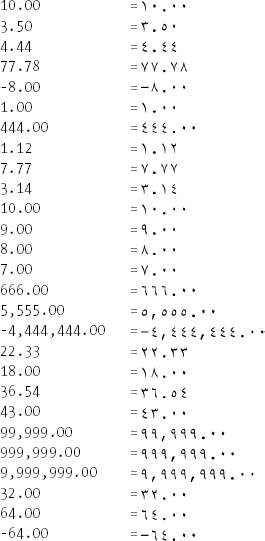
Number formats from other languages can be used by setting digit zero in xsl:decimal-format to that language’s zero. This example uses the Unicode character 0x660 (Arabic-Indic digit zero):
<xsl:stylesheet version="1.0" xmlns:xsl="http://www.w3.org/1999/XSL/Transform" xmlns:str="http://www.ora.com/XSLTCookbook/namespaces/strings">
<xsl:output method="text" encoding="UTF-8"/>
<xsl:include href="../strings/str.dup.xslt"/>
<!-- Dies gibt an, dass Null beim Zeichen 0x660 beginnt, was impliziert, dass Eins 0x661 ist usw. -->
<xsl:decimal-format name="Arabic" zero-digit="٠"/>
<xsl:template match="numbers">
<xsl:for-each select="number">
<xsl:call-template name="pad">
<xsl:with-param name="string" select="format-number(.,'#,###.00')"/>
</xsl:call-template> = <xsl:text/>
<xsl:value-of select="format-number(.,'#,###.٠٠','Arabic')"/>
<xsl:text>
</xsl:text>
</xsl:for-each>
</xsl:template>
<xsl:template name="pad">
<xsl:param name="string"/>
<xsl:param name="width" select="16"/>
<xsl:value-of select="$string"/>
<xsl:call-template name="str:dup">
<xsl:with-param name="input" select="' '"/>
<xsl:with-param name="count" select="$width - string-length($string)"/>
</xsl:call-template>
</xsl:template>
</xsl:stylesheet>Here is an image of the output:
Copyright © 2006 O'Reilly Verlag GmbH & Co. KG
You may print the online version for your private use.
Otherwise, this chapter from “XSLT Kochbuch” is subject to the same conditions as the bound edition. The work, including all its parts, is protected by copyright. All rights reserved, including reproduction, translation, microfilming, and storage and processing in electronic systems.
O'Reilly Verlag GmbH & Co. KG, Balthasarstraße 81, 50670 Köln, kommentar(at)oreilly.de