

Tecnologías XML / XSLT / Recetario XSLT / Números y cálculos / Dar formato a números
(Extracto de «XSLT Kochbuch» de Sal Mangano)
Problema
Necesita mostrar números en distintos formatos.
Solución
Este problema tiene dos soluciones generales.
Utilizar xsl:decimal-format con format-number( )
El elemento de nivel superior xsl:decimal-format define una regla de formato con nombre que la función format-number() puede referenciar cuando se necesite esa regla. xsl:decimal-format tiene varios atributos que describen las reglas de formato. La tabla siguiente los explica e indica sus valores predeterminados entre paréntesis.
Tabla: atributos del elemento xsl:decimal-format.
Atributo | Finalidad |
|---|---|
Nombre | Nombre opcional de la regla. Sin él, pasa a ser la regla predeterminada. Solo puede haber una y todos los nombres deben ser únicos, incluso con distinta precedencia de importación. |
| Carácter que separa las partes entera y fraccionaria de un número. |
| Carácter que separa los grupos de dígitos. |
| Cadena que representa el infinito. |
| Carácter utilizado como signo menos. |
| Cadena que representa el valor numérico «not a number». |
| Signo de porcentaje. |
| Signo por mil. |
| Carácter del patrón que indica dónde colocar un cero inicial o final. Definirlo también restablece el origen del sistema numérico (véase más adelante el ejemplo Entrada). |
| Carácter del patrón que indica dónde debe aparecer un dígito si es significativo. |
| Carácter que separa los subpatrones positivo y negativo. |
La función format-number( ) recibe los argumentos de la tabla siguiente.
Tabla: argumentos de format-number( ).
Argumento | Finalidad |
|---|---|
Valor | Valor al que se dará formato. |
Formato | Cadena de formato, por ejemplo #,###.00. |
Nombre (opcional) | Nombre de un elemento |
Utilizar xsl:number
El uso más habitual de xsl:number es numerar nodos, pero también puede dar formato a números. Para ello dispone de los atributos siguientes.
Tabla: atributos de xsl:number.
Nombre | Finalidad |
|---|---|
| Número al que se dará formato. |
| Cadena de formato, descrita en la discusión. |
| Código de idioma definido por el atributo |
| Debe ser |
| Un solo carácter que separa grupos. En Estados Unidos se utiliza por defecto la coma ( |
| Número de dígitos de cada grupo. |
La tabla siguiente muestra el uso de tokens de formato con un atributo de formato.
Tabla: ejemplos del comportamiento de tokens utilizados con un atributo de formato.
Token de formato | Valor de ejemplo | Salida resultante |
|---|---|---|
1 | 1 | 1 |
1 | 99 | 99 |
01 | 1 | 01 |
001 | 1 | 001 |
a | 1 | A |
a | 10 | J |
a | 27 | Aa |
A | 1 | A |
A | 27 | AA |
i | 1 | I |
i | 10 | X |
I | 1 | I |
I | 11 | XI |
La cadena alterna tokens de formato y puntuación. Varios tokens de formato solo resultan útiles si el valor contiene un grupo de números.
Discusión
Los mecanismos definidos permiten realizar casi cualquier tarea de formato numérico.
Dar formato a números en columnas con un número fijo de decimales
Rellene con ceros iniciales y finales, sustituya los iniciales por espacios y coloque el signo menos al final. Así se obtienen columnas alineadas a la derecha si el medio utiliza una fuente monoespaciada, cuyos caracteres tienen igual anchura. Los tres ejemplos siguientes muestran rellenos más convencionales y el comportamiento del dígito 0 como carácter de formato.
Ejemplo: entrada.
<numbers>
  <number>10</number>
  <number>3.5</number>
  <number>4.44</number>
  <number>77.7777</number>
  <number>-8</number>
  <number>1</number>
  <number>444</number>
  <number>1.1234</number>
  <number>7.77</number>
  <number>3.1415927</number>
  <number>10</number>
  <number>9</number>
  <number>8</number>
  <number>7</number>
  <number>666</number>
  <number>5555</number>
  <number>-4444444</number>
  <number>22.33</number>
  <number>18</number>
  <number>36.54</number>
  <number>43</number>
  <number>99999</number>
  <number>999999</number>
  <number>9999999</number>
  <number>32</number>
  <number>64</number>
  <number>-64.0001</number>
</numbers>
Ejemplo: format-numbers-into-columns.xslt
<xsl:stylesheet version="1.0" xmlns:xsl="http://www.w3.org/1999/XSL/Transform">
<xsl:output method="text"/>
<xsl:variable name="numCols" select="3"/>
<xsl:template match="numbers">
<xsl:for-each select="number[position( ) mod $numCols = 1]">
<xsl:apply-templates select=". | following-sibling::number[position( ) < $numCols]" mode="format"/>
<xsl:text>
</xsl:text>
</xsl:for-each>
</xsl:template>
<xsl:template match="number" name="format" mode="format">
<xsl:param name="number" select="."/>
<xsl:call-template name="leading-zero-to-space">
<xsl:with-param name="input" select="format-number($number, '0000000.0000 ;0000000.0000- ')"/>
</xsl:call-template>
</xsl:template>
<xsl:template name="leading-zero-to-space">
<xsl:param name="input"/>
<xsl:choose>
<xsl:when test="starts-with($input,'0')">
<xsl:value-of select="' '"/>
<xsl:call-template name="leading-zero-to-space">
<xsl:with-param name="input" select="substring-after($input,'0')"/>
</xsl:call-template>
</xsl:when>
<xsl:otherwise>
<xsl:value-of select="$input"/>
</xsl:otherwise>
</xsl:choose>
</xsl:template>
</xsl:stylesheet>Ejemplo: salida.
|
|
|
|
|
|
|
|
|
|
|
|
|
|
|
|
|
|
|
|
|
|
|
|
|
|
|
Dar formato a importes al estilo de los contables estadounidenses
Esta variante de la plantilla anterior encantará a su contable, al menos si comercia con Estados Unidos.
Ejemplo: formato para contables.
<xsl:template match="number" name="format" mode="format">
  <xsl:param name="number" select="."/>
  <xsl:text> $ </xsl:text>
  <xsl:call-template name="leading-zero-to-space">
    <xsl:with-param name="input" select="format-number($number, ' 0000000.00 ;(0000000.00)')"/>
  </xsl:call-template>
</xsl:template>
Salida:
$ | 10.00 | $ | 3.50 | $ | 4.44 |
$ | 77.78 | $ | (8.00) | $ | 1.00 |
$ | 444.00 | $ | 1.12 | $ | 7.77 |
$ | 3.14 | $ | 10.00 | $ | 9.00 |
$ | 8.00 | $ | 7.00 | $ | 666.00 |
$ | 5555.00 | $ | (4444444.00) | $ | 22.33 |
$ | 18.00 | $ | 36.54 | $ | 43.00 |
$ | 99999.00 | $ | 999999.00 | $ | 9999999.00 |
$ | 32.00 | $ | 64.00 | $ | (64.00) |
Dar formato a números para muchos países europeos
El ejemplo siguiente muestra un formato con nombre.
Ejemplo: formato European-number.
<xsl:stylesheet version="1.0" xmlns:xsl="http://www.w3.org/1999/XSL/Transform" xmlns:str="http://www.ora.com/XSLTCookbook/namespaces/strings">
<xsl:output method="text"/>
<!-- Aus Rezept "Einen String n-mal duplizieren" ... -->
<xsl:include href="../strings/str.dup.xslt"/>
<xsl:variable name="numCols" select="3"/>
<xsl:decimal-format name="WesternEurope" decimal-separator="," grouping-separator="."/>
<xsl:template match="numbers">
<xsl:for-each select="number[position() mod $numCols = 1]">
<xsl:apply-templates select=". | following-sibling::number[position() < $numCols]" mode="format"/>
<xsl:text> </xsl:text>
</xsl:for-each>
</xsl:template>
<xsl:template match="number" name="format" mode="format">
<xsl:param name="number" select="."/>
<xsl:call-template name="pad">
<xsl:with-param name="string" select="format-number($number,'#.###,00','WesternEurope')"/>
</xsl:call-template>
</xsl:template>
<xsl:template name="pad">
<xsl:param name="string"/>
<xsl:param name="width" select="16"/>
<xsl:call-template name="str:dup">
<xsl:with-param name="input" select="' '"/>
<xsl:with-param name="count" select="$width - string-length($string)"/>
</xsl:call-template>
<xsl:value-of select="$string"/>
</xsl:template>
</xsl:stylesheet>Salida:
10,00 | 3,50 | 4,44 |
77,78 | -8,00 | 1,00 |
444,00 | 1,12 | 7,77 |
3,14 | 10,00 | 9,00 |
8,00 | 7,00 | 666,00 |
5.555,00 | -4444.444,00 | 22,33 |
18,00 | 36,54 | 43,00 |
99.999,00 | 999.999,00 | 9.999.999,00 |
32,00 | 64,00 | -64,00 |
Convertir números en cifras romanas
El ejemplo siguiente utiliza xsl:number para generar cifras romanas que identifican las columnas:
Ejemplo: formato Roman-numeral.
<xsl:stylesheet version="1.0" xmlns:xsl="http://www.w3.org/1999/XSL/Transform" xmlns:str="http://www.ora.com/XSLTCookbook/namespaces/strings">
<xsl:output method="text" />
<xsl:include href="../strings/str.dup.xslt"/>
<xsl:variable name="numCols" select="3"/>
<xsl:template match="numbers">
<xsl:for-each select="number[position( ) <= $numCols]">
<xsl:text> </xsl:text>
<xsl:number value="position( )" format="I"/><xsl:text> </xsl:text>
</xsl:for-each>
<xsl:text>
 </xsl:text>
<xsl:for-each select="number[position( ) <= $numCols]">
<xsl:text>———————— </xsl:text>
</xsl:for-each>
<xsl:text>
</xsl:text>
<xsl:for-each select="number[position( ) mod $numCols = 1]">
<xsl:call-template name="pad">
<xsl:with-param name="string">
<xsl:number value="position( )" format="i"/>
</xsl:with-param>
<xsl:with-param name="width" select="4"/>
</xsl:call-template>|<xsl:text/> <!-- Siehe Rezept "Der Umgang mit Whitespace" -->
<xsl:apply-templates select=". | following-sibling::number[position( ) < $numCols]" mode="format"/>
<xsl:text>
</xsl:text>
</xsl:for-each>
</xsl:template>
<xsl:template match="number" name="format" mode="format">
<xsl:param name="number" select="." />
<xsl:call-template name="pad">
<xsl:with-param name="string" select="format-number(.,'#,###.00')"/>
</xsl:call-template>
</xsl:template>
<xsl:template name="pad">
<xsl:param name="string"/>
<xsl:param name="width" select="16"/>
<xsl:call-template name="str:dup">
<xsl:with-param name="input" select="' '"/>
<xsl:with-param name="count" select="$width - string-length($string)"/>
</xsl:call-template>
<xsl:value-of select="$string"/>
</xsl:template>
</xsl:stylesheet>Salida:
I | II | III | |
---------------------- | ---------------------- | ---------------------- | |
i | | 10.00 | 3.50 | 4.44 |
ii | | 77.78 | -8.00 | 1.00 |
iii | | 444.00 | 1.12 | 7.77 |
iv | | 3.14 | 10.00 | 9.00 |
v | | 8.00 | 7.00 | 666.00 |
vi | | 5.555.00 | -4444.444.00 | 22.33 |
vii | | 18.00 | 36.54 | 43.00 |
viii | | 99.999.00 | 999.999.00 | 9.999.999.00 |
ix | | 32.00 | 64.00 | -64.00 |
Generar números de columna como en una hoja de cálculo
Las hojas de cálculo numeran las columnas alfabéticamente, A, B, C ... ZZ. Con xsl:number podemos hacer lo mismo; véase el ejemplo siguiente.
Ejemplo: números de columna como en una hoja de cálculo.
<xsl:template match="numbers">
<xsl:for-each select="number[position( ) <= $numCols]">
<xsl:text> </xsl:text>
<xsl:number value="position()" format="A"/><xsl:text> </xsl:text>
<xsl:text> </xsl:text>
</xsl:for-each>
<xsl:text>
</xsl:text>
<xsl:for-each select="number[position() <= $numCols]">
<xsl:text> ---------------- </xsl:text>
</xsl:for-each>
<xsl:text>
</xsl:text>
<xsl:for-each select="number[position() mod $numCols = 1]">
<xsl:value-of select="position()"/><xsl:text>|</xsl:text>
<xsl:apply-templates select=". | following-sibling::number[position() < $numCols]" mode="format"/>
<xsl:text>
</xsl:text>
</xsl:for-each>
</xsl:template>
<xsl:template match="number" name="format" mode="format">
<xsl:param name="number" select="." />
<xsl:call-template name="pad">
<xsl:with-param name="string" select="format-number(.,'#,###.00')"/>
</xsl:call-template>
<xsl:text> </xsl:text>
</xsl:template>Salida:
A | B | C | |
---------------------- | ---------------------- | ---------------------- | |
1 | | 10.0000 | 3.5000 | 4.4400 |
2 | | 77.7777 | 8.0000- | 1.0000 |
3 | | 444.0000 | 1.1234 | 7.7700 |
4 | | 3.1416 | 10.0000 | 9.0000 |
5 | | 8.0000 | 7.0000 | 666.0000 |
6 | | 5555.0000 | 4444444.0000- | 22.3300 |
7 | | 18.0000 | 36.5400 | 43.0000 |
8 | | 99999.0000 | 999999.0000 | 9999999.0000 |
9 | | 32.0000 | 64.0000 | 64.0001- |
Dar formato a números con caracteres árabes
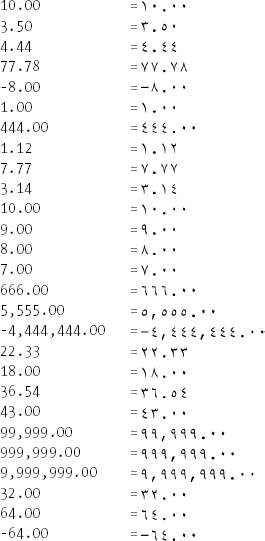
Pueden utilizarse formatos de otros idiomas asignando al dígito cero de xsl:decimal-format el cero de ese idioma. Este ejemplo utiliza el carácter Unicode de punto de código 0x660 (dígito cero arábigo-índico):
<xsl:stylesheet version="1.0" xmlns:xsl="http://www.w3.org/1999/XSL/Transform" xmlns:str="http://www.ora.com/XSLTCookbook/namespaces/strings">
<xsl:output method="text" encoding="UTF-8"/>
<xsl:include href="../strings/str.dup.xslt"/>
<!-- Dies gibt an, dass Null beim Zeichen 0x660 beginnt, was impliziert, dass Eins 0x661 ist usw. -->
<xsl:decimal-format name="Arabic" zero-digit="٠"/>
<xsl:template match="numbers">
<xsl:for-each select="number">
<xsl:call-template name="pad">
<xsl:with-param name="string" select="format-number(.,'#,###.00')"/>
</xsl:call-template> = <xsl:text/>
<xsl:value-of select="format-number(.,'#,###.٠٠','Arabic')"/>
<xsl:text>
</xsl:text>
</xsl:for-each>
</xsl:template>
<xsl:template name="pad">
<xsl:param name="string"/>
<xsl:param name="width" select="16"/>
<xsl:value-of select="$string"/>
<xsl:call-template name="str:dup">
<xsl:with-param name="input" select="' '"/>
<xsl:with-param name="count" select="$width - string-length($string)"/>
</xsl:call-template>
</xsl:template>
</xsl:stylesheet>Esta es una imagen de la salida:
Copyright © 2006 O'Reilly Verlag GmbH & Co. KG
Puede imprimir la versión en línea para uso privado.
Para cualquier otro uso, este capítulo de «XSLT Kochbuch» está sujeto a las mismas condiciones que la edición encuadernada. La obra y todas sus partes están protegidas por derechos de autor. Todos los derechos reservados, incluidos reproducción, traducción, microfilmación, almacenamiento y tratamiento en sistemas electrónicos.
O'Reilly Verlag GmbH & Co. KG, Balthasarstraße 81, 50670 Köln, kommentar(at)oreilly.de