

XML technologies / CSS / Advanced websites with CSS / A simple CSS layout / Building the layout / Repositioning the sidebar
(Excerpt from “CSS − Advanced websites with Cascading Stylesheets” by Rachel Andrew & Dan Shafer)
Experimenting with CSS quickly shows the flexibility of CSS layouts. Suppose we want to see whether this layout also looks good with the sidebar to the left of the main area instead of the right. Only two changes to the stylesheet are needed.
First, find the section containing the rules for #content and swap the margin values: add a left margin of 240px and set the right margin to 0.
#content {
  margin: 0 0 0 240px;
  border: 1px solid #b9d2e3;
  background-color: white;
  color: black;
}
Next, swap the positioning declarations for the element #sidebar: replace right: 0 with left: 0:
#sidebar {
  position: absolute;
  top: 0;
  left: 0;
  width: 220px;
  background-color: #256290;
  color: white;
  margin: 0;
  padding: 0;
}
Save your changes and refresh the page in the browser. The sidebar now appears to the left of the main area, as shown in the following figure.
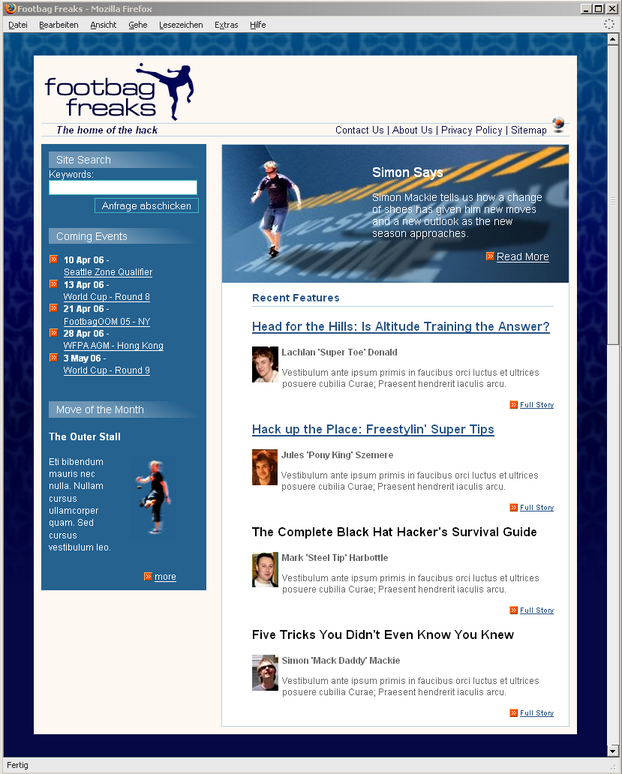
Figure: The sidebar has been repositioned.
Copyright © 2006 of the German translation, dpunkt.verlag GmbH
You may print the online version for your private use.
Otherwise, this chapter from “CSS − Anspruchsvolle Websites mit Cascading Stylesheets” is subject to the same conditions as the bound edition: the work, including all its parts, is protected by copyright. All rights reserved, including reproduction, translation, microfilming, and storage and processing in electronic systems.
dpunkt.verlag GmbH, Ringstraße 19, 69115 Heidelberg
back to top