

XML technologies / SVG / Creating simple SVG graphics / The structure of SVG graphics / Inserting SVG graphics into HTML pages / The OBJECT tag
(Excerpt from “Das Einsteigerseminar SVG — Webgrafiken mit XML” by Helma Spona)
The <OBJECT> tag has a structure similar to the <EMBED> tag. Again, the type attribute specifies the object type, but several MIME types are allowed for SVG files:
type="image/svg+xml"type="image/svg"type="image/svg-xml"
For older browsers, W3C recommends image/svg. The current standard, however, requires image/svg+xml as the MIME type, used below. Netscape 6 and Internet Explorer normally display all these types correctly. Opera is equally indifferent: it does not display the <OBJECT> tag or its contents regardless of the type.
Specify the graphic through the data attribute. As with the src attribute of the <EMBED> tag, a path is allowed. The <OBJECT> tag has the closing tag </OBJECT>. Between them, provide contents for when the file type specified by type cannot be displayed by the browser or an installed plug-in. For example, use the <IMG> tag to show a normal GIF or JPG, and optionally include a plug-in download link.
<OBJECT type="image/svg+xml" data="Bsp01.svg">
  <IMG src="Bsp01.gif" alt="Sie haben keinen SVG-Viewer installiert" />
</OBJECT>
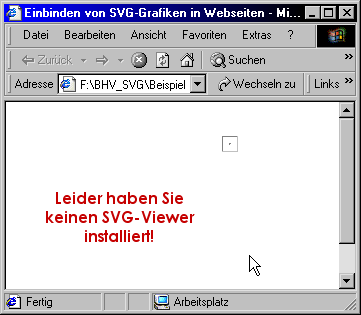
Test alternative contents by adding a character to the type attribute’s value, making type unrecognizable. The next figure shows two <OBJECT> tags with an unknown type attribute. The left displays an alternative image with the text "Leider haben Sie keine SVG-Viewer installiert!"; the second has no alternative contents, so only a placeholder appears.
Figure: <OBJECT> tags with and without alternative contents.
Note:
In the <OBJECT> tag, the type specification is mandatory. Without it, the graphic is not displayed.
Copyright © verlag moderne industrie GmbH 2001
You may print the online version for your private use.
Otherwise, this chapter from “Das Einsteigerseminar SVG — Webgrafiken mit XML” is subject to the same conditions as the bound edition. The work, including all its parts, is protected by copyright. All rights reserved, including reproduction, translation, microfilming, and storage and processing in electronic systems.
verlag moderne industrie GmbH, Justus-von-Liebig-Straße 1, D-86899 Landsberg/Lech, fon ++49 (0) 81 91 / 125 – 0, leserservice(at)mi-verlag.de
back to top