

XML technologies / SVG / Creating simple SVG graphics / The structure of SVG graphics / Inserting SVG graphics into HTML pages / Positioning graphics on the web page
(Excerpt from “Das Einsteigerseminar SVG — Webgrafiken mit XML” by Helma Spona)
You can position the contents of the <EMBED> and <OBJECT> tags absolutely using <DIV> tags or <SPAN> tags. Alternatively, insert a style attribute in the <EMBED> or <OBJECT> tag. You can also use the tag’s attributes width and height to set the graphic’s display size, showing only sections of it. The following figure shows three absolutely positioned SVG graphics on a web page. The first two are positioned with the style attribute; the third uses a <DIV> tag with a red background.
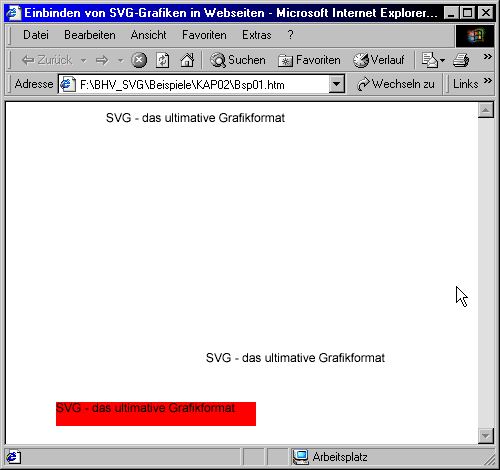
Figure: Three absolutely positioned SVG graphics.
The source code required for this display is:
<HTML>
  <HEAD>
    <TITLE>Einbinden von SVG-Grafiken in Webseiten</TITLE>
  </HEAD>
  <BODY>
    <OBJECT type="image/svg+xml" data="Bsp01.svg" height="100px" style="position:absolute;top:10px;left:100px">
      <img src="Bsp01.gif" align="left" valign="absmiddle" alt="Sie haben keinen SVG-Viewer installiert"/>
    </OBJECT>
    <OBJECT type="image/svg+xml" data="Bsp01.svg" width="200px" height="20px" style="position:absolute;top:250px;left:200px"></OBJECT>
    <DIV style="position:absolute;top:300px;left:50px;background-color:red">
      <EMBED src="Bsp01.svg" type="image/svg-xml" width="200px" height="20px"/>
    </DIV>
  </BODY>
</HTML>
Copyright © verlag moderne industrie GmbH 2001
You may print the online version for your private use.
Otherwise, this chapter from “Das Einsteigerseminar SVG — Webgrafiken mit XML” is subject to the same conditions as the bound edition. The work, including all its parts, is protected by copyright. All rights reserved, including reproduction, translation, microfilming, and storage and processing in electronic systems.
verlag moderne industrie GmbH, Justus-von-Liebig-Straße 1, D-86899 Landsberg/Lech, fon ++49 (0) 81 91 / 125 – 0, leserservice(at)mi-verlag.de
back to top