

XML technologies / SVG / Using complex graphic elements and formatting / Using paths correctly / Commands for drawing lines
(Excerpt from “Das Einsteigerseminar SVG — Webgrafiken mit XML” by Helma Spona)
Lines can be created not only with the L instruction but also with H and V to draw straight horizontal or vertical lines. The M command can also help create dashed lines, for example.
The L instruction has this syntax:
L x y
Here, x and y define the line’s endpoint, in relative or absolute coordinates. The instructions H and V draw only straight lines, so only one coordinate is needed because the other does not change. The syntax is:
H x
V y
The first example uses line commands to draw a cube. First it draws the front face’s lines and ends them with z. Then it draws the top face’s edges and uses the M command to jump to the rear-right corner and draw the vertical line downward.
<?xml version="1.0" standalone="no"?>
...
<svg width="500" height="500">
  <g transform="translate(100,100)">
    <path d="M 0 0 v+100 h+100 v-100 z l+50-50 h+100 l-50 +50 m+50 -50 v+100 l-50 +50" style="fill:none;stroke:black"/>
  </g>
</svg>
Running the code displays this cube in the browser:
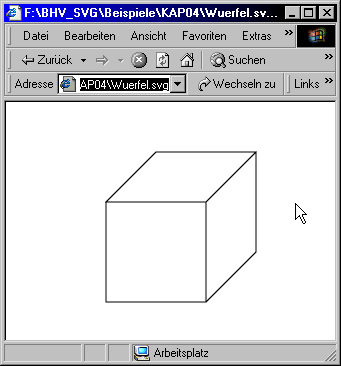
Figure: The resulting cube.
As shown, the M command also jumps to a new position, allowing dotted or dashed lines. The instruction
<path d="M10 30 h+20 m+20 0 h+20 m+20 0 h+20 m+20 0 h+20" style="stroke:rgb(0,0,0)"/>creates the dashed line in the next figure.
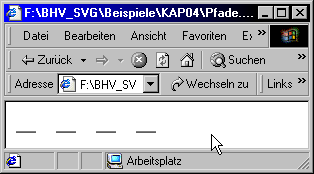
Figure: The resulting dashed line.
Copyright © verlag moderne industrie GmbH 2001
You may print the online version for your private use.
Otherwise, this chapter from “Das Einsteigerseminar SVG — Webgrafiken mit XML” is subject to the same conditions as the bound edition. The work, including all its parts, is protected by copyright. All rights reserved, including reproduction, translation, microfilming, and storage and processing in electronic systems.
verlag moderne industrie GmbH, Justus-von-Liebig-Straße 1, D-86899 Landsberg/Lech, fon ++49 (0) 81 91 / 125 – 0, leserservice(at)mi-verlag.de
back to top