

XML technologies / XML / Python & XML / XML validation and dialects / The BillSummary example
(Excerpt from “Python & XML” by Christopher A. Jones & Fred L. Drake, Jr.)
To combine the validation techniques discussed here, we develop an application using a DTD, flat-file conversion and XML validation.
The programs implement an Internet system receiving a flat file from a browser, parsing and converting it to XML, validating it, publishing it on disk under a unique ID and reporting success or failure to the browser or HTTP client. This can serve as an HTTP flat-file-to-XML conversion interface in a distributed system, also making results available over HTTP.
Use Python’s CGI libraries to extract the file from the HTTP request, string and file APIs to parse it, and a DOM implementation to build a document from its contents. A validating parser ensures the DOM obeys our Bill Summary DTD.
All files are included in the examples archive.
Put these files in a CGI-enabled web-server directory. We create:
- flatfile.html
Sends the flat file from the browser to CGI, initially loading BillSummary.txt.
- FlatfileParser.py
Parses the flat file and returns a DOM document.
- ValidityError.py
Handles validation errors for
xmlproc.- BillSummary.dtd
A DTD validating the converted XML.
- flat2xml.cgi
Receives a flat file, converts and validates it, publishes it on disk and over HTTP, and returns the result to the browser.
The CGI script flat2xml.cgi coordinates everything and is detailed at the end of this section.
The flat file
Our input is a bill from a fictional consulting company. Like many small firms, this unusually farsighted company creates bills in a spreadsheet and exports text. We must enable useful future processing by migrating forms to XML. Conversion and HTTP publication are a good start. The text in the next example, BillSummary.txt, is used throughout this section.
Example: BillSummary.txt
#
# Bill Summary
#
Bill Summary, Format 1.2
Section: Customer
customer-id: 34287-AUHE-39383947579
name: Zeropath Corporation
address1: 123 Zeropath Street
address2:
city: Redmond
state: WA
zip: 98052
phone: 425-555-1212
billing-contact: Larry Boberry
billing-contact-phone: 425-555-1212

Section: Bill Highlights
bill-id: 3453439789-6454-77
customer: 34287-AUHE-39383947579
customer-name: Zeropath Corporation
total-hours: 80
hours-rate: 150
total-svcmtrls: 950
total-bill-amount: 12950

Section: Item
item-id: 8289893
bill-id: 3453439789-6454-77
item-name: Continued Project Work (Backend)
total-hours: 40
total-svcmtrls: 450

Section: Item
item-id: 8289894
bill-id: 3453439789-6454-77
item-name: Continued Project Work (UI)
total-hours: 40
total-svcmtrls: 500
Once the file is on disk, build a form to submit it over HTTP. We examine that application here.
The web form
First create a submission form. If a company stores daily bills as flat files on a shared disk, a batch process could collect them and post them to the conversion service.
HTTP keeps communication open to browsers, HTTP applications behind firewalls and other clients. Users could enter text bills in browsers or submit them programmatically through intelligent HTTP clients.
The form is a simple HTML document. Pay particular attention to tag form and its attributes method and action, defining where the file goes when Submit is pressed. Tag textarea holds the text, with content from BillSummary.txt present by default when the form loads.
Example: flatfile.html submits your text file
<html>
<body bgcolor="#FFFFFF" text="#000000">
<h1>Auswahl der flachen Datei</h1>
<p>Klicken Sie auf den unteren Button, um die flache Datei an den Server zu schicken. Sie können die Datei auch editieren, um Fehler auf dem Server und in dem entsprechenden Code zu erzeugen.</p>
<p>
<form action="flat2xml.cgi" method="POST">
<textarea name="flatfile" rows=20 cols=80>
#
# Bill Summary
#
Bill Summary, Format 1.2
Section: Customer
customer-id: 34287-AUHE-39383947579
name: Zeropath Corporation
address1: 123 Zeropath Street
address2:
city: Redmond
state: WA
zip: 98052
phone: 425-555-1212
billing-contact: Larry Boberry
billing-contact-phone: 425-555-1212
Section: Bill Highlights
bill-id: 3453439789-6454-77
customer: 34287-AUHE-39383947579
customer-name: Zeropath Corporation
total-hours: 80
hours-rate: 150
total-svcmtrls: 950
total-bill-amount: 12950
Section: Item
item-id: 8289893
bill-id: 3453439789-6454-77
item-name: Continued Project Work (Backend)
total-hours: 40
total-svcmtrls: 450
Section: Item
item-id: 8289894
bill-id: 3453439789-6454-77
item-name: Continued Project Work (UI)
total-hours: 40
total-svcmtrls: 500
</textarea>
<br><input type="submit" value="Abschicken">
</form>
</p>
</body>
</html>The resulting page appears as shown below.
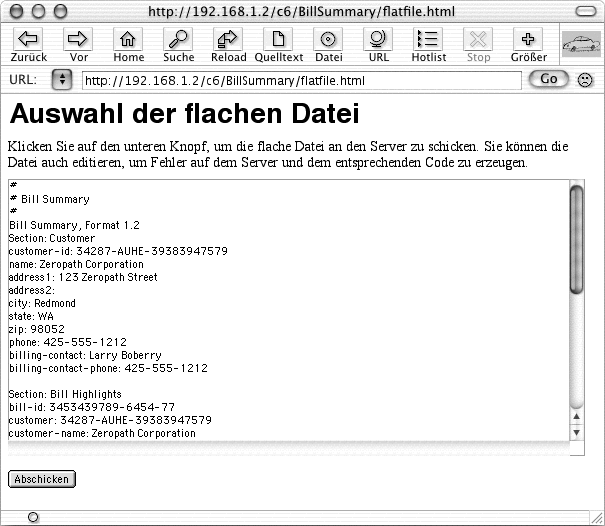
Figure: A form containing a flat file
Starting the CGI script
You now have a sample bill summary and a form sending it over HTTP to Python script flatfile.cgi specified by attribute action of element form.
Before tackling validation, test your local CGI environment and confirm that it receives the browser’s file. The next example, An initial flatfile.cgi version, tests execution and browser connectivity. Extract the file from HTTP and echo it to show everything works; XML and validation follow. The script’s core should resemble this early version of flat2xml.cgi shown below.
Example: An initial flatfile.cgi version
#!/usr/local/bin/python
# flat2xml.cgi

import cgi
import os
import sys

#
# Starte HTTP/HTML-Ausgabe
#
print "Content-type: text/html"
print
print "<html><body>"

# Parse Abfrage-String nach der Flatfile
#
try:
query = cgi.FieldStorage( )
flatfile = query.getvalue("flatfile", "")[0]
except:
print "Konvertierungsanfrage nicht gefunden oder falsch formatiert."
print "</body></html>"
sys.exit(0)

#
# Zeige Flatfile an
#
print "<h1>Flache Datei</h1>"
print "<p>Empfangene flache Datei:</p> "
print "<p><pre>" + flatfile + "</pre></p>"
print "</body></html>"
Most code is straightforward Python. The browser sends the file in a request of type GET as form variable flatfile. Missing content causes an error. If An initial flatfile.cgi version works, expect a screen like the figure below.
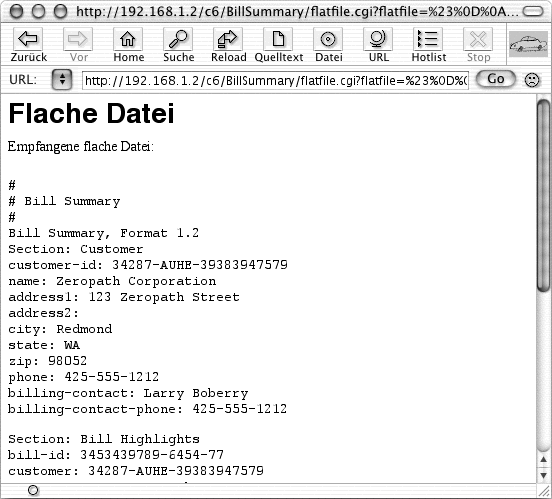
Figure: Basic CGI functionality
We next add conversion to XML, then validation to ensure everything works as intended.
Conversion and validation
Conversion first requires parsing the flat file. Parsing individual formats is tedious but unavoidable in XML integration; tiny differences between formats may be XML’s main motivation. XML imposes a universally parsable format. Fortunately, each system’s flat files should share one structure, requiring just one parser set per file type.
Converting text to XML
The file has sections with their own data. Their number depends on consulting hours billed, so the FlatfileParser must be flexible, assuming neither fixed order nor uniqueness or grouping. To create XML, the FlatfileParser uses DOM implementation to build a structure holding text extracted by the FlatfileParser.
#
# FlatfileParser.py
#

from xml.dom    import implementation
class FlatfileParser:
   def parseFile(self, fileAsString):
Class FlatfileParser provides method parseFile accepting a single string of file contents. Python also has class StringIO giving strings file-like reading and writing. StringIO would suit this class, but we use a complete string for simplicity.
Next, create a new DOM document named BillSummary and obtain its root element. We add children while the FlatfileParser processes the flat file:
# Erzeuge DocType-Deklaration
doctype = implementation.createDocumentType('BillSummary', '',
                                                   'BillSummary.dtd')

# Erzeuge leeres DOM-Dokument und hole Wurzelelement
doc = implementation.createDocument('', 'BillSummary', doctype)
elemDoc = doc.documentElement
The class implementation is imported as xml.dom.implementation and its method createDocumentType builds a BillSummary type referencing file BillSummary.dtd, shown in BillSummary.dtd. Create the document with method createDocument passing the new doctype as argument. Finally get the root with doc.documentElement.
With the foundation in place, iterate through lines. New sections create section elements; data creates their children. Here is part of the flat-file structure:
Section: Bill Highlights
bill-id: 3453439789-6454-77
customer: 34287-AUHE-39383947579
customer-name: Zeropath Corporation
total-hours: 80
hours-rate: 150
total-svcmtrls: 950
total-bill-amount: 12950
In our FlatfileParser, a “Section” string creates and appends a new current element. Other lines, such as bill-id and total-hours, become its children until the next “Section”. The first half checks for a section element; otherwise the second half emits the current line as an XML element plus CDATA.
# Lies jede Zeile der Textdatei zum Bearbeiten ein
for line in fileAsString.splitlines():
  # Teste, ob wir uns in einem Abschnitt befinden oder nicht

if bInElement:
  # Prüfe, ob wir einen Abschnitt verlassen
  if ':' in line:
    # Füge section-Element hinzu, setze Flag zurück
    elemDoc.appendChild(elemCurrent)
    bInElement = 0
  else:
    # Parse eine Abschnittszeile auf ':'
    k,v = line.split(':')

    # Erzeuge Elementnamen und Kindtext aus key/value-Paar
    elem = doc.createElement(k.strip())
    elem.appendChild(doc.createTextNode(v.strip()))

    # Füge Element an aktuelles section-Element an
    elemCurrent.appendChild(elem)
The code first tests for a blank line or section end. Otherwise it treats the line as a child and splits at the colon (:). Method doc.createElement creates a tag from the left half and appends text from the right as a child. Repeat to the end of the file.
The snippet omits what happens when bInElement is false, zero in Python. The file structure means a new section must begin when bInElement is false. The code searches for another “Section”, creates its element, makes it current and resets bInElement to true.
# Erzeuge neues Element abhängig davon, in welchem
# Abschnitt der Flatfile wir uns befinden...
section = line.strip()
if section == "Section: Customer":
   elemCustomer = doc.createElement("Customer")
   bInElement = 1

   # Setze aktuelles Arbeitselement für Customer-Abschnitt
   elemCurrent = elemCustomer

if section == "Section: Bill Highlights":
   elemBillHighlights = doc.createElement("BillHighlights")
   bInElement = 1

   # Setze aktuelles Arbeitselement für BillHighlights-Abschnitt
   elemCurrent = elemBillHighlights

if section == "Section: Item":
   elemItem = doc.createElement("Item")
   bInElement = 1

   # Setze aktuelles Arbeitselement für Item-Abschnitt
   elemCurrent = elemItem
For every file line, FlatfileParser assumes a section or its children. Data between sections is ignored, since parsing depends on section context. At end of input, return the new DOM:
return doc The next example lists FlatfileParser.py completely. A later CGI script uses class FlatfileParser.
Example: FlatfileParser.py
# FlatfileParser.py
#
from xml.dom import implementation

class FlatfileParser:
  def parseFile(self, fileAsString):

      # Erzeuge DocType-Deklaration
      doctype = implementation.createDocumentType('BillSummary', '',
                                            'BillSummary.dtd')

      # Erzeuge leeres DOM-Dokument und hole Wurzelelement
      doc = implementation.createDocument('', 'BillSummary', doctype)
      elemDoc = doc.documentElement

      # Boolesches Textparsing-Flag zum leichteren Navigieren in Flatfile
      bInElement = 0

      # Lies jede Zeile der Flatfile zum Bearbeiten ein
      for line in fileAsString.splitlines( ):
       # Teste, ob wir uns in einem Abschnitt befinden oder nicht
       if bInElement:
        # Prüfe, ob wir einen Abschnitt verlassen
        if ':' in line:
         # Füge section-Element hinzu, setze Flag zurück
         elemDoc.appendChild(elemCurrent)
         bInElement = 0
      else:
         # Parse eine Abschnittszeile auf ':'
         k,v = line.split(':')

         # Erzeuge Elementnamen und Kindtext aus key/value-Paar
         elem = doc.createElement(k.strip( ))
         elem.appendChild(doc.createTextNode(v.strip( )))

         # Füge Element an aktuelles section-Element an
         elemCurrent.appendChild(elem)

      # Erzeuge neues Element abhängig davon, in welchem
      # Abschnitt der Flatfile wir uns befinden...
      section = line.strip( )
      if section == "Section: Customer":
         elemCustomer = doc.createElement("Customer")
         bInElement = 1

         # Setze aktuelles Arbeitselement für Customer-Abschnitt
         elemCurrent = elemCustomer

      if section == "Section: Bill Highlights":
         elemBillHighlights = doc.createElement("BillHighlights")
         bInElement = 1

         # Setze aktuelles Arbeitselement für BillHighlights-Abschnitt
         elemCurrent = elemBillHighlights

      if section == "Section: Item":
      elemItem = doc.createElement("Item")
      bInElement = 1

      # Setze aktuelles Arbeitselement für Item-Abschnitt
      elemCurrent = elemItem

  return doc
Validating XML
What XML does FlatfileParser produce from the text in BillSummary.txt? Running FlatfileParser on Bill-Summary.txt should produce a DOM like BillSummary.xml below, assuming output with PrettyPrint or similar.
Example: A well-formed, converted, valid BillSummary.xml file
<?xml version='1.0' encoding='UTF-8'?>
<!DOCTYPE BillSummary SYSTEM "BillSummary.dtd">
<BillSummary>
  <Customer>
    <customer-id>34287-AUHE-39383947579</customer-id>
    <name>Zeropath Corporation</name>
    <address1>123 Zeropath Street</address1>
    <address2></address2>
    <city>Redmond</city>
    <state>WA</state>
    <zip>98052</zip>
    <phone>425-555-1212</phone>
    <billing-contact>Larry Boberry</billing-contact>
    <billing-contact-phone>425-555-1212</billing-contact-phone>
  </Customer>
  <BillHighlights>
    <bill-id>3453439789-6454-77</bill-id>
    <customer>34287-AUHE-39383947579</customer>
    <customer-name>Zeropath Corporation</customer-name>
    <total-hours>80</total-hours>
    <hours-rate>150</hours-rate>
    <total-svcmtrls>950</total-svcmtrls>
    <total-bill-amount>12950</total-bill-amount>
  </BillHighlights>
  <Item>
    <item-id>8289893</item-id>
    <bill-id>3453439789-6454-77</bill-id>
    <item-name>Continued Project Work (Backend)</item-name>
    <total-hours>40</total-hours>
    <total-svcmtrls>450</total-svcmtrls>
  </Item>
  <Item>
    <item-id>8289894</item-id>
    <bill-id>3453439789-6454-77</bill-id>
    <item-name>Continued Project Work (UI)</item-name>
    <total-hours>40</total-hours>
    <total-svcmtrls>500</total-svcmtrls>
  </Item>
</BillSummary>
The DTD itself is still missing. Conversion followed by validation requires one. The DTD for the BillSummary document is simple, using content models and element ordering from Document type definitions.
Save a DTD as BillSummary.dtd for validation to succeed.
Example: BillSummary.dtd
<!ELEMENT customer-id (#PCDATA)>
<!ELEMENT name (#PCDATA)>
<!ELEMENT address1 (#PCDATA)>
<!ELEMENT address2 (#PCDATA)>
<!ELEMENT city (#PCDATA)>
<!ELEMENT state (#PCDATA)>
<!ELEMENT zip (#PCDATA)>
<!ELEMENT phone (#PCDATA)>
<!ELEMENT billing-contact (#PCDATA)>
<!ELEMENT billing-contact-phone (#PCDATA)>
<!ELEMENT bill-id (#PCDATA)>
<!ELEMENT customer (#PCDATA)>
<!ELEMENT customer-name (#PCDATA)>
<!ELEMENT hours-rate (#PCDATA)>
<!ELEMENT total-bill-amount (#PCDATA)>
<!ELEMENT item-id (#PCDATA)>
<!ELEMENT item-name (#PCDATA)>
<!ELEMENT total-hours (#PCDATA)>
<!ELEMENT total-svcmtrls (#PCDATA)>

<!ELEMENT Customer (customer-id, name, address1, address2, city, state, zip, phone, billing-contact, billing-contact-phone)>

<!ELEMENT BillHighlights (bill-id, customer, customer-name, total-hours, hours-rate, total-svcmtrls, total-bill-amount)>

<!ELEMENT Item (item-id, bill-id, item-name, total-hours, total-svcmtrls)>

<!ELEMENT BillSummary (Customer, BillHighlights, Item*)>
Return to val.py from Command-line validator (val.py) to test your new BillSummary.dtd and sample BillSummary.xml, if you entered the program or extracted it from FlatfileParser. Once the XML is saved, test it as follows:
C:\pythonxml\c7>python val.py BillSummary.xml Creating a validation handler
With a FlatfileParser, generated XML and DTD, we need a validation handler for xmlproc. Class XMLValidator provides method set_error_handler for supplying XMLValidator with an error handler doing what you need, such as reporting errors to HTTP/HTML clients.
To implement the ErrorHandler, subclass its interface and override the methods relevant to your error scheme. Our handler writes text inside HTML. The next example lists ValidityError.py, implementing an object conforming to ErrorHandler.
Example: ValidityError.py
from xml.parsers.xmlproc.xmlapp import ErrorHandler

"""
ValidityErrorHandler -- implementiere ErrorHandler-Schnittstelle aus xmlproc
"""
class ValidityErrorHandler(ErrorHandler):

def warning(self,msg):
   print "<p><b><font color=#FF0000>Warnung erhalten!:</b></font>"
   print "<br>" + msg + "</p>"
   self.errors = 0

def error(self,msg):
   print "<p><b><font color=#aa0000>Fehler erhalten!:</b></font>"
   print "<br>" + msg + "</p>"
   self.errors = 1

def fatal(self,msg):
   print "<p><b><font color=#aa0000>Kritischen Fehler erhalten!:</b></font>"
   print "<br>" + msg + "</p>"
   self.errors = 1
Every method takes a message, writes it to the page and identifies warning, error or fatal error. Each also sets a flag (self.errors) so CGI can detect errors.
Handler, DTD and XML are ready; finish CGI.
Completing CGI
Previously, flat2xml.cgi simply echoed text to verify CGI. We now add functionality. The complete listing appears in flat2xml.cgi at this section’s end.
Defining success and failure functions
CGI coordinates this application. The server starts it after a page request; it imports modules and classes and begins work. First finish imports and define success and failure functions:
#!/usr/local/bin/python
# flat2xml.cgi
import cgi
import os
import sys
from FlatfileParser import FlatfileParser
from xml.dom.ext import PrettyPrint
from xml.parsers.xmlproc import xmlval
from ValidityError import ValidityErrorHandler
# Fehlermeldung für Benutzer
def failure(msg):
print "<h1>Fehler</h1>"
print "<p><b>Text erhalten, Fehler aufgerufen:"
print msg + "</b></p>"
# Erfolgsmeldung für Benutzer
def success(msg):
print "<p><b>XML-Dokument erhalten, ist gültig und "
print "wurde auf Platte gespeichert. "
print "Meldung: " + msg + "</b></p>" Function success runs after successful conversion, validation and disk storage with customer ID in the filename. Function failure runs on fatal errors, though terminating CGI after failure returns remains the caller’s responsibility.
Prepare HTTP/HTML output and browser communication. Conditions lead to either success or a fatal-error message stopping execution. Begin HTML with print statements:
# Starte HTTP/HTML-Ausgabe
print "Content-type: text/html"
print
print "<html>"
print "<body>"
Converting flat files to XML
Most conversion code is in FlatfileParser. Use Python CGI to extract the file from the query string:
# Parse Abfrage-String nach der Flatfile
try:
  querys = cgi.FieldStorage( )
  flatfile = query.getvalue("flatfile", "")[0]

except:
  failure("Konvertierungsanfrage nicht gefunden oder falsch formatiert.")
  print "</body></html>"
  sys.exit(0)

# Instanziiere Parser & zeige Flatfile an
ffp = FlatfileParser( )
print "<h1>Flache Datei</h1>"
print "<p>Flache Datei erhalten:</p> "
print "<p><pre>" + flatfile + "</pre></p>"
Instantiate FlatfileParser and use method parseFile to convert text to XML:
# Konvertiere Flatfile nach XML
print "<h1>Konvertierung</h1>"
BillSummaryDOM = ffp.parseFile(flatfile)
CustomerIdElement = BillSummaryDOM.getElementsByTagName("customer-id")
if CustomerIdElement:
  # Suche Customer-ID
  CustomerId = CustomerIdElement[0].firstChild.data
  print "<p>Konvertiert nach XML...</p>"
else:
  # Keine ID gefunden, boote jetzt Dokument
  failure("Customer-ID in DOM-Instanz nicht auffindbar.")
  print "</body></html>"
  sys.exit(0)
Note the extra logic after BillSummaryDOM extracting element customer-id. Before validation, save under a unique identifier so other systems, including validator, can retrieve it from the server. Extract customer-ID text from element customer-id in the DOM. Continue if present; otherwise report a fatal error and terminate.
Validating converted XML
Once the ID can be extracted, begin validation, guaranteeing adherence to standards and avoiding system problems. With the ID found, save to disk as part of validation:
# Validiere das DOM
print "<h1>Validierung</h1>"
try:
   # Schreibe Dokument auf Platte basierend auf Customer-ID
   fd = open(CustomerId + ".xml", 'w')
   PrettyPrint(BillSummaryDOM, fd)
   fd.close( )

except:
   # Problem beim Schreiben des Dokuments?
   failure("<p>XML-Dokument nicht speicherbar.</p>")
   print "</body></html>"
   sys.exit(1)
Function PrettyPrint writes the DOM to the file descriptor. It uses a try/except statement with a block to catch file I/O problems before they escape and display “Internal Server Error” in the browser. Then instantiate XMLValidator:
# Instanziiere Parser
xv = xmlval.XMLValidator( )

# Instanziiere Fehler-Handler
veh = ValidityErrorHandler(xv.app.locator)

# Setze Parser auf, rufe parse-Methode auf
xv.set_error_handler(veh)
xv.parse_resource(CustomerId + ".xml")
Validation errors are presented to the browser by the custom handler ValidityErrorHandler, and execution continues.
Displaying XML
Regardless of validation errors, CGI displays XML in HTML using tags <pre> and <xmp>. Tag pre displays preformatted text preserving whitespace, ideal for code. XML may be mistaken for unsupported HTML, however. Tag xmp helps: designed for HTML examples, it escapes all text between “<” and “>”, as shown:
# Zeige XML-Dokument an
print "<h1>XML-Dokument</h1><pre><xmp>"
PrettyPrint(BillSummaryDOM)
print "</xmp></pre>"
To emit raw XML in HTTP, use the xml.dom.ext module’s imported PrettyPrint function. It writes XML to any file-like object, defaulting to sys.stdout if only the DOM is supplied.
Without validation errors, execution succeeds. Accumulated errors cause failure even if file and XML pass every other hurdle. Remember the ValidityErrorHandler has an error flag for external observers. CGI checks it to detect validation errors:
# Gib Benutzer eine Bestätigung
if veh.errors:
  failure("Validierungsfehler.")
else:
  success("Erfolg.")

# Beenden
print "</body></html>"
If errors exist in ValidityErrorHandler, the script calls function failure. Here is the complete listing of flat2xml.cgi.
Example: flat2xml.cgi
#!/usr/local/bin/python
# flat2xml.cgi
import cgi
import os
import sys
from FlatfileParser import FlatfileParser
from xml.dom.ext import PrettyPrint
from xml.parsers.xmlproc import xmlval
from ValidityError import ValidityErrorHandler
# Fehlermeldung für Benutzer
def failure(msg):
print "<h1>Fehler</h1>"
print "<p><b>Text erhalten, Fehler aufgerufen:"
print msg + "</b></p>"
# Erfolgsmeldung für Benutzer
def success(msg):
print "<p><b>XML-Dokument erhalten, ist gültig und "
print "wurde auf Platte gespeichert. "
print "Meldung: " + msg + "</b></p>"
# Starte HTTP/HTML-Ausgabe
print "Content-type: text/html"
print
print "<html>"
print "<body>"
# Parse Abfrage-String nach der Flatfile
try:
query = cgi.FieldStorage( )
flatfile = query.getvalue("flatfile", "")
except:
failure("Konvertierungsanfrage nicht gefunden oder falsch formatiert.")
print "</body></html>"
sys.exit(0)
# Instanziiere Parser & zeige Flatfile an
ffp = FlatfileParser( )
print "<h1>Flache Datei</h1>"
print "<p>Flache Datei erhalten:</p> "
print "<p><pre>" + flatfile + "</pre></p>"
# Konvertiere Flatfile nach XML
print "<h1>Konvertierung</h1>"
BillSummaryDOM = ffp.parseFile(flatfile)
CustomerIdElement = BillSummaryDOM.getElementsByTagName("customer-id")
if CustomerIdElement:
# Suche Customer-ID
CustomerId = CustomerIdElement[0].firstChild.data
print "<p>Konvertiert nach XML...</p>"
else:
# Keine ID gefunden, boote jetzt Dokument
failure("Customer-ID in DOM-Instanz nicht auffindbar.")
print "</body></html>"
sys.exit(0)
# Validiere das DOM
print "<h1>Validierung</h1>"
try:
# Schreibe Dokument auf Platte basierend auf Customer-ID
fd = open(CustomerId + ".xml", 'w')
PrettyPrint(BillSummaryDOM, fd)
fd.close( )
except:
# Problem beim Schreiben des Dokuments?
failure("<p>XML-Dokument nicht speicherbar.</p>")
print "</body></html>"
sys.exit(1)
# Instanziiere Parser
xv = xmlval.XMLValidator( )
# Instanziiere Fehler-Handler
veh = ValidityErrorHandler(xv.app.locator)
# Setze Parser auf, rufe parse-Methode auf
xv.set_error_handler(veh)
xv.parse_resource(CustomerId + ".xml")
# Zeige XML-Dokument an
print "<h1>XML-Dokument</h1><pre><xmp>"
PrettyPrint(BillSummaryDOM)
print "</xmp></pre>"
# Gib Benutzer eine Bestätigung
if hasattr(veh, "errors") and veh.errors:
failure("Validierungsfehler.")
else:
success("Erfolg.")
# Beenden
print "</body></html>"Running in a browser
Results vary if text is edited before submission. The default text is well-formed when loading flatfile.html and produces HTML like the next figure.
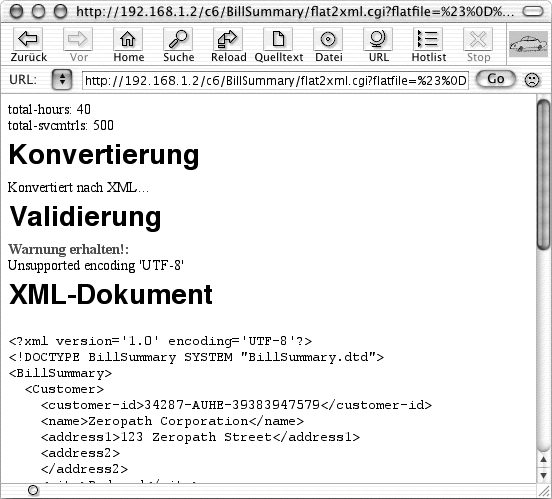
Figure: Successful flat2xml.cgi execution
Editing changes results. Move half of “Bill Highlights” into the first section and many validation errors appear, as shown below.
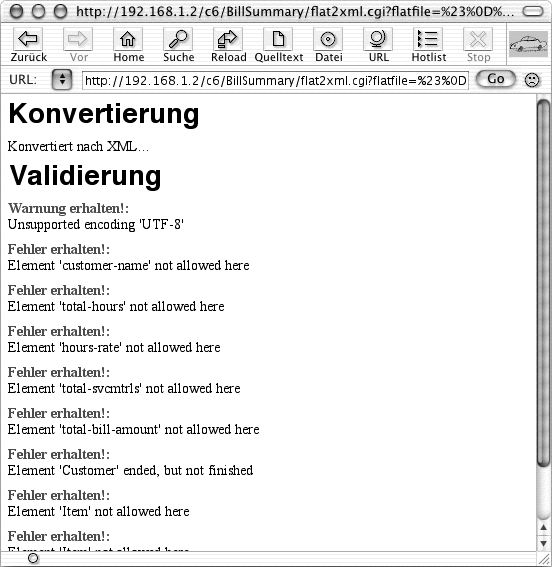
Figure: flat2xml.cgi with many validation errors
Removing arbitrary content caused these errors, which CGI caught through validation. The messages clearly identify document problems and can trigger events elsewhere. Real business logic determines what to do with missing data: an otherwise good document lacking a date might be tolerable, but a missing account number could be fatal and require different handling. The necessary rigor may depend on document complexity. We created this XML from scratch, tailoring it to our situation, perhaps too closely. Choosing a standardized dialect adds requirements, and transactions may have to follow business logic defined by others.
Copyright © 2002 O'Reilly Verlag GmbH & Co. KG
You may print the online version for your private use.
Otherwise, this chapter from “Python & XML” is subject to the same conditions as the bound edition: the work, including all its parts, is protected by copyright. All rights reserved, including reproduction, translation, microfilming, and storage and processing in electronic systems.
O’Reilly Verlag GmbH & Co. KG, Balthasarstraße 81, 50670 Köln, kommentar(at)oreilly.de