

XML technologies / SVG / Interactive graphics / Manipulating graphic elements / Manipulating the visible property
(Excerpt from “Das Einsteigerseminar SVG — Webgrafiken mit XML” by Helma Spona)
If you want an SVG graphic that works like a Flash website and responds to mouse events, you will often need to show and hide elements. First define a property in the style attribute of the element or parent group: the property visibility. Three values are possible. With visibility:visible, the element is visible; visibility:hidden hides it; visibility:inherit makes visibility depend on the parent’s visibility. A parent is the element enclosing another element. For example, a group containing elements is their parent, not the previously defined element.
The following example demonstrates the visible property. It adds text boxes to the familiar graphic navbanner.svg from previous chapters, shown when users click the corresponding navigation texts. Each box also has a button to hide it again. Hovering over this button shows a tooltip explaining its purpose.
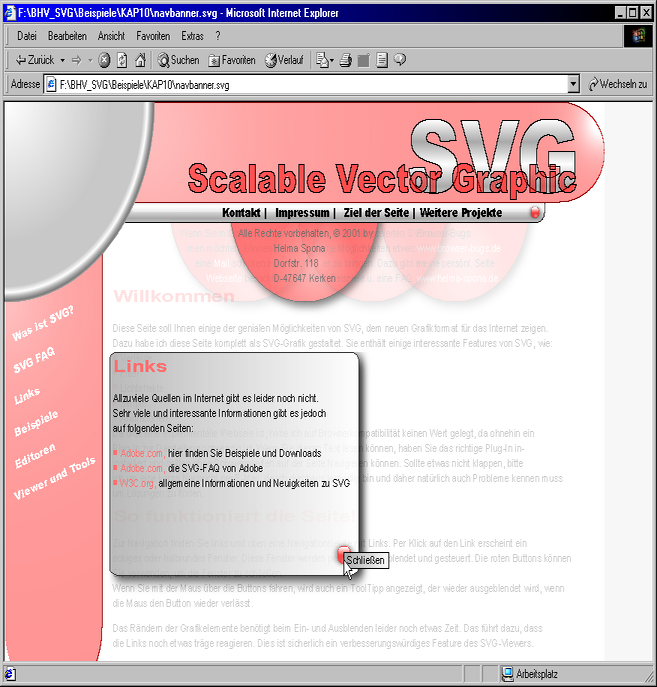
Figure: Features to create in the navbanner.svg graphic.
Copyright © verlag moderne industrie GmbH 2001
You may print the online version for your private use.
Otherwise, this chapter from “Das Einsteigerseminar SVG — Webgrafiken mit XML” is subject to the same conditions as the bound edition. The work, including all its parts, is protected by copyright. All rights reserved, including reproduction, translation, microfilming, and storage and processing in electronic systems.
verlag moderne industrie GmbH, Justus-von-Liebig-Straße 1, D-86899 Landsberg/Lech, fon ++49 (0) 81 91 / 125 – 0, leserservice(at)mi-verlag.de
back to top