

XML technologies / ePUB / Open Publication Structure / References, footnotes and notes / Links and targets
(Excerpt from “E-Books mit ePUB ─ Von Word zum E-Book mit XML” by Dr. Victor Wang)
A link technically consists of a source and target. A passage or image at the source stores information allowing a jump to the target. DTBook and XHTML both use the HTML element <a> (“anchor”). The target is identified by an id attribute. This universal attribute works on almost any element, though conventionally it is mainly used on the <a> element just mentioned.
The element <a> therefore has two functions: at the source, its href attribute points to the target; the text inside <a> is later displayed as link text. As a target marker, <a> must carry the id attribute and is usually empty. Values of the id attribute must be unique within the document. Note also that the name attribute, allowed in HTML and still common online, is prohibited. Possible id attribute values are restricted to letters, numbers and underscores, and must begin with a letter.
The following link cases are conceivable:
Link to a target marker in the current document
Source:<a href="#anker">Verweistext</a>,
Target:<a id="anker"/>
Link to a target marker in another document
Source:<a href="zieldatei.html#anker">Verweistext</a>,
Target:<a id="anker"/>Link to another entire document, without a target marker
Source:<a href="zieldatei.html">Verweistext</a>,
Target: no target marker
Link to an internet document
Source:<a href="http://meine.domain.de/zieldatei.html">Verweistext</a>,
Target: no target marker
The following example places link sources in the first chapter and their targets in the second:
<?xml version="1.0" encoding="UTF-8"?>
<!DOCTYPE html PUBLIC "-//W3C//DTD XHTML 1.0 Strict//EN" "http://www.w3.org/TR/xhtml1/DTD/xhtml1-strict.dtd">
<html xmlns="http://www.w3.org/1999/xhtml" xml:lang="de">
  <head>
    <title>Verweise und Weblinks XHTML</title>
  </head>
  <body>
    <div class="Dokument">
      <h1>Verweise und Weblinks XHTML</h1>
      <div class="Kapitel">
        <h1>Verweise</h1>
        <p><strong>a</strong>: Das Element a dient primär der Auszeichnung von Sprüngen.</p>
        <p>Fall 1: Verweis auf das <a href="#ziele-fall-1">folgende Kapitel</a>, mit dem Attribut <code>id="ziele-fall-1"</code></p>   ①
        <p>Fall 2: Verweis auf das <a href="#ziele-fall-2">folgende Kapitel</a>, mit dem Element a und dessen Attribut <code>id="ziele-fall-2"</code></p>   ②
        <p>Fall 2a: Verweis auf eine Textstelle in diesem Kapitel, beispielsweise als Anmerkung<sup><a href="#fn-1" id="fnpos-1">1</a></sup></p>   ③
        <p>Fall 3: Verweis auf eine externe Datei, beispielsweise auf die <a href="cover.xml">Cover-Datei</a>.</p>   ④
        <p>Fall 4: Verweis auf eine Internetadresse, beispielsweise auf die Startseite des IDPF: <a href="http://www.idpf.org/"><code>http://www.idpf.org/</code></a>.</p>   ⑤
      </div>
      <div class="Kapitel">
        <h1>Ziele</h1>
        <div class="Kapitel">
          <h1 id="ziele-fall-1">Fall 1: id-Attribut am hd-Element</h1>   ⑥
          <p>Die Überschrift hd hat ein Attribut <code>id="ziele-fall-1"</code> erhalten. Leider wird ein solches Ziel häufig nicht von den Browsern korrekt interpretiert.</p>
        </div>
        <div class="Kapitel">
          <h1>Fall 2: id-Attribut am a-Element</h1>
          <p><a id="ziele-fall-2"/>Zu Beginn dieses Absatzes steht das Element a mit einem Attribut <code>id="ziele-fall-2"</code>.</p>   ⑦
        </div>
        <div class="Kapitel">
          <h1>Fall 2a: Anmerkungen mit Rücklink</h1>
          <p><a id="fn-1" href="#fnpos-1">1</a> Hier könnte der Text einer "Fußnote" stehen. Hinter dem Fußnotenzeichen steht wiederum ein Verweis auf das Ziel <code>id="fnpos-1"</code></p>   ⑧
        </div>
      </div>
    </div>
  </body>
</html>
Code example: Link source and target structure
Links ① and ②, cases 1 and 2, target chapter structures ⑥ and ⑦. Although the id attribute at ⑥ should suffice, browsers and readers generally do not support this variant. Adobe Digital Editions implements link 1 in XHTML but not DTBook, for example. When in doubt, prefer variant ⑦ with a separate target anchor carrying an id attribute.
Case 2a at ③ adds a target marker to the source using an id attribute. This enables a return link from note text at ⑧ to the note marker.
In case 3 at ④, the target is another XHTML file that must exist within the e-book publication. Case 4 at ⑤ points to an internet address. Its handling depends on the reader hardware or software. A link click in Adobe Digital Editions opens the current browser, for example.
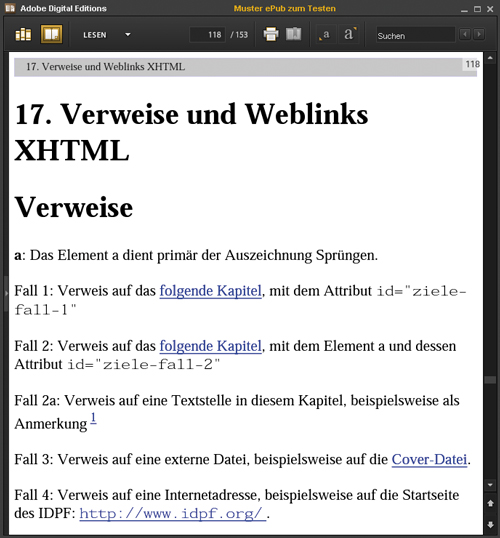
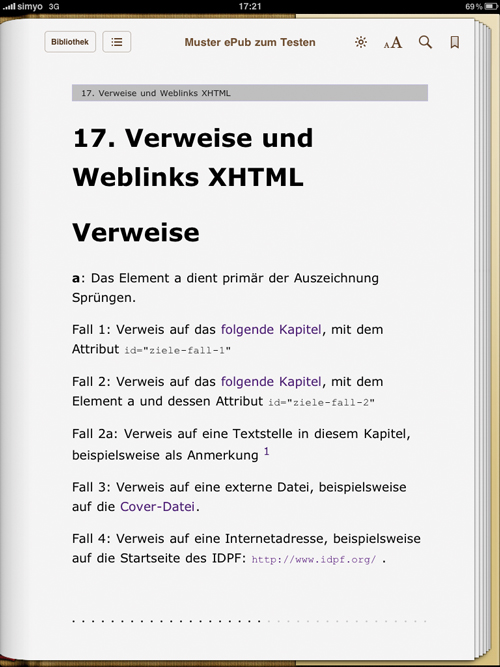
Figures: Link sources (Adobe Digital Editions and iBooks).
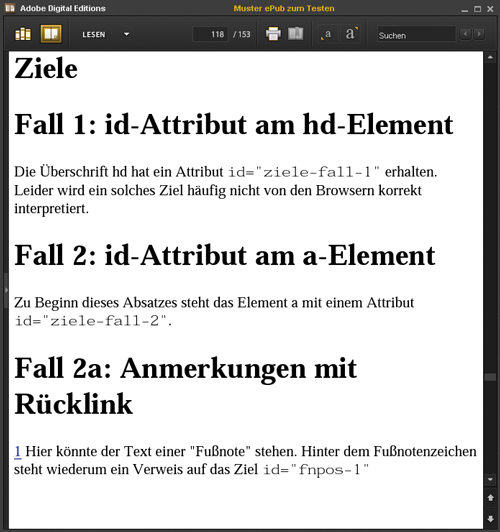
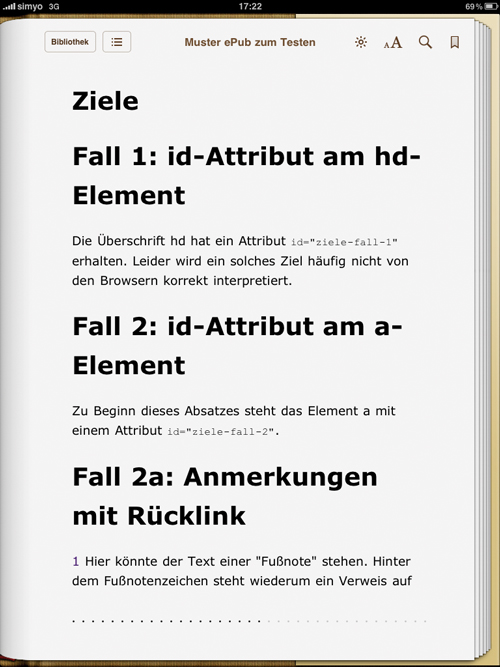
Figures: Link targets (Adobe Digital Editions and iBooks).
This basic link structure is always valid in XHTML and hence DTBook. Which textual structures should be marked as links?
The most obvious are internal textual references within the work itself. “See chapter 7” is easy to structure if chapters are structured. References to existing but structurally elusive passages are harder. “Sentence 3 in chapter 7” works only when sentences are structured and countable; “see the third list item above” is similarly difficult.
We therefore mainly examine the established, generally available reference system of notes or footnotes.
Copyright © mitp 2011
You may print the online version for your private use.
Otherwise, this chapter from “E-Books mit ePUB” is subject to the same terms as the printed edition: the work and all its parts are protected by copyright. All rights reserved, including reproduction, translation, microfilming, and storage and processing in electronic systems.
Verlagsgruppe Hüthig Jehle Rehm GmbH, Im Weiher 10, 69121 Heidelberg, kundenbetreuung(at)hjr-verlag.de
back to top