

XML technologies / WordML / WordML introduction / Links
WordML knows internal and external links. Internal links are reference elements in a document to another section of the same document, whereas external links are reference elements to other documents or files.
Internal links
<w:p>
  <w:r>
    <w:fldChar w:fldCharType="begin"/>                    (1)
  </w:r>
  <w:r>
    <w:instrText> HYPERLINK \l "Ziel" <!-- en: HYPERLINK \l "target" --> </w:instrText> (2)
  </w:r>
  <w:r>
    <w:fldChar w:fldCharType="separate"/>                 (1)
  </w:r>
  <w:r>
    <w:rPr>
      <w:rStyle w:val="Hyperlink"/>                       (3)
    </w:rPr>
    <w:t>Interner Link <!-- internal link --> </w:t>
  </w:r>
  <w:r>
    <w:fldChar w:fldCharType="end"/>                      (1)
  </w:r>
</w:p>
<aml:annotation aml:id="0" w:type="Word.Bookmark.Start" w:name="target"/> (4)
<w:p>
  <w:r>
    <w:t>Linkziel <!-- link target --> </w:t>
  </w:r>
<aml:annotation aml:id="0" w:type="Word.Bookmark.End"/>   (4)
</w:p>
(1) Internal links are defined in Word Fields: <w:fldChar>. Its attribute, w:fldCharType, indicates whether the field begins, is continued or ends at this position.
(2) <w:instrText> generates the actual link to an internal target. In this example, the textual content is partially preset. HYPERLINK \l has to be entered before the target to be referenced. The target is indicated between quotation marks.
(3) The inline formatting with the Hyperlink style used in this example is automatically set by Word 2003 for each link. This style is only used for the usual visualisation of links and has no functionality in connection with references.
(4) <aml:annotation> is used in various contexts, namely for the change tracking, the insertion of Word comments and the definition of link anchors, as in this example. Here, the w:type attribute determines with the values Word.Bookmark.Start and Word.Bookmark.End the beginning and the end of the anchor. The w:name attribute indicates the ID of the anchor.
The links can be generated in the menu Einfügen (Insert) -> Hyperlink or Einfügen -> Textmarke (Bookmark).
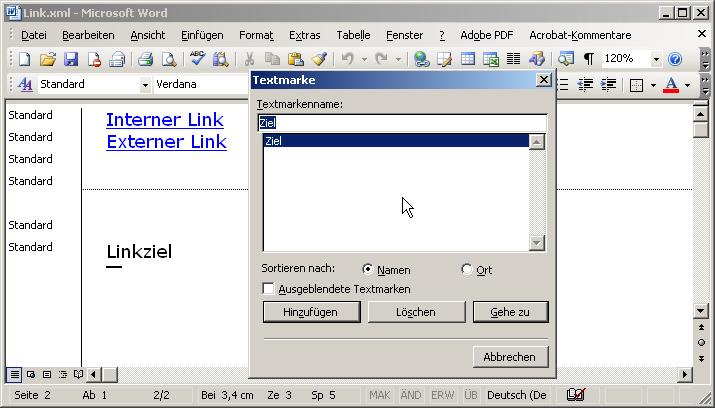
Figure: internal link
External links
<w:p>
  <w:hlink w:dest="http://www.data2type.de/">   (1)
  <w:r>
    <w:rPr>
      <w:rStyle w:val="Hyperlink"/>
    </w:rPr>
    <w:t>Externer Link <!-- en: external link --> </w:t>
  </w:r>
  </w:hlink>
</w:p>
(1) The <w:hlink> element generates a link to an external target, in this case to a website. The w:dest attribute indicates the web address.
Copyright © dpunkt.verlag GmbH 2007
Printing of the online version is permitted exclusively for private use. Otherwise this chapter from the book "Professionelle XML-Verarbeitung mit Word" is subject to the same provisions as those applicable for the hardcover edition: The work including all its components is protected by copyright. All rights reserved, including reproduction, translation, microfilming as well as storage and processing in electronic systems.
dpunkt.verlag GmbH, Ringstraße 19B, 69115 Heidelberg, fon 06221-14830, fax 06221-148399, hallo(at)dpunkt.de