

XML technologies / WordML / WordML introduction / The basic structure
The following "Hello World!" example has been generated manually and is the shortest version of a WordML document with a paragraph:
<?xml version="1.0"?>
<?mso-application progid="Word.Document"?>    (1)
<w:wordDocument xmlns:w="http://schemas.microsoft.com/office/word/2003/wordml"> (2)
   <w:body>                            (3)
      <w:p>                            (4)
         <w:r>                         (5)
            <w:t>Hallo Welt! <!-- en: Hello World! --> </w:t>  (6)
         </w:r>
      </w:p>
   </w:body>
</w:wordDocument>
(1) With the help of the PI (Processing Instruction), the operating system is able to recognise the document as a WordML document. Instead of a XML editor or the Internet Explorer, now Word 2003 is started. Moreover, the PI allows the Internet Explorer to display the WordML document rendered as a Word document instead of displaying it like any XML document in the hierarchical representation. In order to display WordML documents with the Internet Explorer, you have to install a Viewer in case Word 2003 is not available. You can find the Viewer as a free download on the English web page of Microsoft. You have to enter the search terms »Word 2003 XML Viewer«.
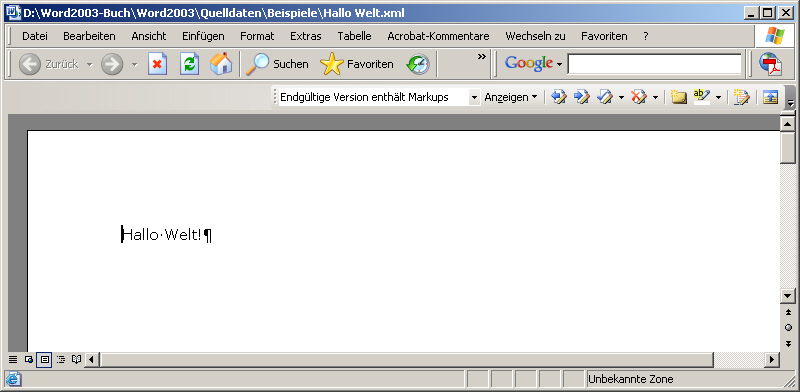
Figure: display in the Internet Explorer
(2) The root element with the namespace declaration for WordML.
(3) <w:body> contains the content of a WordML document.
(4) <w:p> is the paragraph element in WordML.
(5) <w:r> stands for the running text of a paragraph.
(6) <w:t> contains the actual textual content.
Since in this example no styles have been indicated, the "Hello World!" paragraph is displayed in the default setting with the default font, the default font size, etc.
In order to providie a comparison, a "Hello World!" example follows which has not been generated manually, but where the text was entered into a blank Word document and saved with the "Save as" option as XML (WordML).
Since the WordML document is very long, only excerpts are shown in this example.
<?xml version="1.0" encoding="UTF-8" standalone="yes"?>
<?mso-application progid="Word.Document"?>
<w:wordDocument xmlns:w="http://schemas.microsoft.com/office/word/2003/wordml"    (1)
 xmlns:v="urn:schemas-microsoft-com:vml"
 xmlns:w10="urn:schemas-microsoft-com:office:word"
 xmlns:sl="http://schemas.microsoft.com/schemaLibrary/2003/core"
 xmlns:aml="http://schemas.microsoft.com/aml/2001/core"
 xmlns:wx="http://schemas.microsoft.com/office/word/2003/auxHint"
 xmlns:o="urn:schemas-microsoft-com:office:office"
 xmlns:dt="uuid:C2F41010-65B3-11d1-A29F-00AA00C14882"
 w:macrosPresent="no" w:embeddedObjPresent="no" w:ocxPresent="no"
 xml:space="preserve">
    <o:DocumentProperties>                             (2)
      <o:Title>Hallo Welt</o:Title>
      <o:Author>Montero</o:Author>
      <o:LastAuthor>Montero</o:LastAuthor>
      <o:Revision>3</o:Revision>
      <o:TotalTime>0</o:TotalTime>
      <o:Created>2005-12-20T14:31:00Z</o:Created>
      <o:LastSaved>2005-12-20T14:31:00Z</o:LastSaved>
      <o:Pages>1</o:Pages>
      <o:Words>1</o:Words>
      <o:Characters>11</o:Characters>
      <o:Lines>1</o:Lines>
      <o:Paragraphs>1</o:Paragraphs>
      <o:CharactersWithSpaces>11</o:CharactersWithSpaces>
      <o:Version>11.6359</o:Version>
    </o:DocumentProperties>
    <w:fonts>                                         (3)
      <w:defaultFonts w:ascii="Times New Roman" w:fareast="Times New Roman"
       w:h-ansi="Times New Roman" w:cs="Times New Roman"/>
      <w:font w:name="Verdana">
        <w:panose-1 w:val="020B0604030504040204"/>
        <w:charset w:val="00"/>
        <w:family w:val="Swiss"/>
        <w:pitch w:val="variable"/>
        <w:sig w:usb-0="20000287" w:usb-1="00000000" w:usb-2="00000000"
         w:usb-3="00000000" w:csb-0="0000019F" w:csb-1="00000000"/>
      </w:font>
    </w:fonts>
    <w:lists>                                         (4)
      <w:listDef w:listDefId="0">
        <w:lsid w:val="376C6A7C"/>
        <w:plt w:val="HybridMultilevel"/>
        <w:tmpl w:val="D6A4D526"/>
        <w:lvl w:ilvl="0" w:tplc="5D06413E">
          <w:start w:val="1"/>
          <w:pStyle w:val="Style3"/>
          <w:lvlText w:val="%1."/>
          <w:lvlJc w:val="left"/>
          <w:pPr>
            <w:tabs>
              <w:tab w:val="list" w:pos="720"/>
            </w:tabs>
            <w:ind w:left="720" w:hanging="360"/>
          </w:pPr>
        </w:lvl>
        <w:lvl w:ilvl="1" w:tplc="04070019" w:tentative="on">
          <w:start w:val="1"/>
    ...
      </w:list>
    </w:lists>
    <w:styles>                                        (5)
      <w:versionOfBuiltInStylenames w:val="4"/>
      <w:latentStyles w:defLockedState="off" w:latentStyleCount="156"/>
      <w:style w:type="paragraph" w:default="on" w:styleId="Normal">
        <w:name w:val="Normal"/>
        <w:autoRedefine/>
        <w:rsid w:val="00881D85"/>
        <w:pPr>
          <w:jc w:val="both"/>
        </w:pPr>
        <w:rPr>
          <w:rFonts w:ascii="Verdana" w:h-ansi="Verdana"/>
          <wx:font wx:val="Verdana"/>
          <w:sz w:val="22"/>
          <w:sz-cs w:val="24"/>
          <w:lang w:val="DE" w:fareast="DE" w:bidi="AR-SA"/>
        </w:rPr>
      </w:style>
      <w:style w:type="paragraph" w:styleId="Heading1">
        <w:name w:val="heading 1"/>
        <wx:uiName wx:val="Heading 1"/>
        <w:basedOn w:val="Normal"/>
        <w:next w:val="Normal"/>
        <w:rsid w:val="008D1824"/>
        <w:pPr>
          <w:pStyle w:val="Heading1"/>
          <w:keepNext/>
          <w:spacing w:before="240" w:after="60"/>
          <w:outlineLvl w:val="0"/>
        </w:pPr>
        <w:rPr>
          <w:rFonts w:ascii="Arial" w:h-ansi="Arial" w:cs="Arial"/>
          <wx:font wx:val="Arial"/>
          <w:b/>
          <w:b-cs/>
          <w:kern w:val="32"/>
          <w:sz w:val="32"/>
          <w:sz-cs w:val="32"/>
        </w:rPr>
      </w:style>
   ...
    </w:styles>
    <w:shapeDefaults>
      <o:shapedefaults v:ext="edit" spidmax="2050"/>
      <o:shapelayout v:ext="edit">
        <o:idmap v:ext="edit" data="1"/>
      </o:shapelayout>
    </w:shapeDefaults>
    <w:docPr>                                      (6)
      <w:view w:val="print"/>
      <w:zoom w:percent="100"/>
      <w:doNotEmbedSystemFonts/>
      <w:attachedTemplate w:val=""/>
      <w:defaultTabStop w:val="708"/>
      <w:hyphenationZone w:val="425"/>
      <w:punctuationKerning/>
      <w:characterSpacingControl w:val="DontCompress"/>
      <w:optimizeForBrowser/>
      <w:validateAgainstSchema/>
      <w:saveInvalidXML w:val="off"/>
      <w:ignoreMixedContent w:val="off"/>
      <w:alwaysShowPlaceholderText w:val="off"/>
      <w:compat>
        <w:breakWrappedTables/>
        <w:snapToGridInCell/>
        <w:wrapTextWithPunct/>
        <w:useAsianBreakRules/>
        <w:dontGrowAutofit/>
      </w:compat>
    </w:docPr>
    <w:body>                                     (7)
      <wx:sect>
        <w:p>
          <w:r>
            <w:t>Hallo Welt!</w:t>
          </w:r>
        </w:p>
        <w:sectPr>                               (8)
          <w:pgSz w:w="11906" w:h="16838"/>
          <w:pgMar w:top="1417" w:right="1417" w:bottom="1134" w:left="1417"
           w:header="708" w:footer="708" w:gutter="0"/>
          <w:cols w:space="708"/>
          <w:docGrid w:line-pitch="360"/>
        </w:sectPr>
      </wx:sect>
    </w:body>
</w:wordDocument>
(1) Here you can see the root element with the namespace declarations. The Office namespaces are always entered, even if, for example, there are no embedded graphics in the Word document.
(2) The document properties contain any information being important for the Office document, e.g. the name of the author, the last date of saving and the name of the file.
(3) The default values of fonds.
(4) The defaults for lists. In this example they are defined up to and including the ninth level.
(5) The styles for paragraphs and tables.
(6) The <w:docPr> element contains a wide range of child elements. These determine various proporties for the entire document. Among other things, it is indicated in which view the document shall be displayed after opening – in this example in the print view (<w:view w:val="print">) – or whether XML files (XML data following an own schema) can also be saved in a not valid form (<w:saveInvalidXML w:val="off"/>).
(7) The <w:body> element contains the content-related information, such as texts, tables, lists, etc.
(8) The <w:sectPr> element defines with its child elements the properties of the pages, such as page sizes (<w:pgSz>), headers and footers (<w:pgMar>), etc.
Such a flood of information may have a deterrent effect, but it should not. On the one hand many of these elements do not play a role for the normal work with WordML, on the other hand Word itself can help you to generate these. If, for example, you would like to know how a footnote is tagged in WordML, you only need to generate a footnote in a blank Word document and to save this document as WordML. The source code of this WordML document shows you the structure which is required by Word in order to be able to display such a footnote.
To make it easier for you to work with a WordML document, this chapter will show you, in addition to the basic structure, the most important relations.
The general basic structure of a WordML document with the most important elements can be described as follows:
The only valid root element is called <w:wordDocument>. It declares all namespaces and has several child elements:
The optional <o:DocumentProperties> element contains meta information about the document as, for example, the name of the author, the title, etc.
The optional <w:fonts> element defines the default values for the used fonts.
The optional <w:lists> element contains the information on the lists.
The optional <w:styles> element contains the styles for the paragraphs, the inline markups, etc.
The optional <w:docPr> element defines the page layout and contains the information on the margins, the footnotes, the header, the page width, etc.
The <w:body> element contains the actual content of the document.
Copyright © dpunkt.verlag GmbH 2007
Printing of the online version is permitted exclusively for private use. Otherwise this chapter from the book "Professionelle XML-Verarbeitung mit Word" is subject to the same provisions as those applicable for the hardcover edition: The work including all its components is protected by copyright. All rights reserved, including reproduction, translation, microfilming as well as storage and processing in electronic systems.
dpunkt.verlag GmbH, Ringstraße 19B, 69115 Heidelberg, fon 06221-14830, fax 06221-148399, hallo(at)dpunkt.de
back to top