

XML technologies / SVG / Filters, transformations and gradients / Defining shadows and lighting effects with filters / Using lighting effects
(Excerpt from “Das Einsteigerseminar SVG — Webgrafiken mit XML” by Helma Spona)
SVG’s lighting effects are even more interesting than shadows. Define light sources and colors and configure the sources with attributes. The following example adds a lighting effect to the file Navbanner.svg. The finished graphic looks like this:
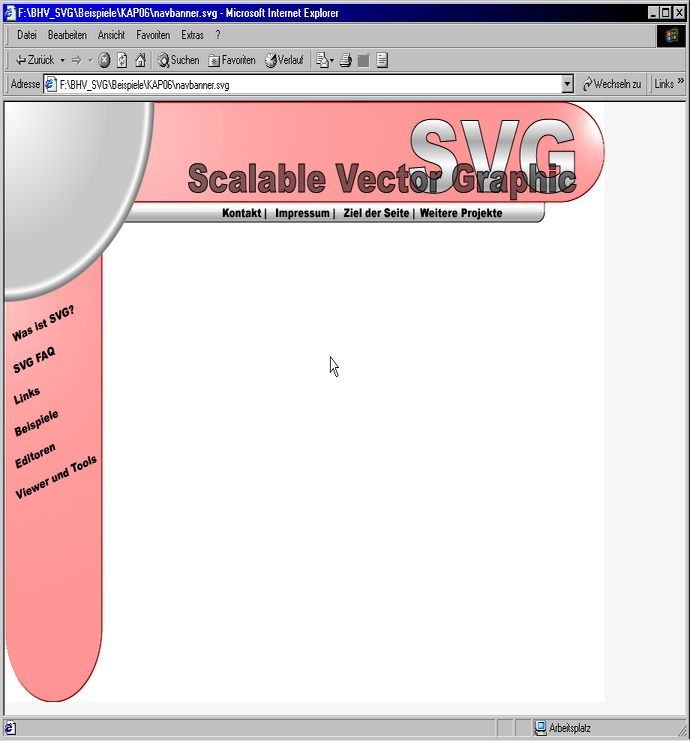
Figure: Graphic with different lighting effects.
First create and position the lights. The following section explains the lighting effects in the horizontal page banner. Three sources are used: two spotlights and a diffuse source. Gray circles in the figure mark the spotlights.
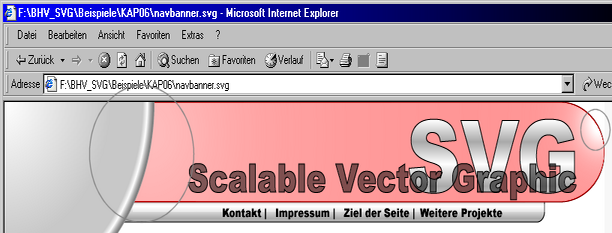
Figure: Spotlights positioned in the horizontal page banner.
For each source, use a filter element producing lighting inside the <filter> tag. The example uses only the tag <feSpecularLighting>. Define the source inside it. The example uses the tags <feSpotLight> and <feDistantLight>.
Note:
SVG has additional light source and lighting effect tags, detailed under Using and combining filters and lighting effects effectively.
The tag <feSpotLight> defines a spotlight, while <feDistantLight> defines a distant diffuse source. The individual attributes will be detailed shortly; only the essentials are covered here.
Use the filter’s in attribute to select its input. The example uses only "SourceGraphic". Also specify the listed attributes, whose values determine the effect’s appearance. The attribute result names the result. Then define the source inside the tag. The first lighting effect creates a diffuse source with <feDistantLight>, illuminating the object evenly.
Note:
Used alone, this effect does little beyond brightening the object’s color evenly. It combines usefully with other filters, as later examples show.
Next define both spotlight effects. Set a spotlight’s position with the attributes x and y of the <feSpotLight> tag. Set the source’s height with the attribute z. Unlike shadows, lighting effects cannot simply be combined with the <feMerge> tag. SVG instead supplies the filter <feComposite> to merge the first result with the original image and then that result with the second lighting effect.
<filter id="lichteffekt">
  <feSpecularLighting in="SourceGraphic" surfaceScale="1" specularConstant="2.9" specularExponent="10" result="Licht">
    <feDistantLight azimuth="1" elevation="285"/>
  </feSpecularLighting>
  <feSpecularLighting in="SourceGraphic" surfaceScale="5" specularConstant="0.5" specularExponent="2" result="Licht3">
    <feSpotLight x="193" y="30" z="90" pointsAtX="600" pointsAtY="50" pointsAtZ="5" LimitingConeAngle="100" />
  </feSpecularLighting>
  <feComposite in="SourceGraphic" in2="Licht" operator="arithmetic" k1="1" k2="1" k3="1" k4="0" result="Kombo" />
  <feSpecularLighting in="SourceGraphic" surfaceScale="5" specularConstant="0.9" specularExponent="20" result="Licht2">
    <feSpotLight  x="795" y="20" z="40" pointsAtX="300" pointsAtY="50" pointsAtZ="10"/>
  </feSpecularLighting>
  <feComposite in="Licht2" in2="Kombo" operator="arithmetic" k1="0" k2="1" k3="1" k4="0" result="Kombo2"/>
  <feComposite in="Licht3" in2="Kombo2" operator="arithmetic" k1="0" k2="1" k3="1" k4="0" result="Kombo2"/>
</filter>
Assign the filter to the rectangle using the filter property. The filter for the left navigation bar is similar but simpler, using only one spotlight and one diffuse source.
<filter id="lichteffekt2">
  <feSpecularLighting in="SourceGraphic" surfaceScale="1" specularConstant="2.9" specularExponent="10" result="Licht">
    <feDistantLight azimuth="5" elevation="195"/>
  </feSpecularLighting>
  <feSpecularLighting in="SourceGraphic" surfaceScale="5" specularConstant="0.5" specularExponent="2" result="Licht3">
    <feSpotLight x="0" y="200" z="50" pointsAtX="200" pointsAtY="600" pointsAtZ="0" limitingConeAngle="100" />
  </feSpecularLighting>
  <feComposite in="SourceGraphic" in2="Licht" operator="arithmetic" k1="1" k2="1" k3="1" k4="0" result="Kombo" />
  <feComposite in="Licht3" in2="Kombo" operator="arithmetic" k1="0" k2="1" k3="1" k4="0" result="Kombo2"/>
</filter>
Copyright © verlag moderne industrie GmbH 2001
You may print the online version for your private use.
Otherwise, this chapter from “Das Einsteigerseminar SVG — Webgrafiken mit XML” is subject to the same conditions as the bound edition. The work, including all its parts, is protected by copyright. All rights reserved, including reproduction, translation, microfilming, and storage and processing in electronic systems.
verlag moderne industrie GmbH, Justus-von-Liebig-Straße 1, D-86899 Landsberg/Lech, fon ++49 (0) 81 91 / 125 – 0, leserservice(at)mi-verlag.de
back to top