

XML technologies / SVG / Filters, transformations and gradients / Defining shadows and lighting effects with filters / Creating shadows
(Excerpt from “Das Einsteigerseminar SVG — Webgrafiken mit XML” by Helma Spona)
Create a simple shadow using the filter <feGaussianBlur>. It has one required attribute and optional ones explained later.
The required attribute is stdDeviation, controlling blur. At 0, equivalent to omission, no change is visible. Higher values make the shadow softer.
Apply a filter to any object or group through its style attribute using the filter property. After the keyword url give the filter’s name prefixed with #. The listing applies the filter named "schatten" to the text.
<?xml version="1.0" standalone="no"?>
...
<svg width="500" height="500">
  <defs>
    <filter id="schatten">
      <feGaussianBlur stdDeviation="2"/>
    </filter>
  </defs>
  <g style="filter:url(#schatten)">
    <text x="100" y="130" style="font-family:'Arial Black';font-size:46;stroke:none;fill:rgb(0,0,255)">SVG</text>
  </g>
</svg>
The browser shows this result:
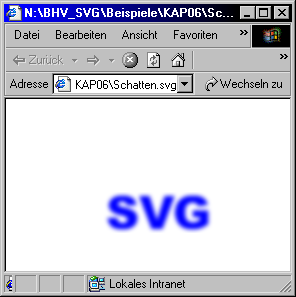
Figure: Created shadow.
The shadow is usable, but where is the original element? Graphics programs add a shadow to an object, retaining both. SVG differs: applying a filter changes the object itself, leaving no original. You can, however, apply and merge multiple filters, using the original graphic as input for several filters and thus creating copies.
The next example creates a shadow and an offset copy of the original. Moving the copy up and left makes the shadow appear down and right.
Change only the filter definition inside the <filter> tag as follows:
<defs>
  <filter id="schatten">
    <feGaussianBlur stdDeviation="2" result="wschatten"/>
    <feOffset in="SourceGraphic" dx="-2" dy="-2" result="original"/>
    <feMerge>
      <feMergeNode in="wschatten" />
      <feMergeNode in="original" />
    </feMerge>
  </filter>
</defs>
First add to the existing filter feGaussianBlur the attribute result with a unique name for storing its result. Then define the filter <feOffset> and its attribute in, which determines its input. The value "SourceGraphic" uses the original graphic; omitting it would use the preceding filter’s result. The attributes dx and dy set the offset from the original position. Name this filter’s result too with the result attribute. Numeric values without units are allowed.
Finally merge both effects. Use the <feMerge> tag inside the <filter> tag. For each result, define a <feMergeNode> tag, whose only parameter is in. Supply the named filter results as values. They are merged in the order listed in the <feMerge> tag. To put the shadow beneath the shifted original, specify the result of the tag <feOffset> last.
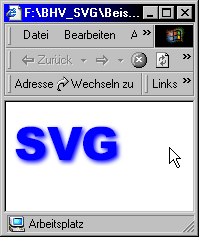
Figure: Result of both filters: original graphic copy and shadow.
Copyright © verlag moderne industrie GmbH 2001
You may print the online version for your private use.
Otherwise, this chapter from “Das Einsteigerseminar SVG — Webgrafiken mit XML” is subject to the same conditions as the bound edition. The work, including all its parts, is protected by copyright. All rights reserved, including reproduction, translation, microfilming, and storage and processing in electronic systems.
verlag moderne industrie GmbH, Justus-von-Liebig-Straße 1, D-86899 Landsberg/Lech, fon ++49 (0) 81 91 / 125 – 0, leserservice(at)mi-verlag.de
back to top