

XML technologies / CSS / Advanced websites with CSS / Using fonts with CSS / The font-size property / Relative to what?
(Excerpt from “CSS − Advanced websites with Cascading Stylesheets” by Rachel Andrew & Dan Shafer)
When using relative font sizes such as em, percentages or the relative constants larger and smaller, consider which starting values they refer to. In Relative values we learned that the unit em tells the browser to calculate the font size as a multiple or fraction of that starting value. Specifying font-size: 1.5em enlarges the text to one and a half times the starting value, while font-size: 0.5em displays text at half its normal size.
But what is this starting value?
If the text is directly inside a document’s body, it is simple: the size is relative to the browser’s default font size. If that default is 12 points, for example, the rule font-size: 1.5em enlarges the font to 18 points.
If the text is inside other HTML elements with their own font sizes, the starting value is always the parent element’s font-size value, as you probably suspected. Inheritance plays a major role in relative font sizes and must be considered to avoid unpleasant surprises.
For example, defining a particular tag <h1> with a font-size of 1.5em does not necessarily make that heading one and a half times larger than the other headings h1 on the page. Here too, the parent element’s value is the starting point, whether that parent is body, p, td or another element.
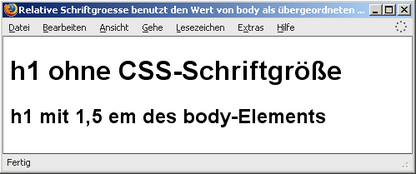
Figure: Relative font size uses the value of <body> as the parent starting value.
The figure above shows two headings whose immediate parent is body. The upper h1 has no explicit definition and receives the default size for level-one headings. The lower h1 receives a font-size of 1.5em. It is therefore not 1.5 times larger than h1, but 1.5 times larger than body. (Note: if no specific values are defined for body, it always receives the browser defaults as the highest element in the document hierarchy.)
In the following figure, we use a tag <span> within the heading h1. A style rule for span defines the font-size as 1.5em. Here the tag <h1> is the parent, so its default size is the starting value for the font size. The word “span-Element” appears 1.5 times larger than the rest of the heading.
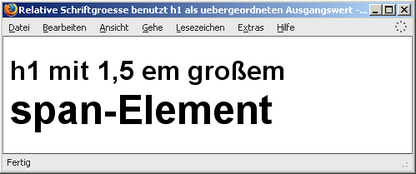
Figure: Relative font size uses <h1> as the parent starting value.
Copyright © 2006 of the German translation, dpunkt.verlag GmbH
You may print the online version for your private use.
Otherwise, this chapter from “CSS − Anspruchsvolle Websites mit Cascading Stylesheets” is subject to the same conditions as the bound edition: the work, including all its parts, is protected by copyright. All rights reserved, including reproduction, translation, microfilming, and storage and processing in electronic systems.
dpunkt.verlag GmbH, Ringstraße 19, 69115 Heidelberg