

XML technologies / XML / XML in a Nutshell / Cascading Style Sheets (CSS) / The CSS syntax
(Excerpt from "XML in a Nutshell" by Elliotte Rusty Harold & W. Scott Means)
CSS syntax is not XML syntax, but it is so simple that this hardly matters. A CSS stylesheet is simply a list of the elements to which styles should apply, usually with one element per line. If an element belongs to a namespace, its qualified name, such as rezept:gericht, must be used. The prefix must be the same in the stylesheet and the XML document. Each element name is followed by a list of the styles to apply to it. You can insert comments enclosed by comment delimiters (/*...*/) that will be familiar if you program in C. whitespace has no special significance, so you can use it to format the stylesheet. The following example shows a simple CSS stylesheet for the recipe in the code example Marjorie Anderson’s recipe for Southern Corn Bread. The following figure shows how the Opera 4.01 browser renders the recipe using this stylesheet.
/* Vorgaben für das gesamte Dokument */
rezept  {font-family: "New York", "Times New Roman", serif; font-size: 12pt }

/* Hiermit sieht der Name des Gerichts wie eine Überschrift aus */
gericht    {
  display: block;
  font-family: Helvetica, Arial, sans-serif;
  font-size: 20pt;
  font-weight: bold;
  text-align: center }

/* Eine Aufzählungsliste */
zutat  {display: list-item; list-style-position: inside }

/* Diese beiden Einträge sollen als Absätze formatiert werden */
anweisungen, geschichte {
  display: block;
  margin-top: 12pt;
  margin-left: 4pt }
Code example: A CSS stylesheet for recipes
This stylesheet contains four style rules. Each rule names the element or elements it formats, followed by a pair of braces containing the style properties to apply. Each property has a name, such as font-family, and a value, such as "New York", "Times New Roman", serif. Properties are separated by semicolons. Neither names nor values are case-sensitive; font-family is the same as FONT-FAMILY or Font-Family. CSS Level 2 defines more than 100 different style properties. You do not need to know them all, however. Sensible defaults exist for all properties you do not set explicitly.
For example, the first rule applies to the element rezept. It specifies the New York font at 12 points. If New York is unavailable, Times New Roman is selected instead. If that font is also unavailable, any suitable serif font can be used. These styles also apply to all descendants of the element rezept; that is, child elements inherit their parents’ styles unless they explicitly override the same properties with other values. Since rezept is the root element, it sets the font for the whole document.
The second rule makes the element gericht look like a heading, as the following figure shows. It uses a much larger font, is bold, and is centered. In addition, its display-Style is set to block. This causes a line break between this element and its preceding and following siblings. The third rule formats the ingredients as a bulleted list, while the fourth formats the elements anweisungen and geschichte as fairly simple paragraphs with a little extra space above and to the left.
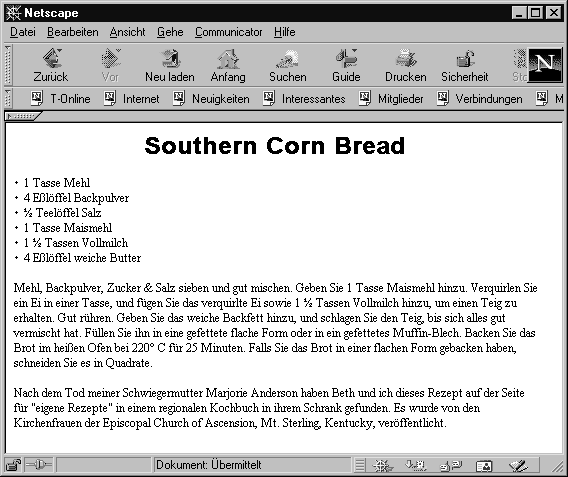
Figure: A semantically marked-up XML document after applying a CSS stylesheet
Not every element in the document has a style rule, and not every element needs one. For example, the element schritt has no special style of its own. It already inherits various styles from its ancestors anweisungen and rezept and uses some default values. Another stylesheet could add a rule for the element schritt that overrides its inherited styles. For example, the following rule would use 10-point Palatino for its font:
schritt {font-family: Palatino, serif; font-size: 10pt }
Copyright © 2005 O'Reilly Verlag GmbH & Co. KG
You may print the online version for your private use.
Otherwise, this chapter from the book "XML in a Nutshell" is subject to the same conditions as the printed edition: the work and all its parts are protected by copyright. All rights reserved, including reproduction, translation, microfilming, and storage and processing in electronic systems.
O’Reilly Verlag GmbH & Co. KG, Balthasarstraße 81, 50670 Köln, kommentar(at)oreilly.de
back to top