

XML technologies / XML / Python & XML / Python, web services and SOAP / Example of a SOAP server and SOAP client
(Excerpt from “Python & XML” by Christopher A. Jones & Fred L. Drake, Jr.)
At present, server-side SOAP service implementations barely exist. The few available depart from emerging standards and are likely to change considerably as they discover what users really want.
Microsoft and IBM provide the most stable example web-service implementations. Here we build a Python client for the calculator service in Microsoft’s free SOAP Toolkit 2.0. The service must run on Windows NT Server 4.0 or Windows 2000 Server; clients can run wherever COM is available. On these platforms, installing the toolkit is easy and it is ready as soon as installation finishes.
This Python client uses COM to connect to objects in the MSSOAP type library and interact with the service. Clients may use essentially any Windows version provided they can access the server’s services and WSDL files. They may also run on the server machine, probably the most convenient arrangement.
Requirements for using MSSOAP
SOAP and web services are new, so developers experimenting with them must install appropriate software. The rest of this section relies heavily on COM. If you are unfamiliar with COM and Python, this section should help set up what you need.
To run this section’s Python client example, complete these steps:
Install Microsoft SOAP Toolkit 2.0 on a server.
Make its WSDL and service implementations visible over HTTP on your network using the toolkit’s installation examples. This applies even if client and server share a machine.
Python clients must have win32all.exe installed, Mark Hammond’s COM support for Python, and run the helper script makepy.py on the SOAP type library. If clients run on another computer, install the toolkit there, or at least its COM object files ending in .dll.
Downloading Microsoft SOAP Toolkit 2.0
Microsoft supplies client DLLs and robust client and server samples in SOAP Toolkit 2.0.
Installation automatically supplies an updated MSXML 3.0 package with full XSLT support. Working with MSXML 3.0 covers Python and the MSXML parser.
Making samples visible on the Web
When installing samples, follow the instructions to create an IIS virtual directory (Internet Information Server, the standard HTTP implementation on Windows servers) pointing to them. The instructions request an entry for MSSOAPSampleServer in your hosts file (c:\winnt\system32\hosts), but this optional step is only needed for Microsoft’s own sample clients. Here you write a completely new Python client, so your existing hostname suffices. You must be able to view the sample directory over HTTP as instructed.
If the client runs on the sample server machine, no further installation is needed to continue, except possibly Python COM support.
Downloading COM support for Python
If you have not used COM from Python, as we have not yet in this book, download and install Python COM support. Start by obtaining the appropriate installer from the Web.
There you will find links and instructions to download win32all.exe for your Python version. Read carefully to select the correct version. The installer supplies full COM support for Python programs, including implementing COM servers usable from other languages.
Fixing MSSOAP with makepy.py
Even with COM support installed, Python’s access to the SOAP type library needs adjustment. Unfortunately, toolkit authors rely on Visual Basic and Windows scripting to set object properties like this:
Object.Property("PropertyName") = NewPropertyValue This syntax is not even legal Python. Visual C++ uses a slightly different syntax, allowing an overloaded operator to provide syntax matching Python dictionary assignment:
Object.Property["PropertyName"] = NewPropertyValue Excellent: this works in Python for assigning an instance dictionary element. Unfortunately, COM does not automatically convert this construct into Python instance dictionaries. For this object, Property is a method, and Python cannot assign a value to an object’s method. Components usually provide accessors or at least SetProperty and GetProperty constructs. Fortunately, the script makepy.py in win32all.exe wraps COM objects in another Python interface and accesses them through a lower-level API, solving the problem.
To run makepy.py, start it in the win32com\client directory of your Python installation, usually C:\Python20\win32com\client:
C:\Python20\win32com\client>python makepy.py A dialog lists the type libraries registered on your system. Find Microsoft SOAP Type Library (1.0) and click OK. The script produces a burst of activity and text output, writing a .py file with an enormously long name into C:\Python20\win32com\gen_py. You probably need not examine it: a standard call to win32com.client.Dispatch starts the object and finds the updated Python-friendly interface generated by makepy.py. The following figure shows the dialog with Microsoft SOAP Type Library (1.0) selected.
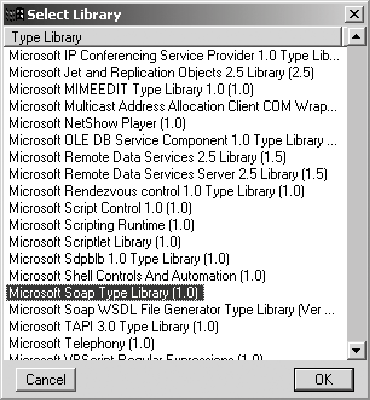
Figure: Selecting the SOAP type library with makepy.py
After generating the Python interface, instantiate the object normally, but now use constructs such as:
Object.SetProperty("PropertyName", "NewValue") However, makepy.py does more than fix property assignment syntax: it also fixes parameter types and properties for all kinds of COM objects. See the documentation for makepy for details.
Setting up the server
Before developing the client, understand the server setup. SOAP and web services are inherently cross-platform. Even if services run on Windows, clients can run anywhere provided they generate correct SOAP packets or interpret published WSDL to wrap services in local proxy objects.
This Python client accesses a SOAP connector and serializer through COM. Any SOAP implementation, however, should be able to connect to and use these services.
The toolkit’s server setup is simply WSDL service descriptions and implementing endpoints. Endpoints use various languages and techniques, from Active Server Pages to ISAPI plugins; their interface is pure SOAP.
A SOAP client in Python
The toolkit includes a calculator service performing four operations on two supplied parameters. This client resembles the bundled VBScript sample in functionality, but is implemented entirely from scratch in Python.
These are the four basic arithmetic operations (add, subtract, multiply and divide). After a fresh installation, test the calculator with a bundled sample client to verify it works. This helps troubleshooting by isolating Python-client errors once the web server and SOAP implementation are known to work.
Establishing reusable foundations
To construct SOAP packets, define a SOAP action URI prefix to which method names can be appended. You will also reuse the namespace URI between calls. Define these two reusable values and the endpoint as global variables at the start:
import win32com.client

# SOAP-Action-URI
BaseSoapActionUri = "http://tempuri.org/action/Calc."

# Namensraum
WrapperElementNamespace = "http://tempuri.org/message/"

# Dienst-Endpunkt
EndPointUrl = \
   "http://centauri/MSSoapSamples/Calc/Service/SrSz/AspVbs/Calc.asp"
Wrap the calculator functionality in a method taking a string with the desired operation and parameters. Call it repeatedly to obtain responses:
def Calculate(Op, Val1, Val2):
   """Nimmt Operator (als Wort, z.B. "Add") plus zwei
       ganzzahlige Werte und gibt Ergebnis zurück."""
   # Instanziiere HttpConnector
   connector = win32com.client.Dispatch("MSSOAP.HttpConnector")
As the preceding code shows, the function first creates the HTTP SOAP connector, then supplies critical service-location information:
# Setze Eigenschaften (schlägt fehl, falls makepy.py
# nicht auf der SOAP-Typbibliothek ausgeführt wurde)
connector.SetProperty("EndPointURL", EndPointUrl)
connector.SetProperty("SoapAction", BaseSoapActionUri + Op)

# Beginne SOAP-Nachricht
connector.BeginMessage( )
The critical part calls SetProperty to change SoapAction. As you can see, BaseSoapActionUri is concatenated with the requested operation Op. Using the method add produces a SoapAction string like:
"http://tempuri.org/action/Calc.Add"
Now create the actual SOAP envelope.
# Erzeuge Serialisierungsobjekt
serializer = win32com.client.Dispatch("MSSOAP.SoapSerializer")

# Füge es an vorher erzeugten Connector an
serializer.Init(connector.InputStream)
The serializer is connected to the input stream of the connector so the packet reaches the endpoint. Construct the rest as before, with methods marking element starts and ends:
# Erzeuge SOAP-Umschlag
serializer.startEnvelope( )
serializer.startBody( )
serializer.startElement(Op, WrapperElementNamespace, '', "m")
serializer.startElement("A")
serializer.writeString(Val1)
serializer.endElement( )
serializer.startElement("B")
serializer.writeString(Val2)
serializer.endElement( )
serializer.endElement( )
serializer.endBody( )
serializer.endEnvelope( )

# Beende SOAP-Nachricht
connector.EndMessage( )
The reader reads and interprets the service result. As explained in The emerging SOAP standard, the reader attaches to the output stream of the connector and processes returned information:
# Erzeuge SOAP-reader-Objekt
reader = win32com.client.Dispatch("MSSOAP.SoapReader")
reader.Load(connector.OutputStream)

# Prüfe auf Fehler
if reader.Fault:
print "Fehler: ", reader.faultstring.Text

# Liefere berechneten Wert
return reader.RPCResult.Text
Any error appears in the attribute reader.Fault. A failed SOAP call returns a fault to the client. SOAP shares much HTTP error-reporting semantics. Over HTTP, it must return HTTP 500 Internal Server Error when SOAP-handling code fails, even if the web server itself works. This ensures the client need not know server implementation details; it is not a SOAP or HTTP protocol defect.
The following example lists the complete PyCalcSerial.py.
Example: PyCalcSerial.py
"""
Python-MSSOAP-Serialisierungsbeispiel
"""

# Importiere COM-Unterstützung
import win32com.client

# SOAP-Action-URI
BaseSoapActionUri = "http://tempuri.org/action/Calc."

# Namensraum
WrapperElementNamespace = "http://tempuri.org/message/"

# Dienst-Endpunkt
EndPointUrl = \
"http://centauri/MSSoapSamples/Calc/Service/SrSz/AspVbs/Calc.asp"

def Calculate(Op, Val1, Val2)
   """Nimmt Operator (als Wort, z.B. "Add") plus zwei
   ganzzahlige Werte und gibt Ergebnis zurück."""
   # Instanziiere HttpConnector
   connector = win32com.client.Dispatch("MSSOAP.HttpConnector")

   # Setze Eigenschaften (schlägt fehl, falls makepy.py
   # nicht auf der SOAP-Typbibliothek ausgeführt wurde)
   connector.SetProperty("EndPointURL", EndPointUrl)
   connector.SetProperty("SoapAction", BaseSoapActionUri + Op)

   # Beginne SOAP-Nachricht
   connector.BeginMessage( )

   # Erzeuge Serialisierungsobjekt
   serializer = win32com.client.Dispatch("MSSOAP.SoapSerializer")

   # Füge es an vorher erzeugten Connector an
   serializer.Init(connector.InputStream)

   # Erzeuge SOAP-Umschlag
   serializer.startEnvelope( )
   serializer.startBody( )
   serializer.startElement(Op, WrapperElementNamespace, '', "m")
   serializer.startElement("A")
   serializer.writeString(Val1)
   serializer.endElement( )
   serializer.startElement("B")
   serializer.writeString(Val2)
   serializer.endElement( )
   serializer.endElement( )
   serializer.endBody( )
   serializer.endEnvelope( )

   # Beende SOAP-Nachricht
   connector.EndMessage( )

   # Erzeuge SOAP-reader-Objekt
   reader = win32com.client.Dispatch("MSSOAP.SoapReader")
   reader.Load(connector.OutputStream)

   # Prüfe auf Fehler
   if reader.Fault:
   print "Fehler: ", reader.faultstring.Text

   # Liefere berechneten Wert
   return reader.RPCResult.Text

# Hauptzeile -- führe einige Berechnungen durch
print "Benutzter Dienst-Endpunkt:", EndPointUrl
print "Berechne 3 * 4: \t",
print Calculate("Multiply", 3, 4)
print "Berechne 4 - 3: \t",
print Calculate("Subtract", 4, 3)
print "Berechne 345 + 1004: \t",
print Calculate("Add", 345, 1004)
print "Berechne 115 / 5: \t",
print Calculate("Divide", 115, 5)
Run the example from your command line. Output should resemble:
C:\mein-dir> python PyCalcSerial.py
Benutzter Dienst-Endpunkt:
http://centauri/MSSoapSamples/Calc/Service/SrSz/AspVbs/Calc.asp
Berechne 3 * 4: 12
Berechne 4 - 3: 1
Berechne 345 + 1004: 1349
Berechne 115 / 5: 23
SOAP is the heart of web services as most major players describe them. Correctly implemented WSDL is rarely noticed by developers because it can be generated from object source files. As WSDL support matures, most languages, probably including Python, will gain generators producing WSDL directly from class source. SOAP server implementations or Python object servers such as Zope may also supply these tools.
Copyright © 2002 O'Reilly Verlag GmbH & Co. KG
You may print the online version for your private use.
Otherwise, this chapter from “Python & XML” is subject to the same conditions as the bound edition: the work, including all its parts, is protected by copyright. All rights reserved, including reproduction, translation, microfilming, and storage and processing in electronic systems.
O’Reilly Verlag GmbH & Co. KG, Balthasarstraße 81, 50670 Köln, kommentar(at)oreilly.de