

XML technologies / XML / Python & XML / Working with MSXML 3.0
(Excerpt from “Python & XML” by Christopher A. Jones & Fred L. Drake, Jr.)
This page focuses on techniques for using Microsoft’s MSXML (Microsoft XML Core Services) 3.0 parser with Python. If you work with XML on Windows, you probably know MSXML already.
Setting up MSXML 3.0
Using Python for XML development does not mean giving up MSXML 3.0. Python’s COM support makes this Microsoft parser fully accessible.
If you have not already done so, visit python.org and extend your installation with win32all.exe. This Windows-specific package supports Microsoft’s COM framework (Component Object Model). The package win32all.exe must be installed before using COM objects. More details on Python and COM appear in Python, web services and SOAP, where COM accesses MSSOAP objects.
Version 3.0 is this Microsoft parser’s latest release, fully supporting XSLT and other features. Applications such as Internet Explorer may use another, older version. This matters when embedding Python or automating another application. Client-side Internet Explorer scripts using a predetermined parser, such as stylesheets linked from XML, particularly need the exact version. Standalone applications can select their own parser, as we do here.
Python normally instantiates COM objects through a program ID (ProgID), explicitly selecting 3.0 rather than an earlier version. To make Internet Explorer use MSXML 3.0 for an embedded stylesheet, consult Microsoft’s XML SDK documentation on installing in replace mode. ProgID works well for our Python examples.
Basic DOM operations
This section covers techniques for DOM and features MSXML offers beyond PyXML. Working with MSXML also means COM, so examples handle returned types that may differ from Python’s usual lists and tuples.
Microsoft’s DOM supports PyXML’s operations but differs in use. First, COM is required, making Python a COM client. Second, MSXML is not native Python and does not use its lists and tuples. Here are the basics of using this foreign parser from Python.
To illustrate node and document manipulation, use structured XML such as books.xml in the next example to test your MSXML skills.
Example: books.xml
<book name="Python und XML">
  <section name="Anhang E" type="Anhang">
    <chapterTitle>Anhang E</chapterTitle>
    <bodytext>Dieser Anhang konzentriert sich auf...</bodytext>
  </section>
</book>
MSXML easily dissects this document. First import the library for COM access (win32com.client). You also need the Microsoft parser’s ProgID for calling Dispatch. Installing the latest XML SDK provides MSXML 3.0, probably also installed with Visual Studio.NET or Internet Explorer 6. If unsure, download Microsoft’s XML SDK and install the latest parser.
After importing the client package and calling Dispatch with the right ProgID, use MSXML method load to load a document:
>>> import win32com.client
>>> msxml = win32com.client.Dispatch("MSXML2.DOMDocument.3.0")
>>> msxml.load("books.xml")
1
The returned 1 signals success in Python style and enables this syntax:
if (msxml.load("books.xml")):
  # Erfolg
else:
  # Fehler
The instance msxml is now ready for selecting and experimenting with document nodes.
MSXML nodes
Objects will look familiar from PyXML. Getting an element’s documentElement or nodeName works as expected:
>>> docelem = msxml.documentElement
>>> print docelem.nodeName
book
>>> print docelem.getAttribute("name")
Python und XML
MSXML adds conveniences such as attribute text of class Node, returning all text or character data below the current node:
>>> print docelem.text
Anhang E Dieser Anhang konzentriert sich auf...
This helps with text-heavy documents. Attribute xml holds an XML string representing this node and its children:
>>> print docelem.xml
<book name="Python und XML">
  <section name="Anhang E" type="Anhang">
    <chapterTitle>Anhang E</chapterTitle>
    <bodytext>Dieser Anhang konzentriert sich auf...</bodytext>
  </section>
</book>
Certainly less typing than method PrettyPrint in PyXML’s DOM. Like PyXML, some methods return node sets rather than individual nodes. Handle them through MSXML’s interface NodeList.
Using a NodeList
MSXML 3.0 supports node lists through an object NodeList differing from Python and PyXML’s robust native list type. An object NodeList contains an iterator accessible through method nextNode. This differs from Python 2.2 and later iterator concepts.
node = NodeList.nextNode( )
while node:
   # Tue hier etwas...
   node = NodeList.nextNode( )
A while-loop can run until method nextNode returns no node. File people.xml below describes employees and positions.
Example: people.xml
<employees>
  <person title="Projektmanager">Cal Ender</person>
  <person title="Kundendienst-Rep.">A. Buddy Codit</person>
  <person title="Customer Service Rep">Will Icare</person>
  <person title="Dokumentationsschreiber">E. Manual</person>
  <person title="Versorgungsspezialist">Willy Eadit</person>
</employees>
For this structure, a NodeList conveniently processes all nodes of a type. A NodeList may be returned by get-ElementsByTagName or by string expressions in MSXML 3.0 methods selectNodes and selectSingleNode. The following example, in nodelists.py, shows a NodeList:
Example: nodelists.py
"""
  nodelists.py -- benutzt das NodeList-Objekt aus MSXML 3.0
"""
import win32com.client
# Quell-XML
strSourceDoc = "people.xml"
# Instanziiere Parser
objXML = win32com.client.Dispatch("MSXML2.DOMDocument.3.0")

# Prüfe, ob das Laden erfolgreich war
if (not objXML.load(strSourceDoc)):
   print "Fehler beim Laden von", strSourceDoc

# Hole alle person-Elemente
peopleNodes = objXML.getElementsByTagName("person")

# Beginne Iteration durch NodeList mit nextNode()
node = peopleNodes.nextNode()
while node:
    # Gib Wert von text-Abkömmlingen aus
    print "Name: ", node.text,

    # Gib Wert des title-Attributs aus
    print "\tPosition: ", node.getAttribute("title")

    # Setze Iteration fort
    node = peopleNodes.nextNode()
Running nodelists.py from the command line yields this text:
C:\appD>c:\python21\python nodelists.py
Name: Cal Ender Position: Projektmanager
Name: A. Buddy Codit Position: Entwicklungsleiter
Name: Will Icare Position: Kundendienst-Rep.
Name: E. Manual Position: Dokumentationsschreiber
Name: Willy Eadit Position: Versorgungsspezialist
XSLT support in MSXML 3.0
MSXML supports XSL transformations without extra software. Method transformNode normally accepts a stylesheet DOM and returns the result of applying it to the current document. For example:
objXML = win32com.client.Dispatch("MSXML2.DOMDocument.3.0")
objXSL = win32com.client.Dispatch("MSXML2.DOMDocument.3.0")
strTransformedXML = objXML.transformNode(objXSL)
The preceding example creates two DOM instances, one for source and one for stylesheet. Obtain the result by calling transformNode on the source DOM with the stylesheet DOM as argument.
The XML source
The next example shows 1999temps.xml, a flat XML document of monthly average temperatures in Woodinville, Washington, USA, in degrees Celsius.
Example: 1999 temps.xml
<CalendarYear value="1999" data="Monats-Durchschnittshoechstwerte">
  <Month name="Januar">7.22</Month>
  <Month name="Februar">9.72</Month>
  <Month name="Maerz">11.50</Month>
  <Month name="April">14.00</Month>
  <Month name="Mai">17.72</Month>
  <Month name="Juni">21.06</Month>
  <Month name="Juli">24.00</Month>
  <Month name="August">24.00</Month>
  <Month name="September">20.72</Month>
  <Month name="Oktober">15.39</Month>
  <Month name="November">10.28</Month>
  <Month name="Dezember">7.28</Month>
</CalendarYear>
Attributes identify the year and data type. Month elements have a name attribute; temperature is character data.
XSL stylesheet
Calculate the yearly average from monthly averages with the combination of function sum and operator div from XPath. The next example shows stylesheet temps.xsl.
Example: temps.xsl
<?xml version="1.0"?>
<xsl:stylesheet xmlns:xsl="http://www.w3.org/1999/XSL/Transform" version="1.0">
  <xsl:variable name="average" select="sum(//CalendarYear/Month/text( )) div 12"/>
  <xsl:template match="/">
    <html>
      <body>
        <p>
          <font face="tahoma,arial,helvetica" size="2">
            <xsl:value-of select="/CalendarYear/@data"/> for
            <xsl:value-of select="/CalendarYear/@value"/>:
          </font>
        </p>
        <table border="1" bordercolor="#000000" cellpadding="5" cellspacing="0" width="350">
          <xsl:apply-templates/>
          <tr>
            <td colspan="2" bgcolor="#88BBEE" width="350" align="right">
              <p>
                <font face="tahoma,arial,helvetica" size="2">
                  <b>Average: <xsl:value-of select="format-number($average, ’0.00’)"/></b>
                </font>
              </p>
            </td>
          </tr>
        </table>
      </body>
    </html>
  </xsl:template>
  <xsl:template match="Month">
    <tr>
      <td bgcolor="#CCCCCC" width="325" align="left">
        <p>
          <font face="tahoma,arial,helvetica" size="2">Month: <b><xsl:value-of select="@name"/></b></font>
        </p>
      </td>
      <td bgcolor="#CCCCCC" width="25" align="left">
        <p>
          <font face="tahoma,arial,helvetica" size="2">
            <b><xsl:value-of select="./text( )"/></b>
          </font>
        </p>
      </td>
    </tr>
  </xsl:template>
</xsl:stylesheet>
The stylesheet works in two steps: first create a variable holding the average by adding temperatures with function sum and dividing by the months per year with operator div:
<xsl:variable name="average" select="sum(//CalendarYear/Month/text( )) div 12"/> Finally format the result with a template calling format-number with argument $average:
<xsl:value-of select="format-number($average, '0.00')"/> This guarantees at least two decimal places.
Running an MSXML transformation
Create two MSXML 3.0 instances for source and stylesheet, then use transformNode to complete the transformation. The next example shows transform.py doing this.
Example: transform.py
"""
   transform.py - benutzt XSLT-Unterstützung von MSXML 3.0 in Python
"""
import win32com.client

strSourceDoc = "1999temps.xml"
strStyleDoc = "temps.xsl"

objXML = win32com.client.Dispatch("MSXML2.DOMDocument.3.0")
objXSL = win32com.client.Dispatch("MSXML2.DOMDocument.3.0")

if (not objXML.load(strSourceDoc)):
   print "Fehler beim Laden von", strSourceDoc

if (not objXSL.load(strStyleDoc)):
   print "Fehler beim Laden von", strStyleDoc

strTransformedXML = objXML.transformNode(objXSL)
print strTransformedXML
Run from the command line and write the output to HTML to view it in a browser.
>c:\python21\python transform.py > temps.htmlThis figure shows the transformed XML in a browser.
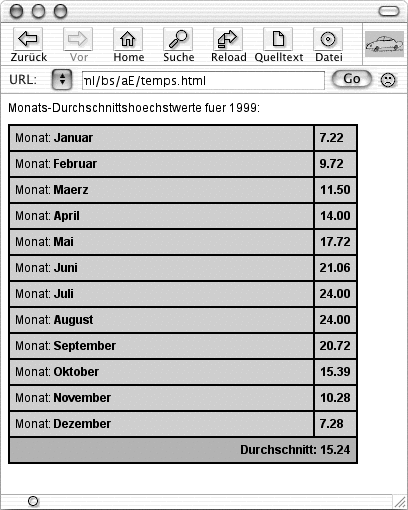
Figure: The transformation result
Handling parsing errors
The object parseError contains the latest parser errors. Try loading a nonexistent document:
>>> msxml.load("OderAuchNicht.xml")
0
The result 0 indicates something failed. Inspect the object parseError for possible causes:
>>> pe = msxml.parseError The interface parseError is detailed at this page’s end. It encapsulates seven parsing-error attributes accessible through object ParseError:
>>> print pe.errorCode
-2146697211
>>> print pe.reason
The system cannot locate the resource specified.
The error suggests checking the URL used to load the document:
>>> print pe.url
OderAuchNicht.xml
The parser is looking for a nonexistent file. Besides the error reason (reason) and code (errorCode), location information is available (filepos, line and linepos).
MSXML 3.0 reference
This reference covers public methods usable from Python. MSXML 3.0 supports five main DOM-based object types. The object Node provides a node’s DOM interface with Microsoft convenience extensions. Document supports the DOM interface for a Document plus Microsoft extensions. MSXML also supports NamedNodeMap, NodeList and ParseError objects. The sections below detail each type and its methods.
Document objects in MSXML 3.0
The object Document supports the W3C DOM interface Document with Microsoft extensions. For example, method validate checks validity against the document’s DTD:
myDomDocument.validate( )Besides validation, method transformNode supports XSLT transformations:
myDomDocument.transformNode(myXSLTDomDocument)The method transformNode accepts a DOM stylesheet, transforms the current document and returns the result. The following reference covers methods and properties of the object Document.
MSXML 3.0 Document methods
abort( )
Aborts an asynchronous load if still running.
createAttribute(name)
Creates an attribute with the specified
nameas argument.
createCDATASection(data)
Creates and returns the string
dataas a CDATA node.
createComment(data)
Creates and returns a comment containing
data.
createDocumentFragment( )
Creates and returns a new empty document fragment.
createElement(elementName)
Creates and returns an element with the specified name.
createEntityReference(name)
Creates and returns a new entity reference object.
createNode(type, name, namespaceURI)
Creates and returns a node with the specified
typeandnamein the given namespace context.
createProcessingInstruction(target, data)
Creates and returns a new processing instruction with the specified
targetanddata.
createTextNode(data)
Creates and returns a text node containing
dataas character data.
getElementsByTagName(elementName)
Returns a
NodeListof elements matching the name.
getProperty( )
Returns object attributes
SelectionLanguage,ServerHTTPRequestorSelection-Namespace.
load(url)
Loads the URL: local file or remote HTTP document, opening a connection if necessary. Deletes existing document content.
loadXML(strXML)
Creates a document from a well-formed XML string. Only UTF-16 and UCS-2 text is accepted. Deletes existing document content.
nodeFromID(id)
Returns the node with the unique ID value.
save(objTarget)
Attempts to save the XML document at the specified location.
setProperty( )
Sets object attributes
SelectionLanguage,ServerHTTPRequestorSelectionNamespace.
validate( )
Validates against the specified DTD.
MSXML 3.0 Document attributes
Here “attributes” usually means object properties, not XML attributes. —Translator’s note.
async
Read/write: controls synchronous or asynchronous loading.
doctype
Read-only: contains the document’s associated
doctype.
documentElement
Read/write: holds the XML root element.
implementation
Read-only: contains the document instance’s object
DOMImplementation.
namespaces
Read-only: contains all namespaces used in the document.
ondataavailable
Read/write: handler called when data becomes available.
onreadystatechange
Read/write: handler called when attribute
readyStatechanges.
ontransformnode
Read/write: handler called on event
transformnode.
parseError
Read-only: contains the document’s object
ParseError.
preserveWhiteSpace
Read/write: controls whether whitespace is preserved while parsing.
readyState
Read-only: current document state.
resolvedExternals
Read/write: controls external-definition resolution during parsing.
url
Read-only: canonical URL of the last loaded document.
validateOnParse
Read/write Boolean: controls validation during parsing.
Node objects in MSXML 3.0
The object Node is fundamental to DOM and MSXML 3.0, supporting the usual methods used throughout this book.
MSXML 3.0 Node methods
appendChild(newChildElement)
Appends the node to this element’s child
NodeList.
cloneNode( )
Creates a complete copy of this node.
hasChildNodes( )
Returns
trueif the node has children.
insertBefore(newChild, referenceChild)
Takes node
newChildand inserts it in this node’sNodeListimmediately beforereferenceChild, which must be an existing child.
removeChild(oldChild)
Removes the node from this node’s
NodeList.
replaceChild(newChild, oldChild)
Inserts
newChildin the position previously occupied byoldChild.
selectNodes(pattern)
Returns nodes matching the pattern.
selectSingleNode(pattern)
Returns the first matching node.
transformNode(stylesheet)
Takes a
stylesheetloaded in a DOM instance, applies it to this node and returns the transformation result.
transformNodeToObject(stylesheet, outputObject)
Like
transformNodebut sends output to the specified object.
MSXML 3.0 Node attributes
Here “attributes” usually means object properties, not XML attributes. —Translator’s note.
attribute
Read-only: the node’s attributes.
baseName
Read-only: base name of the namespace-qualified name.
childNodes
Read-only: a
NodeListof this node’s children.
dataType
Read/write: this node’s data type.
definition
Read-only: the node’s DTD definition.
firstChild
Read-only: the first child element.
lastChild
Read-only: like
firstChildbut represents the last node inNodeList.
namespaceURI
Read-only: namespace URI.
nextSibling
Read-only: the next sibling relative to this node and its parent.
nodeName
The node’s element name.
nodeType
Node type as defined by DOM.
nodeTypedValue
Read/write: the node’s value in a defined data type.
nodeTypeString
The node type as a string.
nodeValue
Node data, for example a text node’s text.
ownerDocument
Read-only: the document owning this node.
parentNode
The parent node.
parsed
Boolean indicating successful parsing of the node and its children.
prefix
Read/write: the node’s namespace prefix.
previousSibling
Read-only: the previous node in the parent’s child list.
specified
Read-only: whether an attribute was explicitly specified or derived from a DTD or schema default.
text
Read/write: text of the node and its children.
xml
Read-only: XML representation of the node including children.
NamedNodeMap objects in MSXML 3.0
The object NamedNodeMap handles namespace and attribute-node support.
getNamedItem(name)
Retrieves the named attribute.
getQualifiedItem(baseName, namespaceURI)
Retrieves an attribute in the specified namespace context.
item(index)
Returns the entry for
index, orNoneif none exists.
nextNode( )
Returns the next node in the set.
removeNamedItem(name)
Removes the specified entry.
removeQualifiedItem(name, namespaceURI)
Removes the entry in the specified namespace.
reset( )
Resets the iteration counter to zero.
setNamedItem(newItem)
Adds the specified node entry to the set.
length
The attribute
lengthholds the integer number of entries.
NodeList objects in MSXML 3.0
The NodeList is normally returned by DOM methods yielding node sets or lists. NodeList provides methods and attributes simplifying list access.
item(index)
Returns the list element at
index, zero-based like Python sequences, orNoneif no node exists atindex.
nextNode( )
Returns the next node using the internal iterator.
reset( )
Resets the internal iterator to zero.
length
Returns the list’s element count.
ParseError objects in MSXML 3.0
The object ParserError collects attributes populated at runtime when parsing errors occur.
errorCode
Numeric error code.
filepos
Byte-based file position.
line
File line number of the error.
linepos
Character position within the error’s line.
reason
Error reason, if known.
srcText
Complete text of the line containing the error.
url
Document URL.
Copyright © 2002 O'Reilly Verlag GmbH & Co. KG
You may print the online version for your private use.
Otherwise, this chapter from “Python & XML” is subject to the same conditions as the bound edition: the work, including all its parts, is protected by copyright. All rights reserved, including reproduction, translation, microfilming, and storage and processing in electronic systems.
O’Reilly Verlag GmbH & Co. KG, Balthasarstraße 81, 50670 Köln, kommentar(at)oreilly.de