

XML technologies / CSS / Advanced websites with CSS / A three-column layout / Adding a footer
Our completed layout works perfectly until we try to add a footer spanning all three columns.
If the middle column is the longest, adding a footer seems easy at first. To demonstrate this, add the HTML immediately before the closing tag </div> of the element wrapper.
      </div> <!-- main -->
      <div id="footer">
        <p>Copyright 2006 - All Rights Reserved</p>
      </div> <!-- footer -->
    </div> <!-- wrapper -->
  </body>
</html>
Add the following rules to the stylesheet:
#footer {
  width: 100%;
  border-top: 1px solid #b9d2e3;
  border-bottom: 1px solid #b9d2e3;
  margin-top: 10px;
}
#footer p {
  font-size: 90%;
  color: #256290;
  margin: 0;
  padding: 0.2em 0 0.2em 0;
}
So where is the problem? As the following figure shows, everything looks correct in the browser.
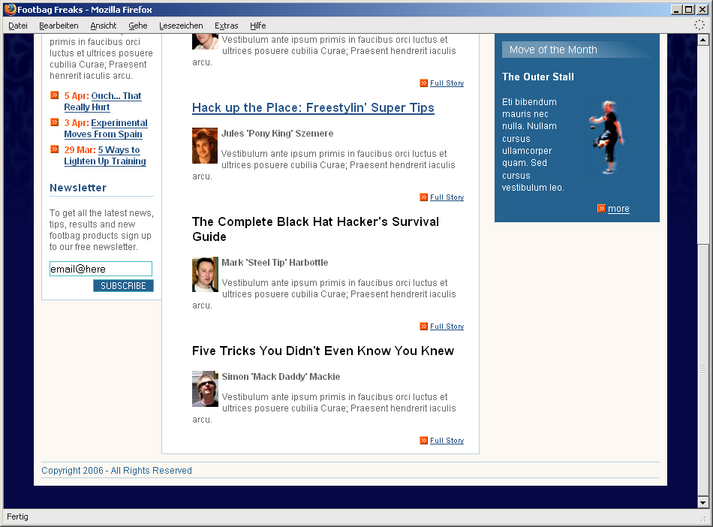
Figure: The footer has been added to the layout.
Do not be fooled: there is a problem. It becomes apparent if you delete a few articles from the main area so it is shorter than the sidebars. Reload the page and you will see it clearly. The footer follows the end of the main area and has therefore moved upward into the page. As the following figure shows, the sidebars overlap the footer. Oops!
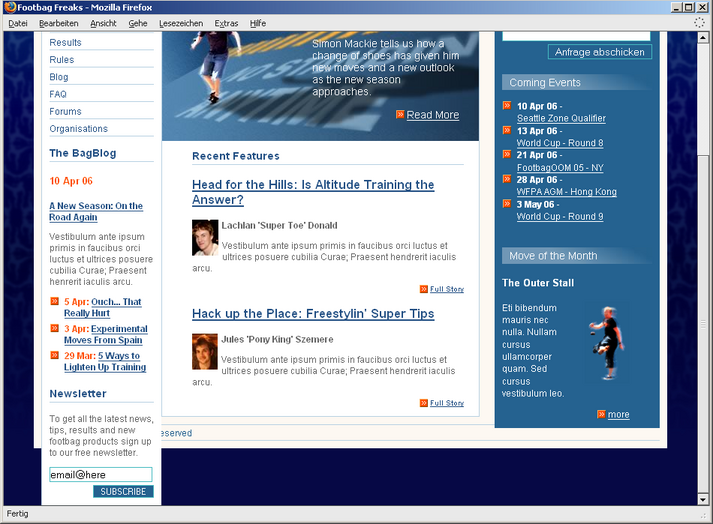
Figure: The sidebars overlap the footer.
The footer appears beneath the absolutely positioned sidebars, which have been removed from the document’s normal flow. They are therefore not displayed immediately after the preceding element as they normally would be. The main area is not positioned, so the footer appears directly below it. The sidebars, however, are positioned in place and rendered from there without regard for other parts of the page. Removing any element from the flow with position: absolute makes it completely independent of all other page elements, overlapping any that get in its way.
When developing a page, you can never assume that one column will always be longer than another. To include a footer, you therefore need a different solution. Before exploring that approach, however, we need to learn a little more about the property float.
Copyright © 2006 of the German translation, dpunkt.verlag GmbH
You may print the online version for your private use.
Otherwise, this chapter from “CSS − Anspruchsvolle Websites mit Cascading Stylesheets” is subject to the same conditions as the bound edition: the work, including all its parts, is protected by copyright. All rights reserved, including reproduction, translation, microfilming, and storage and processing in electronic systems.
dpunkt.verlag GmbH, Ringstraße 19, 69115 Heidelberg
back to top