

XML technologies / XML / XML in a Nutshell / XLinks / Extended links
(Excerpt from “XML in a Nutshell” by Elliotte Rusty Harold & W. Scott Means)
A simple link is a single one-way connection between an XML element and an external resource. An extended link, however, describes a collection of resources and paths between them. Each path connects exactly two resources. Any resource may connect to one, two, none, all, or any subset of the other resources. It can even connect to itself. In computer science terms, an extended link is a directed, labeled graph whose paths are edges, documents are nodes, and URIs are labels.
Simple links are easy to understand by analogy with HTML links. No comparable analogy exists for extended links. Their appearance, how applications handle them and how users see them are all uncertain. No simple visual metaphor such as “click the blue underlined text to jump to a new page” has been devised, and no browsers support them. Their future uses and user interfaces remain to be seen.
In XML, an extended link is represented by an extended-link element: an element of any type whose xlink:type attribute has the value extended. For example, this extended-link element refers to the novel The Wonderful Wizard of Oz:
<roman xlink:type="extended">
   <titel>The Wonderful Wizard of Oz</titel>
   <autor>L. Frank Baum</autor>
   <jahr>1900</jahr>
</roman>
Although this extended link is rather bare, most extended links contain local and external resources and arcs between them. An external resource is represented by a locator element, an element of any type whose xlink:type attribute has the value locator. A local resource is represented by a resource element, an element of any type whose xlink:type attribute has the value resource. An arc between two resources, local or remote, is represented by an arc element, an element of any type whose xlink:type attribute has the value arc.
Locator elements
Every locator element has an xlink:type attribute with the value locator and an xlink:href attribute containing the URI of its addressed resource. For example, this roman element for The Wonderful Wizard of Oz contains three locator elements identifying particular editions of the book:
<roman xlink:type="extended">
   <titel>The Wonderful Wizard of Oz</titel>
   <autor>L. Frank Baum</autor>
   <jahr>1900</jahr>
   <ausgabe xlink:type="locator" xlink:href="urn:isbn:0688069444" />
   <ausgabe xlink:type="locator" xlink:href="urn:isbn:0192839306" />
   <ausgabe xlink:type="locator" xlink:href="urn:isbn:0700609857" />
</roman>
Usually each locator also has an xlink:label attribute naming the element. Its value may be any XML name without a colon, that is, without a namespace-prefix. In the preceding example, ISBNs could provide labels as follows:
<roman xlink:type="extended">
   <titel>The Wonderful Wizard of Oz</titel>
   <autor>L. Frank Baum</autor>
   <jahr>1900</jahr>
   <ausgabe xlink:type="locator" xlink:href="urn:isbn:0688069444" xlink:label="ISBN0688069444"/>
   <ausgabe xlink:type="locator" xlink:href="urn:isbn:0192839306" xlink:label="ISBN0192839306"/>
   <ausgabe xlink:type="locator" xlink:href="urn:isbn:0700609857" xlink:label="ISBN0700609857"/>
</roman>
The number alone cannot be used, because XML names cannot start with digits. Here, as in most cases, labels are unique within the extended link, but uniqueness is by no means required.
Locator elements may also have the optional semantic attributes xlink:title and xlink:role to supply more information about the external resource and its link. Their meanings are the same as for simple XLinks. The attribute xlink:title holds a short description of the external resource, and xlink:role holds an absolute URI characterizing the link’s nature. For example, the ausgabe elements could use these attributes to give the publisher’s name in xlink:title and use a Dublin Core URI to indicate a formal identifier that should not be followed:
<roman xlink:type="extended">
  <titel>The Wonderful Wizard of Oz</titel>
  <autor>L. Frank Baum</autor>
  <jahr>1900</jahr>
  <ausgabe xlink:type="locator" xlink:href="urn:isbn:0688069444" xlink:title="William Morrow" xlink:role="http://purl.org/dc/elements/1.1/publisher" xlink:label="ISBN0688069444"/>
  <ausgabe xlink:type="locator" xlink:href="urn:isbn:0192839306" xlink:title="Oxford University Press" xlink:role="http://purl.org/dc/elements/1.1/publisher" xlink:label="ISBN0192839306"/>
  <ausgabe xlink:type="locator" xlink:href="urn:isbn:0700609857" xlink:title="University Press of Kansas" xlink:role="http://purl.org/dc/elements/1.1/publisher" xlink:label="ISBN0700609857"/>
</roman>
Arcs (edges)
Paths between resources are called arcs or edges. An arc is represented by an arc element, an element of any type whose xlink:type attribute has the value arc. Every arc element should have the attributes xlink:from and xlink:to. The attribute xlink:from identifies the link source, and xlink:to identifies its target. These attributes do not contain URIs as you might expect, but a name matching the xlink:label attribute of one of the locator elements in the extended link.
The following extended link contains the first three Wizard of Oz novels: The Wonderful Wizard of Oz, The Marvelous Land of Oz and Ozma of Oz. Arcs connect the first novel to the second, the second to the third, and back again. Here, the root element reihe is the extended link, each roman element is a locator, and nächster and vorheriger are arc elements.
<reihe xlink:type="extended" xmlns:xlink="http://www.w3.org/1999/xlink">
  <autor>L. Frank Baum</autor>
  <!-- Locator-Elemente -->
  <roman xlink:type="locator" xlink:label="oz1" xlink:href="ftp://archive.org/pub/etext/etext93/wizoz10.txt">
    <titel>The Wonderful Wizard of Oz</titel>
    <jahr>1900</jahr>
  </roman>
  <roman xlink:type="locator" xlink:label="oz2" xlink:href="ftp://archive.org/pub/etext/etext93/ozland10.txt">
    <titel>The Marvelous Land of Oz</titel>
    <jahr>1904</jahr>
  </roman>
  <roman xlink:type="locator" xlink:label="oz3" xlink:href="ftp://archive.org/pub/etext/etext93/wizoz10.txt">
    <titel>Ozma of Oz</titel>
    <jahr>1907</jahr>
  </roman>
  <!-- Bögen -->
  <nächster   xlink:type="arc" xlink:from="oz1" xlink:to="oz2" />
  <nächster   xlink:type="arc" xlink:from="oz2" xlink:to="oz3" />
  <vorheriger xlink:type="arc" xlink:from="oz2" xlink:to="oz1" />
  <vorheriger xlink:type="arc" xlink:from="oz3" xlink:to="oz2" />
</reihe>
Code example: An extended link with three locators and four arcs
The following figure graphs this extended link, representing resources as books and arcs as arrows. Although we can understand the abstract link, that does not determine how a browser would present it or how users would choose which link to follow. It could simply specify the order in which to print the documents. The application decides the interpretation details.
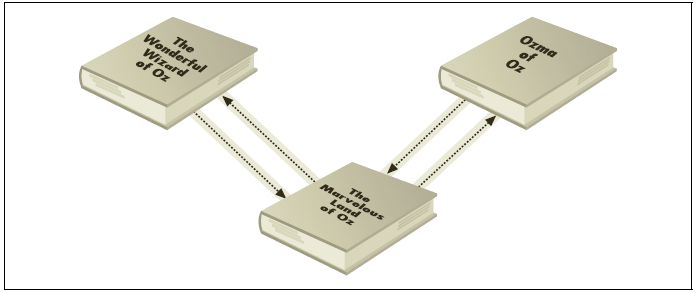
Figure: An extended link with three resources and four arcs between them
Multiple arcs from one arc element
One arc element sometimes defines several arcs. If several elements share a label, an arc element using that label in its xlink:to or xlink:from attribute defines arcs between all resources using that label. The following extended link contains locators for three online bookstores and an edition of The Wonderful Wizard of Oz. Each buchladen element has the label kaufen, and a single arc element erwerben connects them all. The following figure shows the graph structure.
<buch xlink:type="extended" xmlns:xlink="http://www.w3.org/1999/xlink">
<autor>L. Frank Baum</autor>
<titel>The Wonderful Wizard of Oz</titel>
<!-- Locator-Elemente -->
<ausgabe xlink:type="locator" xlink:href="urn:isbn:0192839306" xlink:title="Oxford University Press" xlink:role="http://www.oup-usa.org/" xlink:label="ISBN0192839306"/>
<buchladen xlink:type="locator" xlink:href="http://www.amazon.com/exec/obidos/ASIN/0192839306" xlink:label="kaufen">Amazon</buchladen>
<buchladen xlink:type="locator" xlink:href="http://www.powells.com/cgi-bin/biblio?isbn=0192839306" xlink:label="kaufen">Powell's</buchladen>
<buchladen xlink:type="locator" xlink:href="http://shop.bn.com/booksearch/isbninquiry.asp?isbn=0192839306" xlink:label="kaufen">Barnes &amp; Noble</buchladen>
<!-- Bögen -->
<erwerben xlink:type="arc" xlink:from="ISBN0192839306" xlink:to="kaufen" />
</buch>Code example: An extended link with one arc element but three arcs
An arc element without an xlink:to attribute uses every resource in the extended link as a target. Without an xlink:from attribute, it uses every resource as a source.
However, more than one arc element defining an arc between the same two resources, implicitly or explicitly, is an error. For example, if an extended link contains N resources and an arc element such as <ausgabe xlink:type="arc"/> without the attributes xlink:to or xlink:from, it cannot have other arc elements: this single element defines all N 2 possible arcs among its resources.
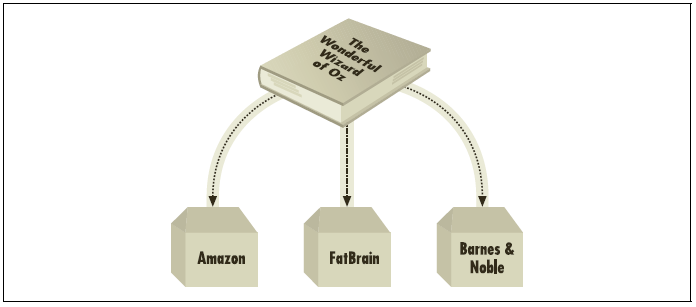
Figure: One arc element can generate multiple arcs
Arc titles
Like all other XLink elements, each arc element may have an optional xlink:title attribute containing a short, human-readable description. In the code example “An extended link with three locators and four arcs”, for example, the arcs could receive the following titles:
<nächster   xlink:type="arc" xlink:from="oz1" xlink:to="oz2" xlink:title="Nächster" />
<nächster   xlink:type="arc" xlink:from="oz2" xlink:to="oz3" xlink:title="Nächster" />
<vorheriger xlink:type="arc" xlink:from="oz2" xlink:to="oz1" xlink:title="Vorheriger" />
<vorheriger xlink:type="arc" xlink:from="oz3" xlink:to="oz2" xlink:title="Vorheriger" />
When processing an extended link, a browser could show its title as link content, letting users decide which arc to follow from their current location. It might also appear in a popup menu while viewing a referenced page. XLink specifies no particular interface for arcs or their titles.
Arc roles
Arc elements cannot have xlink:role attributes, but may have an xlink:arcrole attribute containing an absolute URI identifying the arc’s nature. Specifically, it should point to a resource identifying the relationship described, such as parent-child or employer-employee. There is no way to validate this information beyond checking that xlink:arcrole contains a legal URI; even that URI is not mandatory. In the code example “An extended link with one arc element but three arcs”, for example, we could add to the erwerben arc an xlink:arcrole attribute pointing to "http://www.example.com/erwerben_details.txt":
<erwerben xlink:type="arc" xlink:from="ISBN0192839306" xlink:to="kaufen" xlink:arcrole="http://www.example.com/erwerben_details.txt" />The file erwerben_details.txt might contain the text “is bought at”, indicating that the link source was bought at its target, for example “The Wonderful Wizard of Oz is bought at Amazon”, “The Wonderful Wizard of Oz is bought at Fatbrain” or “The Wonderful Wizard of Oz is bought at Barnes & Noble”. Though suggested, this practice is not enforced by XLink processors. They could not do so without understanding what they read. The attribute xlink:arcrole is optional. You need not include it in arcs, and processors need not process it if you do.
Local resources
Locators represent external resources, outside the document containing the extended link. Extended links can also contain local resources whose data lies inside the extended-link element. Each is represented by a resource element, an element of any type whose xlink:type attribute has the value resource. In the code example “An extended link with three locators and four arcs”, the extended link reihe has a child element autor. Adding the attribute xlink:type="resource" makes it a local resource:
<autor xlink:type="resource">L. Frank Baum</autor> A resource element can, and generally will, have the same attributes as a locator: xlink:label, xlink:role and xlink:title. Their meanings are identical. A label, for instance, can name a resource so arcs can connect it. An arc may connect resource to resource, resource to locator, locator to resource or locator to locator. Arcs do not care whether resources are local or external. For links to or from this resource, it needs an xlink:label attribute like this:
<autor xlink:type="resource" xlink:label="baum">L. Frank Baum</autor> To link this local resource to all the books, simply add these three arc elements:
<buch xlink:type="arc" xlink:from="baum" xlink:to="oz1" />
<buch xlink:type="arc" xlink:from="baum" xlink:to="oz2" />
<buch xlink:type="arc" xlink:from="baum" xlink:to="oz3" />
To go in the other direction, swap the values of the attributes xlink:from and xlink:to.
Title elements
As you have seen, extended-link, locator, arc and resource elements may have xlink:title attributes with short descriptions identifying the link. That is not always enough. In a document that is one large extended link, for instance, you might want to mark up titles with XHTML or another vocabulary. A title can instead, or additionally, be supplied as a child title element: one whose xlink:type attribute has the value title.
Suppose you want to describe all editions of The Wonderful Wizard of Oz more fully than by publisher name alone. Add a suitable element containing your desired markup to the ausgabe element:
<ausgabe xlink:type="locator" xlink:href="urn:isbn:0700609857" xlink:title="University Press of Kansas" xlink:role="http://www.kansaspress.ku.edu/" xlink:label="ISBN0700609857">
   <herausgeber-info xlink:type="title">
      <ul>
        <li>The Kansas Centennial Edition</li>
        <li>Illustriert von Michael McCurdy</li>
        <li>Vorwort von Ray Bradbury</li>
        <li>1999</li>
        <li>216 Seiten</li>
        <li>Preis: $24.95</li>
      </ul>
   </herausgeber-info>
</ausgabe>
The markup within the title element is entirely up to you, provided it is well-formed XML. XLink imposes no restrictions. How the application interprets it is its own concern. We used simple HTML that a browser might display. Remember, though, that even a browser supporting extended XLinks has behavior that is hard to predict precisely.
Copyright © 2005 O'Reilly Verlag GmbH & Co. KG
You may print the online version for your private use.
Otherwise, this chapter from “XML in a Nutshell” is subject to the same conditions as the bound edition: the work, including all its parts, is protected by copyright. All rights reserved, including reproduction, translation, microfilming, and storage and processing in electronic systems.
O’Reilly Verlag GmbH & Co. KG, Balthasarstraße 81, 50670 Köln, kommentar(at)oreilly.de