

XML technologies / XSL-FO / XSL-FO introduction / Graphics
In XSL-FO graphics and other images which are stored outside the XML document are integrated with the <fo:external-graphic> element. The element can be used in a block as well as in an inline manner.
The graphic is integrated in the document with the help of the src attribute. The attribute expects as a value the relative path to the image file which emanates from the XML instance.
The following attributes may be used in order to change the size of the integrated graphic:
content-height (height expansion of the graphic). The default value is auto, which means that the height of the graphic, as in the graphic itself, is adopted. The value scale-to-fit effects that the graphic is adjusted to the dimensions of a preset rectangle. A lenght in any supported measure as attribute value may lead to a restriction in lenght (size reduction of the graphic). A percentage as attribute value leads to an appropriate scaling.
content-width (width expansion of the graphic). The attribute values are the same ones as for the height and they effect the same thing.
If the size or scaling is only specified for one dimension, the size is adjusted proportionally in another dimension. In order to avoid distortions, in each case only one of both dimensions should be specified.
Example:
<fo:block>
   <fo:inline>
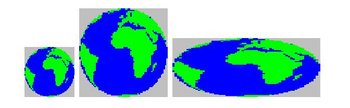
      <fo:external-graphic src="xml/Images/image.bmp"/>               (1)
   </fo:inline>
   <fo:inline>
      <fo:external-graphic src="xml/Images/image.bmp" content-width="30mm"/> (2)
   </fo:inline>
   <fo:inline>
      <fo:external-graphic src="xml/Images/image.bmp" content-width="50mm"
       content-height="20mm"/>             (3)
   </fo:inline>
</fo:block>
(1) The relative path to the Images/image.bmp file is transferred as a value to the obligatory src attribute. The size of the image is adopted from the original without scaling.
(2) The content-width attribute indicates the width of the image. If no height is determined, it is adjusted proportionally.
(3) In this example the height is determined with content-height and the width is determined with content-width, that is the reason why the graphic is distorted.
Formatter view
Background images and background areas
For the embedding of background images and areas there are a number of attributes which can be used in blocks for the typographical control.
The attributes are:
background-image (path to the background image). The attribute expects as a value the relative path to the image file emanating from the XML instance.
background-position-vertical (vertical positioning within the given block rectangle including the defined padding area). The default value is 0% (beginning from the top margin of the rectangle). As a value also a percentage between 0% and 100% or an absolute value in any valid measure may be indicated. So the background image moves within the given rectangle from the top to the bottom. Further valid values are: top (corresponds to 0%), center (50%) and bottom (100%).
background-position-horizontal (horizontal positioning within the given block rectangle including the defined padding area). The default value is 0% (beginning from the left margin of the rectangle). As a value also a percentage between 0% and 100% or an absolute value in any valid measure may be indicated. So the background image moves within the given rectangle from the left to the right. Further valid values are: left (corresponds to 0%), center (50%) and right (100%).
background-position (abbreviated notation for the positioning of the background image within the rectangle in both dimensions). The first value corresponds to background-position-vertical, the second to background-position-horizontal.
background-repeat (repetition of the background image within the rectangle). The default value is repeat (the background image is repeated horizontally as well as vertically). With the x-repeat value only a horizontal repetition occurs, with y-repeat only a vertical one and with no-repeat the image is not repeated.
background-color (a background colour instead of a background image). As attribute value a colour specification is expected.
Example:
<fo:block background-image="Images/image.bmp" background-repeat="repeat"
 font-size="20pt">                        (1)
 Hintergrundbild Hintergrundbild Hintergrundbild
 <!-- en: background image ... -->
</fo:block>
(1) The image is used as a background image for the block. The background-repeat attribute controls the repetition of the graphic.
Formatter view

Copyright © dpunkt.verlag GmbH 2004
Printing of the online version is permitted exclusively for private use. Otherwise this chapter from the book "XSL-FO in der Praxis" ("XSL-FO in practice") is subject to the same provisions as those applicable for the hardcover edition: The work including all its components is protected by copyright. All rights reserved, including reproduction, translation, microfilming as well as storage and processing in electronic systems.
dpunkt.verlag GmbH, Ringstraße 19B, 69115 Heidelberg, fon 06221-14830, fax 06221-148399, hallo@dpunkt.de