

XML technologies / XML / Python & XML / Transforming XML with XSLT / Defining stylesheets
(Excerpt from “Python & XML” by Christopher A. Jones & Fred L. Drake, Jr.)
If familiar with Cascading Style Sheets (CSS), common on the web, you know stylesheets can be separate files or embedded HTML elements, and individual attributes can carry styling information. Here we examine corresponding approaches in XSLT.
All three CSS approaches have XSLT counterparts, though XSLT is far more powerful. We mention specific elements and show some in examples without assuming prior knowledge; they are detailed later. Here we introduce ways to write stylesheets and their relationship to processed documents.
Simplified stylesheets
Simplified stylesheets are closest to HTML’s style attribute, though barely. They are less powerful than embedded or standalone sheets: xsl:stylesheet is forbidden because the entire sheet is interpreted as the body of an xsl:template element. Many features require additional top-level elements, siblings of xsl:template, and are unavailable here. Preserving source structure is harder, but querying structure and content works perfectly. These sheets are most common when output is highly regular and uses only specific source parts.
As simplified sheets are easiest while learning XSLT, let us try one. In Querying XML with XPath, we used a list of spaceships from familiar television series (example ships.xml); we reuse it here. Instead of obtaining nodes with DOM and XPath, XSLT will produce a ship list sorted by registration number and displayed as an HTML table. The following stylesheet does this. Its root declares the XSLT namespace and version, both required for simplified sheets.
Example: ships-template.html
<html xmlns:xsl="http://www.w3.org/1999/XSL/Transform" xsl:version="1.0">
  <head>
    <title>Schiffe der <xsl:value-of select="/shiptypes/@name" /></title>
  </head>
  <body>
    <table border="1">
      <tr>
        <th>Schiff</th>
        <th>Klasse</th>
        <th>Registrierung</th>
        <th>Captain</th>
      </tr>
      <xsl:for-each select="/shiptypes/ship">
        <xsl:sort select="registry-code" />
        <tr>
          <td><xsl:value-of select="@name" /></td>
          <td><xsl:value-of select="class" /></td>
          <td><xsl:value-of select="registry-code" /></td>
          <td><xsl:value-of select="captain" /></td>
        </tr>
      </xsl:for-each>
    </table>
  </body>
</html>
Processing the file ships.xml from the example ships.xml with the stylesheet ships-template.html from the example ships-template.html produces the file ships.html shown next. The transformation used 4XSLT.
Example: ships.html
<html>
  <head>
    <meta http-equiv='Content-Type' content='text/html; charset=iso-8859-1'>
      <title>Schiffe der United Federation of Planets</title>
  </head>
  <body>
    <table border="1">
      <tr>
        <th>Schiff</th>
        <th>Klasse</th>
        <th>Registrierung</th>
        <th>Captain</th>
      </tr>
      <tr>
        <td>USS Enterprise</td>
        <td>Constitution</td>
        <td>NCC-1701</td>
        <td>James T. Kirk</td>
      </tr>
      <tr>
        <td>USS Enterprise</td>
        <td>Galaxy</td>
        <td>NCC-1701-D</td>
        <td>Jean-Luc Picard</td>
      </tr>
      <tr>
        <td>USS Enterprise</td>
        <td>Sovereign</td>
        <td>NCC-1701-E</td>
        <td>Jean-Luc Picard</td>
      </tr>
      <tr>
        <td>USS Voyager</td>
        <td>Intrepid</td>
        <td>NCC-74656</td>
        <td>Kathryn Janeway</td>
      </tr>
      <tr>
        <td>USS Sao Paulo</td>
        <td>Defiant</td>
        <td>NCC-75633</td>
        <td>Benjamin L. Sisko</td>
      </tr>
    </table>
  </body>
</html>
The transformation added a meta element at the start of the generated HTML and slightly adjusted indentation and whitespace inserted for the xsl:for-each element. The figure shows the resulting HTML in a browser.
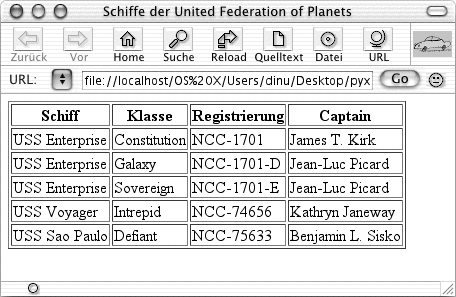
Figure: ships.html in a browser
Standalone stylesheets
Separate files are probably the commonest form for both CSS and XSLT. The root must be an xsl:stylesheet or xsl:transform element, as in most book examples. These sheets are more powerful and flexible than simplified ones, with better modularization, a powerful import mechanism and extensive pattern matching.
Revisit the example with a standalone sheet. Simply wrapping the template document (template ) would be technically correct, but we go further and use a more typical structure. It no longer sorts ships, retaining source order, as common in document-oriented applications. The next example shows it. Again it declares the XSLT namespace and the version attribute, but no namespace prefix is required when it is on an existing xsl:stylesheet element.
Example: ships.xsl
<xsl:stylesheet xmlns:xsl="http://www.w3.org/1999/XSL/Transform" version="1.0">
  <xsl:template match="/">
    <html>
      <head>
        <title>Schiffe der <xsl:apply-templates mode="head" /></title>
      </head>
      <body>
        <xsl:apply-templates />
      </body>
    </html>
  </xsl:template>
  <xsl:template match="shiptypes" mode="head">
    <xsl:value-of select="@name" />
  </xsl:template>
  <xsl:template match="shiptypes">
    <table border="1">
      <tr>
        <th>Schiff</th>
        <th>Klasse</th>
        <th>Registrierung</th>
        <th>Captain</th>
      </tr>
      <xsl:apply-templates />
    </table>
  </xsl:template>
  <xsl:template match="ship">
    <tr><td><xsl:value-of select="@name" /></td>
      <td><xsl:value-of select="class" /></td>
      <td><xsl:value-of select="registry-code" /></td>
      <td><xsl:value-of select="captain" /></td>
    </tr>
  </xsl:template>
</xsl:stylesheet>
This version has templates matching source constructs specified by the attribute match of the xsl:template element. Details of its XSLT constructs follow later. The next example transforms ships.xml (see example ships.xml) with ships.xsl (see the preceding example).
Example: ships2.html
<html>
  <head>
    <meta http-equiv='Content-Type' content='text/html; charset=iso-8859-1'>
      <title>Schiffe der United Federation of Planets</title>
  </head>
  <body>
    <table border="1">
      <tr>
        <th>Schiff</th>
        <th>Klasse</th>
        <th>Registrierung</th>
        <th>Captain</th>
      </tr>
      <tr>
        <td>USS Enterprise</td>
        <td>Sovereign</td>
        <td>NCC-1701-E</td>
        <td>Jean-Luc Picard</td>
      </tr>
      <tr>
        <td>USS Voyager</td>
        <td>Intrepid</td>
        <td>NCC-74656</td>
        <td>Kathryn Janeway</td>
      </tr>
      <tr>
        <td>USS Enterprise</td>
        <td>Galaxy</td>
        <td>NCC-1701-D</td>
        <td>Jean-Luc Picard</td>
      </tr>
      <tr>
        <td>USS Enterprise</td>
        <td>Constitution</td>
        <td>NCC-1701</td>
        <td>James T. Kirk</td>
      </tr>
      <tr>
        <td>USS Sao Paulo</td>
        <td>Defiant</td>
        <td>NCC-75633</td>
        <td>Benjamin L. Sisko</td>
      </tr>
    </table>
  </body>
</html>
The only difference from the output in ships.html is the unsorted table.
Embedded stylesheets
XSLT can be embedded in other documents much like CSS in HTML, usually in the document it transforms. The embedded element must be xsl:stylesheet or xsl:transform. This is uncommon because reuse elsewhere is harder and few processors support embedded sheets. Lacking broad tool support, we show no examples.
Copyright © 2002 O'Reilly Verlag GmbH & Co. KG
You may print the online version for your private use.
Otherwise, this chapter from “Python & XML” is subject to the same conditions as the bound edition: the work, including all its parts, is protected by copyright. All rights reserved, including reproduction, translation, microfilming, and storage and processing in electronic systems.
O’Reilly Verlag GmbH & Co. KG, Balthasarstraße 81, 50670 Köln, kommentar(at)oreilly.de