

XML technologies / XML / Python & XML / The Document Object Model / Building a web application
(Excerpt from “Python & XML” by Christopher A. Jones & Fred L. Drake, Jr.)
Now use your knowledge of DOM to build a simple web application for publishing and reading articles. Users submit and read them through a browser, but the server stores them as XML, making them usable in other XML-aware information systems. HTML articles, by contrast, are useless outside a browser.
Preparing the web server
These examples require a CGI-capable web server. They were developed with Apache, so scripts contain a sh-bang line giving the Python executable path, the expression #!/usr/bin/python at the start of the file, so Apache can run them like other CGI scripts. Understanding “sh-bang” requires Unix history. The traditional Unix command environment was implemented by sh. The exclamation mark was called “bang” after words such as “bang” and “pow” in comics. Script lines beginning with #! were interpreted by sh and became known as sh-bang lines.
Making scripts executable
Ensure your Python scripts are executable on your web server. For Apache, enable CGI in the web directory, include the interpreter reference in scripts, and set their execute permissions using chmod:
$> chmod +x start.cgi Other servers and Windows require assigning a handler to CGI scripts so Python executes them. You may need the extension .py instead of .cgi if .cgi already has another handler.
Setting write permissions
Besides script execution, these examples require the web user to write in the directory. They demonstrate XML processing and making XML available to different applications.
To avoid a database dependency and keep XML access simple, the examples use the filesystem directly as storage. Articles are saved on disk as .xml files.
With Apache, give the user nobody write permission for the web directory. If pages come from /home/httpd/myXMLApplication, configure something like:
$> mkdir /home/httpd/myXMLApplication
$> chown nobody /home/httpd/myXMLApplication
$> chmod 755 /home/httpd/myXMLApplication
This gives nobody, Apache’s user ID, write access. There are many secure ways to configure this; this is only one. Generally, web users should have no write access.
Web application structure
One script, start.cgi, drives the application: processing, content templates, and objects saving and loading XML articles. The main components are the article object, storage object, article manager, SAX-based article handler and the start.cgi coordination script. The figure diagrams these components.
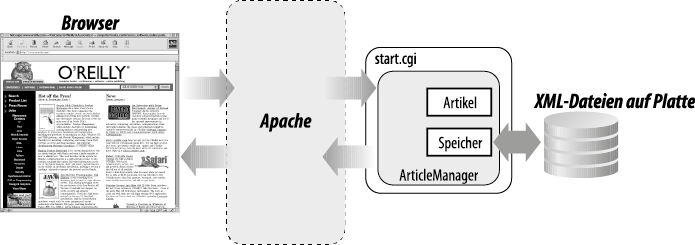
Figure: Site architecture
The next sections examine CGI component code and behavior in detail.
The Article class
The Article class represents an article as XML. This thin class only creates articles from existing XML or retrieves the article XML as a string. Mutable attributes let you edit the content:
def __init__(self):
    """Setze initiale Datenattribute."""
    self.reset( )

def reset(self):
    self.title = ""
    self.size = 0
    self.time = ""        # Pretty-Print des Zeit-Strings
    self.author = ""
    self.contributor = ""
    self.contents = ""
Modify attributes throughout the object’s lifetime rather than generate XML in your program. For example:
>>> from article import Article
>>> art = Article( )
>>> art.title = "ErsteNachricht"
>>> art.contents = "Dies ist der erste Artikel."
>>> print art.getXML( )
<?xml version="1.0"?>
<article title="ErsteNachricht">
  <contents>Dies ist der erste Artikel.</contents>
</article>
Calling getXML regenerates XML when necessary. Create articles from well-formed XML strings or strings loaded from files. The getXML method extracts XML again. Notice the function escape imported from xml.sax.saxutils, ensuring XML-significant characters are properly escaped in the result.
def getXML(self):
    """Liefert XML nach erneutem Zusammensetzen von
    Datenattributen, die verändert sein können."""

    attr = ''
    if self.title:
      attr = ' title="%s"' % escape(self.title)
    s = '<?xml version="1.0"?>\n<article%s>\n' % attr
    if self.author:
      s = '%s <author name="%s" />\n' % (s, escape(self.author))
    if self.contributor:
      s = '%s <contributor name="%s" />\n' % (s, escape(self.contributor))
    if self.contents:
      s = ('%s <contents>\n%s\n </contents>\n' % (s, escape(self.contents)))
    return s + "</article>\n"
The fromXML method fills the article object from a string. It uses the helper parseString from xml.dom.minidom to build a document object, then DOM methods to access and collect the required data:
def fromXML(self, data):
   """Initialisiere mit einem als String übergebenen XML-Dokument."""
   self.reset()
   dom = xml.dom.minidom.parseString(data)
   self.title = get_attribute(dom, "article", "title")
   self.size = int(get_attribute(dom, "size", "bytes") or 0)
   self.time = get_attribute(dom, "time", "stime")
   self.author = get_attribute(dom, "author", "name")
   self.contributor = get_attribute(dom, "contributor", "name")
   nodelist = dom.getElementsByTagName("contents")
   if nodelist:
      assert len(nodelist) == 1
      contents = nodelist[0]
      contents.normalize()
      if contents.childNodes:
        self.contents = contents.firstChild.data.strip()
It uses another helper defined in the module. The function get_attribute finds an attribute and returns its value, or an empty string if it or its expected element is missing. Multiple matching elements trigger a loud complaint through assert. Real applications would not use assert this way, but this suffices for our XML-focused examples.
Most article manipulation occurs in the Storage class while loading from disk, or after parsing a submitted form to create an article, followed by the Storage class saving XML to disk. The example lists the complete Article class.
Example: The Article class from article.py
import xml.dom.minidom
from xml.sax.saxutils import escape

class Article:
   """Stellt einen aus XML erzeugten Block von Text und Metadaten dar."""

   def __init__(self):
     """Setze initiale Datenattribute."""
     self.reset( )

   def reset(self):
     """Re-initialisiere Datenattribute."""
     self.title = ""
     self.size = 0
     self.time = ""          # Pretty-Print des Zeit-Strings
     self.author = ""
     self.contributor = ""
     self.contents = ""

def getXML(self):
     """Liefert XML nach erneutem Zusammensetzen von
     Datenattributen, die verändert sein können."""

   attr = ''
   if self.title:
      attr = ' title="%s"' % escape(self.title)
   s = '<?xml version="1.0"?>\n<article%s>\n' % attr
   if self.author:
   s = ('<?xml version="1.0"?>\n' '<article%s>\n' % attr)
   if self.author:
      s = '%s <author name="%s" />\n' % (s, escape(self.author))
   if self.contributor:
      s = '%s <contributor name="%s" />\n' % (s, escape(self.contributor))
   if self.contents:
      s = ('%s <contents>\n%s\n </contents>\n' % (s, escape(self.contents)))
   return s + "</article>\n"

   def fromXML(self, data):
      """Initialisiere mit einem als String übergebenen XML-Dokument."""
      self.reset( )
      dom = xml.dom.minidom.parseString(data)
      self.title = get_attribute(dom, "article", "title")
      self.size = int(get_attribute(dom, "size", "bytes") or 0)
      self.time = get_attribute(dom, "time", "stime")
      self.author = get_attribute(dom, "author", "name")
      self.contributor = get_attribute(dom, "contributor", "name")
      nodelist = dom.getElementsByTagName("contents")
      if nodelist:
         assert len(nodelist) == 1
         contents = nodelist[0]
         contents.normalize( )
         if contents.childNodes:
            self.contents = contents.firstChild.data.strip( )

   # Hilfsfunktion:

   def get_attribute(dom, tagname, attrname):
      """Liefere den Wert eines einzelnen Elements & Attributs, falls vorhanden."""
      nodelist = dom.getElementsByTagName(tagname)
      if nodelist:
         assert len(nodelist) == 1
         node = nodelist[0]
         return node.getAttribute(attrname).strip( )
      else:
         return ""
The Storage class
The Storage class saves articles as XML files and builds article objects from existing files:
>>> from article import Article
>>> from storage import Storage
>>> a = Article( )
>>> a.title = "ErsterArtikel"
>>> a.contents = "Dies ist ein ErsterArtikel."
>>> a.author = "Fred L. Drake, Jr."
>>> s = Storage( )
>>> s.save(a)
>>>
>>> b = s.load("FirstPost.xml")
>>> print b.getXML( )
<?xml version="1.0"?>
<article title="ErsterArtikel">
   <author name="Fred L. Drake, Jr." />
   <contents>Dies ist ein ErsterArtikel.</contents>
</article>
Create a new article a, save it using the Storage object, then recreate it as b using the load method of Storage. Note that load expects an actual filename, concatenating article.title and the extension .xml.
The method Storage.save takes one article instance and writes it as an XML file named article.title.xml:
sFilename = article.title + ".xml"
fd = open(sFilename, "w")

# Schreibe Datei auf Platte mit Daten aus getXML()-Aufruf
fd.write(article.getXML( ))
fd.close( )
The method getXML produces the article’s XML string for storage. The method Storage.load reads a disk XML file and creates an article using Article.fromXML.
fd = open(sName, "r")
sxml = fd.read( )
fd.close( )

# Erzeuge eine Artikelinstanz
a = Article( )
a.fromXML(sxml)

# Gib Artikelobjekt an Aufrufer zurück
return a
Returns an Article instance. The next example lists all of storage.py.
Example: storage.py
# storage.py
from article import Article

class Storage:
   """Speichert und lädt Artikelobjekte als XML-Datei
   --- sollte einfach zu einer Datenbank zu migrieren sein."""

def save(self, article):
   """Speichern als <article.title>.xml."""
   sFilename = article.title + ".xml"
   fd = open(sFilename, "w")

# Schreibe Datei auf Festplatte mit Daten aus getXML()-Aufruf
   fd.write(article.getXML( ))
   fd.close( )

def load(self, sName):
   """Name muß filename.xml sein -- Liefert ein Artikelobjekt."""
   fd = open(sName, "r")
   sxml = fd.read( )

   # Erzeuge eine Artikelinstanz
   a = Article( )

   # Benutze fromXML zur Initialisierung eines Artikelobjekts aus dem XML der Datei
   a.fromXML(sxml)
   fd.close( )

   # Gib Artikelobjekt an Aufrufer zurück
   return a
Implementing site logic
The classes Article and Storage are not web-specific. Any application could use them, since articles are XML and Storage merely handles disk I/O. In principle, they can underpin XML storage anywhere.
One CGI script could contain all saving, loading and parsing logic, but articles would then be confined to it. Separating core functionality frees you to use Article and Storage in any application.
To manage web interaction, create another class (ArticleManager) and script (start.cgi). The class ArticleManager provides the web interface: display articles as HTML, accept submitted articles and control navigation. The script start.cgi handles web-server I/O and controls the ArticleManager.
The ArticleManager class
The ArticleManager class has four article methods, bridging article objects and the CGI script interfacing with the server and indirectly the browser.
The method viewAll retrieves all disk XML articles and generates HTML links. CGI calls it to display all titles and links:
def viewAll(self):
   """Zeigt alle XML-Dateien im aktuellen Arbeitsverzeichnis an."""
   print "<p>Alle ansehen<br><br>"

   # Hole Liste aller Dateien im aktuellen Verzeichnis
   fl = os.listdir(".")
   for xmlFile in fl:
      # Sortiere XML-Dateien aus
      tname, ext = os.path.splitext(xmlFile)
      if ext == ".xml":
         # Erzeuge HTML-Link um Artikelnamen herum
         print '<br><a href="start.cgi?cmd=v1a&af=%s">%s</a><br>' % (quote(xmlFile), tname)
This is not elegant: read the current directory, pick XML files and remove their .xml extensions for display. Links return to the same page (start.cgi) with query parameters telling start.cgi to call viewOne to display one article. The function imported from urllib, quote, escapes filename characters that could trouble browsers. URL construction and quoting are detailed in Python’s Internet APIs.
The method viewOne restores a stored article through the storage object, then retrieves its fields and decorates them with HTML for the browser:
def viewOne(self, articleFile):
   """Nimmt einen Artikeldateinamen als Parameter,
   erzeugt ein Artikelobjekt dafür und zeigt es an.
   """
   # Erzeuge Speicher- und Artikelobjekte
   store = Storage( )
   art = store.load(articleFile)

   # Schreibe HTML zum Browser (Standardausgabe)
   print "<p>Title: " + art.title + "<br>"
   print "Author: " + art.author + "<br>"
   print "Date: " + art.time + "<br>"
   print "<table width=500><tr><td>" + art.contents
   print "</td></tr></table></p>"
Remember that the parameter passed to viewOne is an actual filename, not just an XML title.
The method postArticle is perhaps simplest: it generates an HTML form for users to write articles and submit them for XML storage. Since the form is fixed, the method returns a string constant containing it.
The method postArticleData extracts key/value pairs from the HTTP form and creates an XML article. It instantiates an article, assigns the form values to its variables, then saves it using the Storage class.
def postArticleData(self, form):
     """Erwartet übermittelte Formulardaten, erzeugt und
     speichert ein Artikelobjekt."""
     # Fülle Artikel mit Informationen aus dem Formular
     art = Article()
     art.title = form["title"].value
     art.author = form["author"].value
     art.contributor = form["contrib"].value
     art.contents = form["contents"].value

     # Speichere den Artikel
     store = Storage()
     store.save(art)
The complete file follows: ArticleManager.py.
Example: ArticleManager.py
   # ArticleManager.py
   import os
   from urllib import quote
   from article import Article
   from storage import Storage

   class ArticleManager:
   """Verwaltet Artikel für die Webseite.

   Verantwortlich für das Erzeugen, Laden, Speichern und Anzeigen von Artikeln.
   """

   def viewAll(self):
      """Zeigt alle XML-Dateien im aktuellen Arbeitsverzeichnis an."""
      print "<p>Alle ansehen<br><br>"

      # Hole Liste aller Dateien im aktuellen Verzeichnis
      fl = os.listdir(".")
      for xmlFile in fl:
        # Sortiere XML-Dateien aus
        tname, ext = os.path.splitext(xmlFile)
        if ext == ".xml":
          # Erzeuge HTML-Link um Artikelnamen herum
          print '<br><a href="start.cgi?cmd=v1a&af=%s">%s</a><br>' \ % (quote(xmlFile), tname)

   def viewOne(self, articleFile):
      """Nimmt einen Artikeldateinamen als Parameter,
      erzeugt ein Artikelobjekt dafür und zeigt es an.
      """
      # Erzeuge Speicher- und Artikelobjekte
      store = Storage( )
      art = store.load(articleFile)

      # Schreibe HTML zum Browser (Standardausgabe)
      print "<p>Title: " + art.title + "<br>"
      print "Author: " + art.author + "<br>"
      print "Date: " + art.time + "<br>"
      print "<table width=500><tr><td>" + art.contents
      print "</td></tr></table></p>"

   def postArticle(self):
      """Zeigt das Artikeleinsendeformular an."""
      print POSTING_FORM

   def postArticleData(self,form):
      """Erwartet übermittelte Formulardaten, erzeugt und
      speichert ein Artikelobjekt."""
      # Fülle Artikel mit Informationen aus dem Formular
      art = Article()
      art.title = form["title"].value
      art.author = form["author"].value
      art.contributor = form["contrib"].value
      art.contents = form["contents"].value
      # Speichere den Artikel
      store = Storage()
      store.save(art)

POSTING_FORM = '''\
<form method="POST" action="start.cgi?cmd=pd">
 <p>
 Title:      <br><input type="text" length="40" name="title"><br>
 Contributor:<br><input type="text" length="40" name="contrib"><br>
 Author:     <br><input type="text" length="40" name="author"><br>
 Contents:   <br><textarea rows="15" cols="80" name="contents"></textarea><br>
 <input type="submit">
</form>
...
Controlling the application
CGI is the application’s main program and the only page ever loaded in the browser. Entering start.cgi in the address bar makes Apache run it on the server.
It first imports cgi and os:
import cgi
import os
Then print the content header and opening HTML, identical for every operation of start.cgi, stored in the constant HEADER, not shown, and printed for every request:
# Content-type-Header
print "Content-type: text/html"
print
print HEADER
After the common page content, inspect the query string’s cmd parameter indicating what start.cgi should do. Links from start.cgi carry this parameter with an instruction such as view or post. Inspect the query string with cgi for the cmd parameter. Continue if found; otherwise report an error.
query = cgi.FieldStorage( )
if query.has_key("cmd"):
 cmd = query["cmd"][0].value

  # Instanziiere einen ArticleManager
  am = ArticleManager( )
Instantiate the ArticleManager as am, then inspect cmd against its four possible values. To view titles, use va:
# Kommando: viewAll - liste alle Artikel auf
if cmd == "va":
  am.viewAll( )
To view a particular article, use v1a:
# Kommando: viewOne - zeige einen Artikel an
if cmd == "v1a":
  aname = query["af"].value
  am.viewOne(aname)
To submit an article, show a form. CGI checks for pa:
# Kommando: postArticle - zeige Seite zum Artikel-Abschicken
  if cmd == "pa":
    am.postArticle( )
Submitted forms send data to the server. CGI checks for pd, indicating article data, then passes the form to ArticleManager.postArticleData:
# Kommando: postData - nimm einen abgeschickten Artikel an
if cmd == "pd":
print "<p>Danke für Ihren Artikel!</p>"
am.postArticleData(query)If cmd is absent or cmd is not one of the four values, display an error in the else clause of the first if statement:
else:
  # ungueltige Auswahl
  print "<p>Ihre Auswahl wurde nicht erkannt.</p>"
Finally, close the HTML with a last print statement:
# Beende HTML
print "</body></html>"
The complete start.cgi listing follows.
Example: start.cgi
#!/usr/local/bin/python
#
# start.cgi - ein Python-CGI-Skript
import cgi
import os
from ArticleManager import ArticleManager
HEADER = """\
<html>
<body>
<p>
<table cellspacing="0" cellpadding="1">
<tr>
<td>
<h1>XML-Artikel</h1>
</td>
</tr>
<tr>
<td>
<h3><a href="start.cgi?cmd=va">Alle ansehen</a> | <a href="start.cgi?cmd=pa">Artikel einreichen</a></h3>
</td>
</tr>
</table>
"""
#
# HAUPTPROGRAMM
#
# Content-type-Header
print "Content-type: text/html"
print
print HEADER
# Hole Abfrage-String
query = cgi.FieldStorage( )
if query.has_key("cmd"):
cmd = query["cmd"].value
# Instanziiere einen ArticleManager
am = ArticleManager( )
# Mache etwas mit jedem Kommando
# Kommando: viewAll - liste alle Artikel auf
if cmd == "va":
am.viewAll( )
# Kommando: viewOne - zeige einen Artikel an
if cmd == "v1a":
aname = query["af"].value
am.viewOne(aname)
# Kommando: postArticle - zeige Seite zum Artikel-Abschicken
if cmd == "pa":
am.postArticle( )
# Kommando: postData - nimm einen abgeschickten Artikel an
if cmd == "pd":
print "<p>Danke für Ihren Artikel!</p>"
am.postArticleData(query)
else:
# ungültige Auswahl
print "<p>Ihre Auswahl wurde nicht erkannt.</p>"
# Beende HTML
print "</body></html>"Notice the first expression, #!/usr/local/bin/python. CGI scripts need to tell the operating system how to start them. Compiled C could run directly, but scripts generally need an interpreter, as Python does. We did not use the sh-bang line #!/usr/bin/env python, which could open a CGI security hole. See Python’s cgi module documentation for CGI security and its proper handling with Python.
Copyright © 2002 O'Reilly Verlag GmbH & Co. KG
You may print the online version for your private use.
Otherwise, this chapter from “Python & XML” is subject to the same conditions as the bound edition: the work, including all its parts, is protected by copyright. All rights reserved, including reproduction, translation, microfilming, and storage and processing in electronic systems.
O’Reilly Verlag GmbH & Co. KG, Balthasarstraße 81, 50670 Köln, kommentar(at)oreilly.de