

AI & XML / Comparative study of PDF-to-AI converters / Conversion results
9.1 Headings, document structure and page layout
Evaluation of the chapter “Headings, document structure and page layout” reveals clear quality differences between conversion methods. Gemini XML and ChatGPT Markdown achieve the best results, both scoring 585 out of 700 points, or 84 %. Both capture almost all text, reliably remove headers and footers, and correctly mark page breaks. Octopus follows with 78 %, while Gemini Markdown at 54 %, Mistral at 45 % and OpenDataLoader at 45 % achieve only middling results. ChatGPT XML at 31 % and Poppler/Pandoc at 29 % perform worst.
Table 9.1 Results and scores of the tools tested for the chapter “Headings, document structure and page layout”
Criterion | Points | Oct | Mi | GeM | Pop | ChM | Op | GeX | ChX |
Content (text) correct | 100 | 100 | 100 | 100 | 100 | 100 | 100 | 100 | 10 |
Heading hierarchy recognized (H1–H6 and title) | 100 | 85 | 35 | 85 | 5 | 85 | 15 | 90 | 5 |
Paragraphs and line breaks correct | 100 | 60 | 100 | 95 | 0 | 100 | 100 | 95 | 0 |
Running head removed from header | 100 | 100 | 0 | 0 | 0 | 100 | 0 | 100 | 100 |
Page number removed from footer | 100 | 100 | 80 | 100 | 0 | 100 | 100 | 100 | 100 |
Page break marked | 100 | 100 | 0 | 0 | 100 | 100 | 0 | 100 | 0 |
Printed page number captured | 100 | 0 | 0 | 0 | 0 | 0 | 0 | 0 | 0 |
Total | 700 | 545 | 315 | 380 | 205 | 585 | 315 | 585 | 215 |
Percentage | 100% | 78% | 45% | 54% | 29% | 84% | 45% | 84% | 31% |
Tool abbreviations in table header: see legend in the chapter “Brief description of this study”
First, almost all tools captured the plain text correctly. Only ChatGPT XML falls well behind: it fully captured only the first paragraph of the first chapter, with almost all remaining text missing. This shows that text recognition itself works reliably in most methods, while document structuring quality varies considerably.
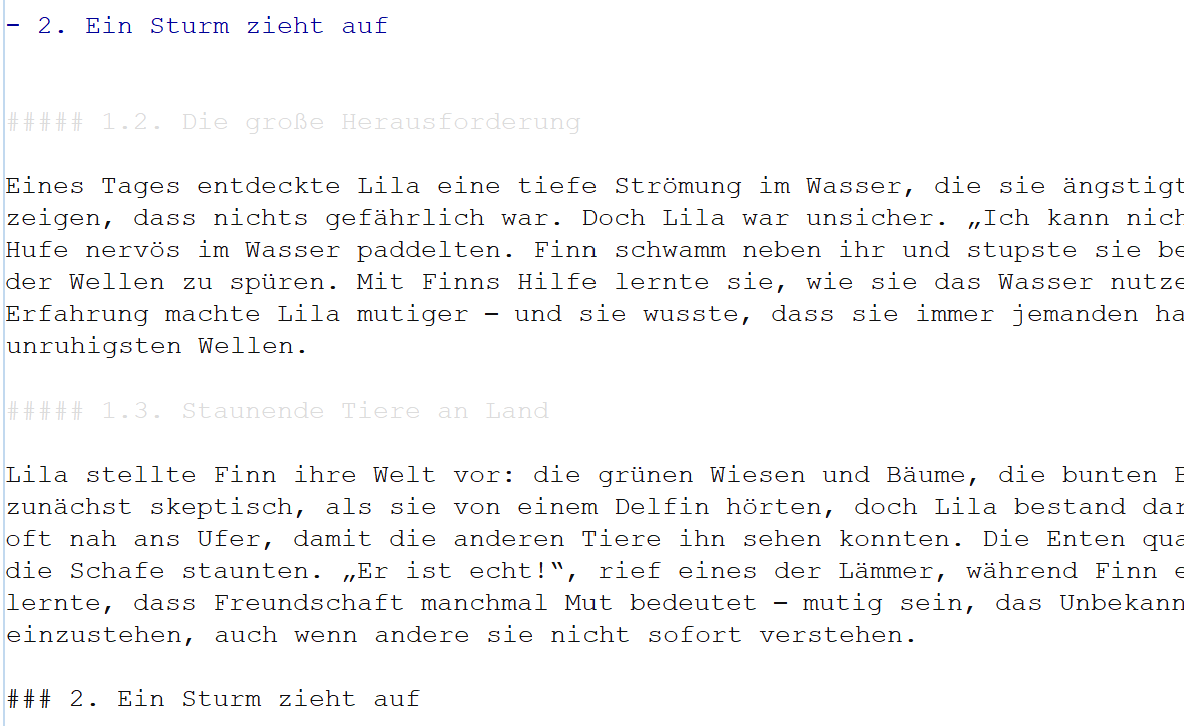
Heading hierarchy is a major weakness for many tools. The repeated first heading level is particularly problematic: Octopus interpreted the second H1 as H2, shifting subsequent levels accordingly. ChatGPT Markdown and Gemini Markdown show similar shifts. Mistral recognizes only the first H1 correctly, marking nearly all subsequent headings as H2. OpenDataLoader also has serious structural problems, merging the first H1 with the title and outputting subsequent levels inconsistently as H3, H4, H5 or H6.
Fig. 9.1 Excerpt from the test document with running head and heading levels
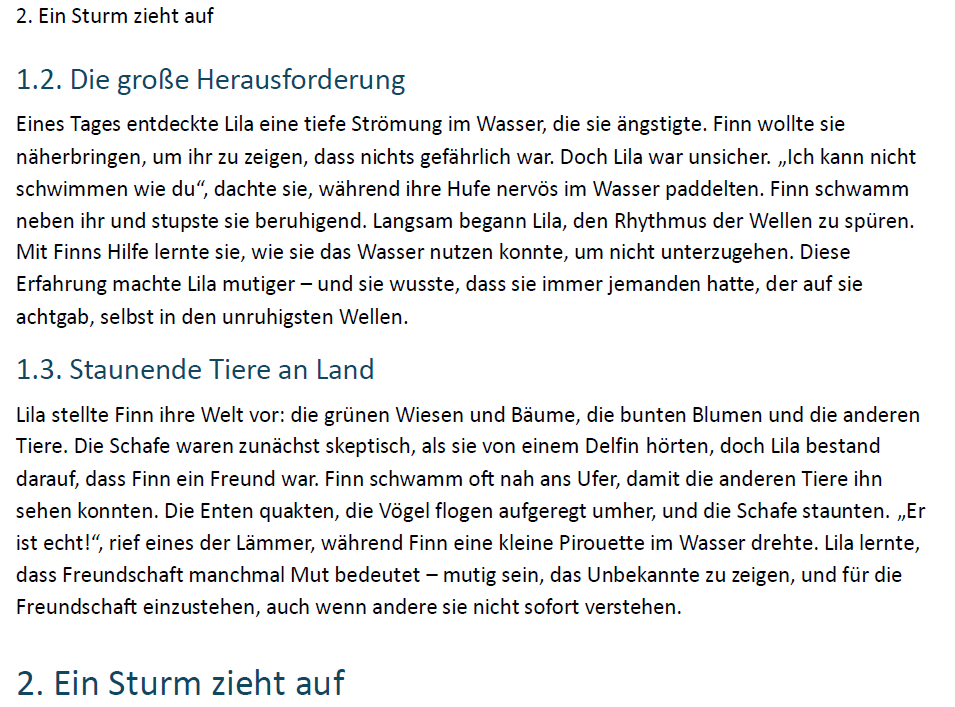
Fig. 9.2 Excerpt from conversion output of OpenDataLoader
Another notable result concerns the title “Flossen und Fell – Eine ungewöhnliche Freundschaft”. Several methods fail to recognize it as the document title. Octopus outputs it in bold only, ChatGPT Markdown as an italic paragraph, Gemini XML as a bold paragraph, and Gemini Markdown and Mistral as a normal heading. Many tools therefore struggle to distinguish document titles, chapter headings and subheadings. This persists even with excellent overall results, such as Gemini XML.
Headers and footers also differ clearly. Almost all tools remove footer page numbers; only Poppler/Pandoc consistently retains them, while Mistral removes them on only some pages. Running heads are more problematic: Mistral, Gemini Markdown, Poppler/Pandoc and OpenDataLoader retain them as lists, headings or ordinary text. This creates extra structural elements outside the actual content that can disrupt subsequent processing.
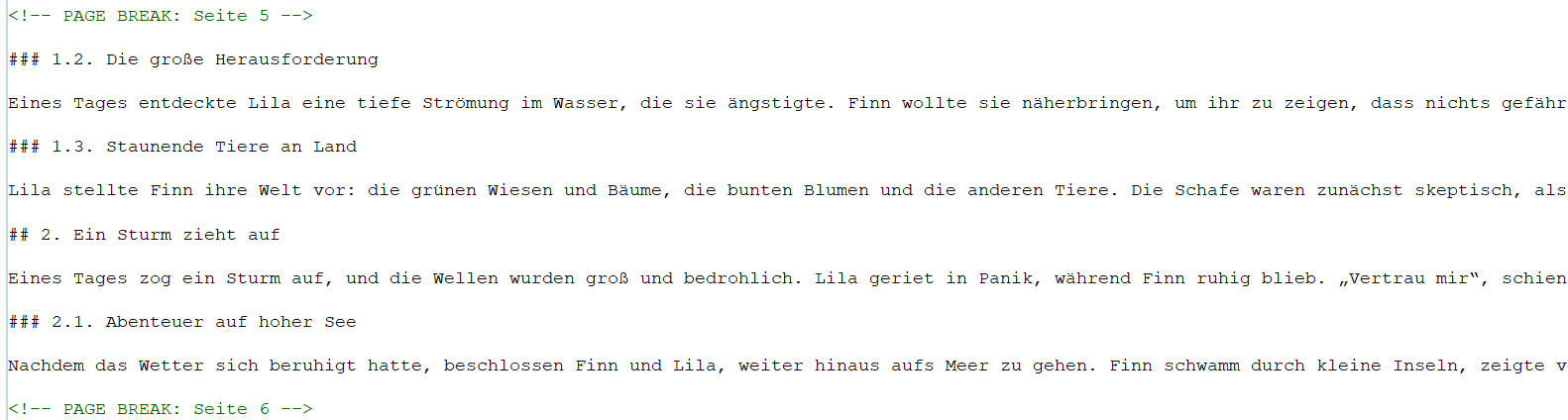
ChatGPT Markdown and Gemini XML are especially convincing at marking page breaks precisely.
Fig. 9.3 Excerpt from conversion output of ChatGPT Markdown
Poppler/Pandoc also earns points for page-break marking but adds problematic artifacts: during PDF processing, every page is additionally exported as an image, and a layout container with image attributes, including its PDF page number, is inserted before every page break. Despite recognized page transitions, this makes the output considerably less clean.
Fig. 9.4 Excerpt from conversion output of Poppler/Pandoc

Overall, semantic document structure rather than text recognition alone determines conversion quality. Methods handling heading hierarchy, paragraphs, headers, footers and page breaks correctly together are especially capable. Gemini XML, ChatGPT Markdown and Octopus therefore provide the most reliable results here. Weaker methods exhibit typical errors: wrong heading levels, retained running heads or footer page numbers, or even missing text.
9.2 Text emphasis and inline formatting
This chapter examined how well tools recognize text styling and inline formatting in the source and transfer them to the target format. Examples include bold, italics, underline, strikethrough, superscripts and subscripts, and color treatments such as red text or yellow highlighting. These matter because they change appearance and often emphasize content or convey additional meaning.
Table 9.2 Results and scores of the tools tested for the chapter “Text emphasis and inline formatting”
Criterion | Points | Oct | Mi | GeM | Pop | ChM | Op | GeX | ChX |
Content (text) correct | 100 | 100 | 100 | 98 | 100 | 100 | 90 | 100 | 5 |
Bold recognized | 100 | 100 | 0 | 0 | 100 | 100 | 0 | 0 | 0 |
Italics recognized | 100 | 100 | 0 | 0 | 20 | 100 | 0 | 0 | 0 |
Superscripts and subscripts recognized | 100 | 100 | 100 | 15 | 20 | 100 | 20 | 100 | 5 |
Underlining recognized | 100 | 100 | 0 | 0 | 0 | 70 | 0 | 0 | 0 |
Strikethrough recognized | 100 | 100 | 0 | 0 | 0 | 100 | 0 | 0 | 0 |
Font color (red) recognized | 100 | 0 | 0 | 0 | 0 | 100 | 0 | 0 | 0 |
Text highlight color (yellow) recognized | 100 | 0 | 0 | 0 | 0 | 15 | 0 | 0 | 0 |
Total | 800 | 600 | 200 | 113 | 240 | 685 | 110 | 200 | 10 |
Percentage | 100% | 75% | 25% | 14% | 30% | 86% | 14% | 25% | 1% |
Tool abbreviations in table header: see legend in the chapter “Brief description of this study”
Evaluation of the chapter “Text emphasis and inline formatting” reveals clear differences between the conversion methods. ChatGPT Markdown performs best with 685 out of 800 points, or 86 %, followed by Octopus with 600 points, or 75 %. Poppler/Pandoc at 30 %, Mistral and Gemini XML at 25 % each, and Gemini Markdown and OpenDataLoader at 14 % each are much weaker. ChatGPT XML performs worst at just 1 %, capturing only a tiny text fragment of the chapter.
Most tools recognize text much better than its inline formatting. Almost all captured content largely correctly, but red text, yellow highlighting, underlining and strikethrough were often unrecognized or only partly recognized. Superscripts and subscripts were preserved correctly relatively often, for example by Octopus, Mistral, ChatGPT Markdown and Gemini XML. Others misinterpreted them or output ordinary body text.
Superscripts and subscripts also work better than other formatting in several tools. Octopus, Mistral, ChatGPT Markdown and Gemini XML captured them at least in principle. Misinterpretation remains problematic, however: Gemini Markdown output them as mathematical formulas.
Fig. 9.5 Excerpt from the test document with text styling
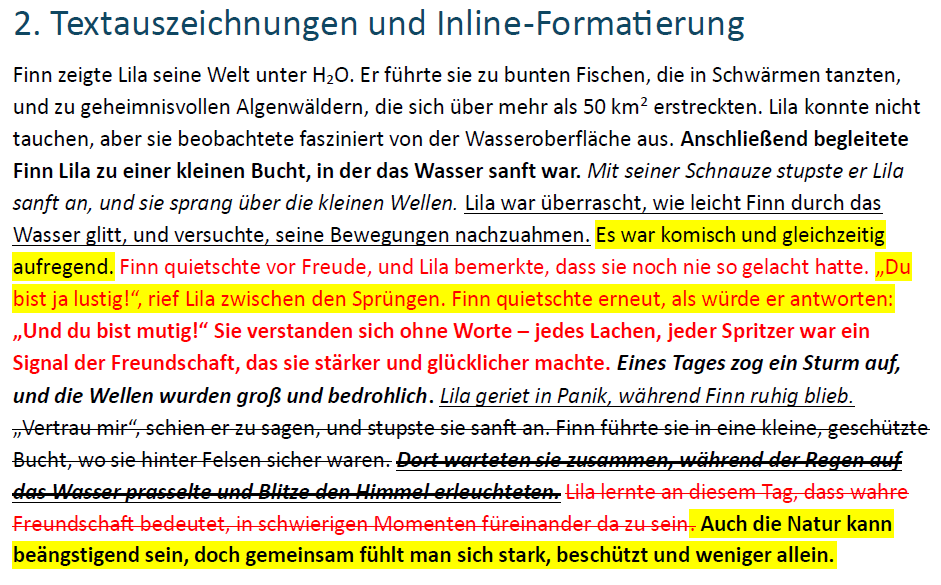
Fig. 9.6 Excerpt from conversion output of Gemini Markdown

ChatGPT Markdown performs best overall, preserving text and much of the inline formatting. Octopus also performs well but loses substantially on color markings. Weaker tools show that correct text recognition alone is insufficient when formatting matters for subsequent processing or display.
Mistral illustrates this: text, superscripts and subscripts were captured correctly, but all other text styling and inline formatting was lost.
Fig. 9.7 Excerpt from conversion output of Mistral
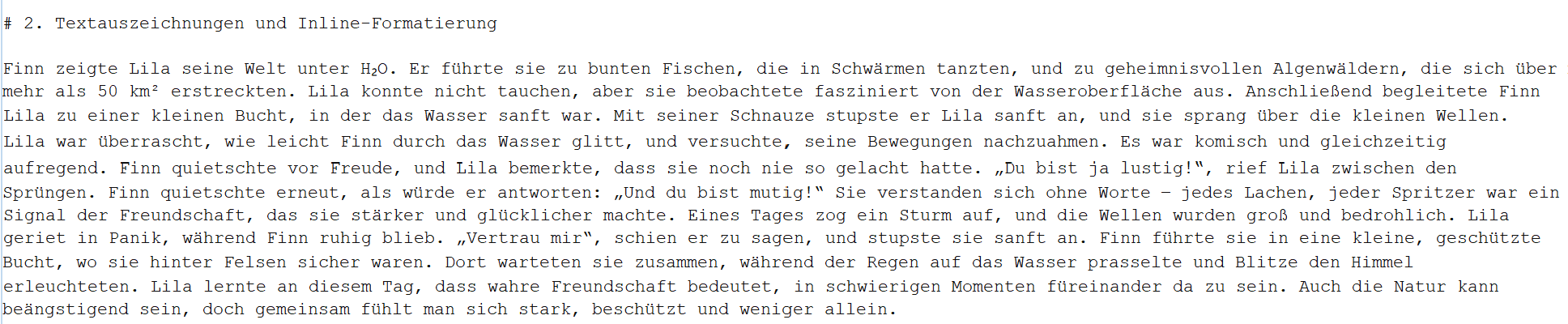
In summary, most tools capture text relatively reliably but struggle with differentiated inline formatting. Colors, highlighting, underlining and strikethrough are often lost. Best results arise when tools recognize the semantic structure of formatting as well as text and convert it into suitable markup. ChatGPT Markdown is strongest here; Octopus also performs well but has weaknesses in color markings.
9.3 Special characters, numbers and fonts
The chapter “Special characters, numbers and fonts” tests reliable recognition and reproduction of typographically demanding content. It focuses on body text and especially special characters and number formats across different fonts and font styles.
Table 9.3 Results and scores of the tools tested for the chapter “Special characters, numbers and fonts”
Criterion | Points | Oct | Mi | GeM | Pop | ChM | Op | GeX | ChX |
Content (text) correct | 100 | 100 | 100 | 80 | 100 | 100 | 85 | 10 | 2 |
Paragraphs and line breaks correct | 100 | 30 | 100 | 90 | 5 | 90 | 80 | 100 | 0 |
Numbers correct | 100 | 100 | 90 | 80 | 100 | 100 | 100 | 100 | 10 |
Special characters correct | 100 | 99 | 90 | 20 | 100 | 100 | 95 | 90 | 5 |
Total | 400 | 329 | 380 | 270 | 305 | 390 | 360 | 300 | 17 |
Percentage | 100% | 82% | 95% | 68% | 76% | 98% | 90% | 75% | 4% |
Tool abbreviations in table header: see legend in the chapter “Brief description of this study”
ChatGPT Markdown performs best overall with 390 out of 400 points (98 %), followed by Mistral at 95 % and OpenDataLoader at 90 %. Octopus scores 82 %, Poppler/Pandoc 76 % and Gemini XML 75 %. Gemini Markdown is weaker at 68 %. ChatGPT XML is by far the worst with only 17 out of 400 points, or 4 %.
The best results depend strongly on preserving structure and special characters as well as correctly recognized text. ChatGPT Markdown recognizes all special characters and numbers correctly but loses points for five additional paragraphs. Mistral also performs very well, but sometimes misreads “¼” in Courier New as “4”.
Fig. 9.8 Excerpt from the test document with special characters and numbers
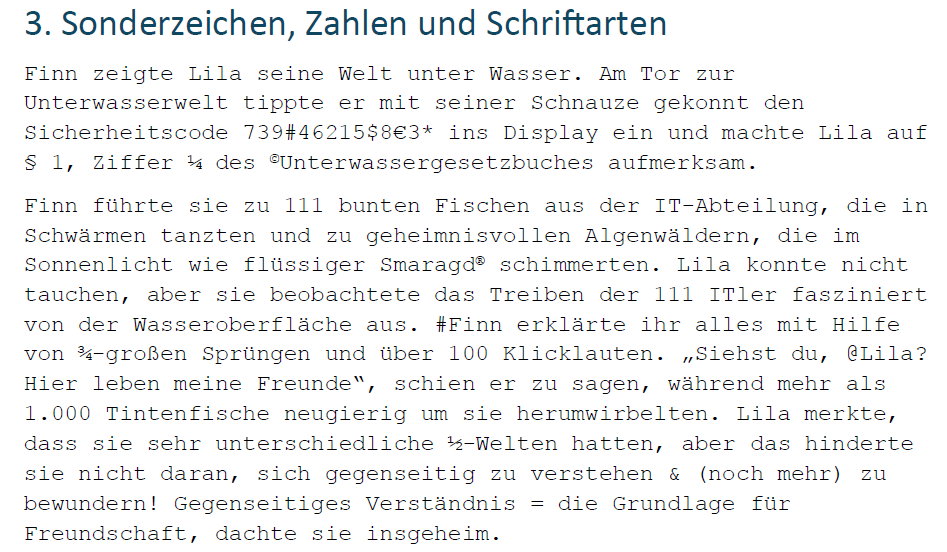
Fig. 9.9 Excerpt from conversion output of Mistral

Gemini Markdown is much more problematic. It basically recognizes text but makes many special-character errors. “©”, “®”, “¼”, “½”, “¾” and “=” are especially often missing or changed. Sometimes incorrect numeric sequences replace special characters, such as “4”, “1½” or “14” for “¼”; some variants also misinterpret the security code “739#46215$8€3*” as a mathematical expression.
Fig. 9.10 Excerpt from conversion output of Gemini Markdown

Overall, ChatGPT Markdown best balances correct content, numbers, special characters and structure. Mistral and OpenDataLoader are also capable but have formatting and detailed-markup weaknesses. Octopus and Poppler/Pandoc also recognize characters well, but lose points for many extra paragraphs and line breaks. Gemini Markdown and both XML outputs show the greatest problems: missing or wrongly substituted special characters and entire sections not exported. These examples show how missing characters and text substantially impair conversion completeness and informativeness.
9.4 Multiple columns
For the chapter “Multiple columns”, the test examined correct conversion of multicolumn text to linear reading order. Besides merging columns in the correct sequence, this requires preserving paragraphs and excluding layout-induced hyphenation or line breaks from the output.
Table 9.4 Results and scores of the tools tested for the chapter “Multiple columns”
Criterion | Points | Oct | Mi | GeM | Pop | ChM | Op | GeX | ChX |
Columns processed correctly (in reading order) | 100 | 100 | 100 | 100 | 100 | 100 | 100 | 100 | 0 |
Clean paragraphs | 100 | 90 | 90 | 95 | 0 | 95 | 80 | 0 | 0 |
Hyphenation resolved | 100 | 0 | 100 | 100 | 100 | 100 | 100 | 100 | 0 |
Total | 300 | 190 | 290 | 295 | 200 | 295 | 280 | 200 | 0 |
Percentage | 100% | 63% | 97% | 98% | 67% | 98% | 93% | 67% | 0% |
Tool abbreviations in table header: see legend in the chapter “Brief description of this study”
Gemini Markdown and ChatGPT Markdown lead with 295 out of 300 points each (98 %). Mistral follows closely with 290 points (97 %). OpenDataLoader also performs well with 280 points (93 %). Octopus at 190 points (63 %), Poppler/Pandoc and Gemini XML at 200 points each (67 %) are much weaker. ChatGPT XML scores 0 because almost the entire test chapter is missing, with only a short fragment captured.
Column processing itself poses little difficulty for almost all methods: all except ChatGPT XML earn full marks. Problems instead involve clean paragraph reconstruction and hyphenation. Mistral, for example, processes all columns correctly, marks text correctly and basically recognizes paragraphs, but inserts extra paragraphs before both column breaks. OpenDataLoader has a similar problem and also invents a paragraph in the first section.
Gemini Markdown and ChatGPT Markdown merge columns correctly, resolve hyphenation and output generally clean text. Their only major weakness is failing to recognize the first paragraph as separate, losing few points under “Clean paragraphs”. Mistral is similarly reliable but loses slightly more for extra paragraph breaks at original column transitions. Octopus stands out: although columns and most paragraphs are correct, it scores only 63 %, mainly because it retains source hyphenation such as “Stran-des”, “erkun-den” or “Krib-beln”.
Fig. 9.11 Excerpt from the test document with three-column text
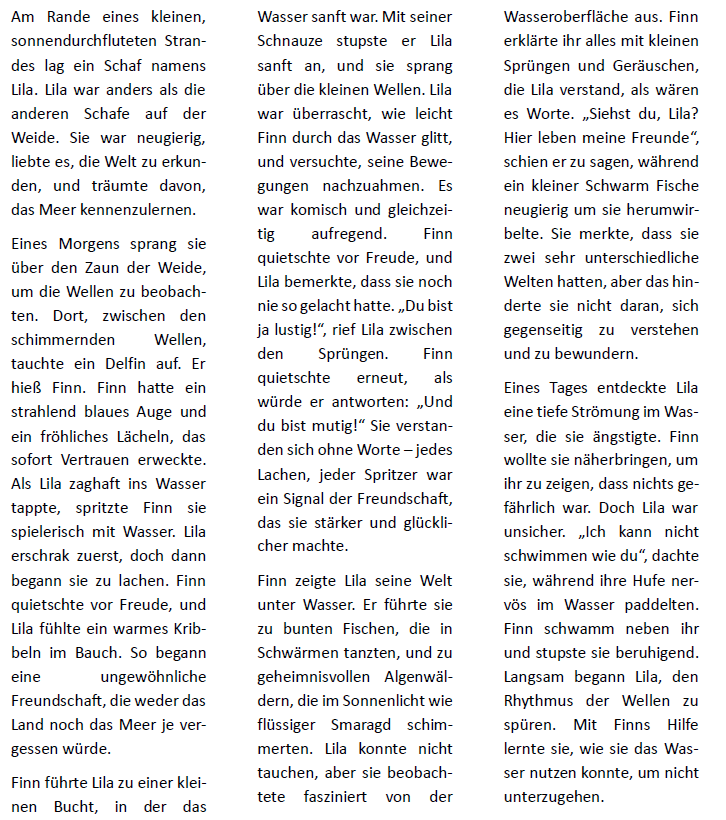
Fig. 9.12 Excerpt from conversion output of Octopus

Overall, multicolumn documents chiefly challenge reconstruction of original text structure rather than recognition of reading order. Gemini and ChatGPT Markdown perform best by largely handling text flow and hyphenation correctly. Weaker results arise from retaining layout artifacts—column breaks, soft line breaks or hyphenation—or losing paragraph structure.
9.5 Footnotes, endnotes and citations
This chapter tested reliable transfer of footnotes, endnotes and citations from the PDF. It matters not only whether markers and content are recognized, but whether the reference relationship between text and note survives. It also tested whether citations are recognized as independent reference elements or treated merely as body text.
Table 9.5 Results and scores of the tools tested for the chapter “Footnotes, endnotes and citations”
Criterion | Points | Oct | Mi | GeM | Pop | ChM | Op | GeX | ChX |
Footnotes (markers and content) recognized | 100 | 100 | 100 | 70 | 100 | 100 | 100 | 60 | 0 |
Endnotes (markers and content) recognized | 100 | 100 | 70 | 0 | 100 | 100 | 100 | 0 | 0 |
Footnote reference relationships present | 100 | 100 | 0 | 70 | 0 | 100 | 0 | 60 | 0 |
Endnote reference relationships present | 100 | 0 | 0 | 0 | 0 | 100 | 0 | 0 | 0 |
Citations linked to bibliography | 100 | 100 | 0 | 0 | 0 | 0 | 0 | 25 | 0 |
Total | 500 | 400 | 170 | 140 | 200 | 400 | 200 | 145 | 0 |
Percentage | 100% | 80% | 34% | 28% | 40% | 80% | 40% | 29% | 0% |
Tool abbreviations in table header: see legend in the chapter “Brief description of this study”
Octopus and ChatGPT Markdown lead with 400 out of 500 points each (80 %), clearly ahead of the other systems, but their errors differ. Octopus marks footnotes and citations as reference structures but renders endnotes as body text. ChatGPT Markdown correctly represents footnotes and endnotes with reference relationships but retains citations only as plain text.
Fig. 9.13 Excerpt from the test document with footnotes
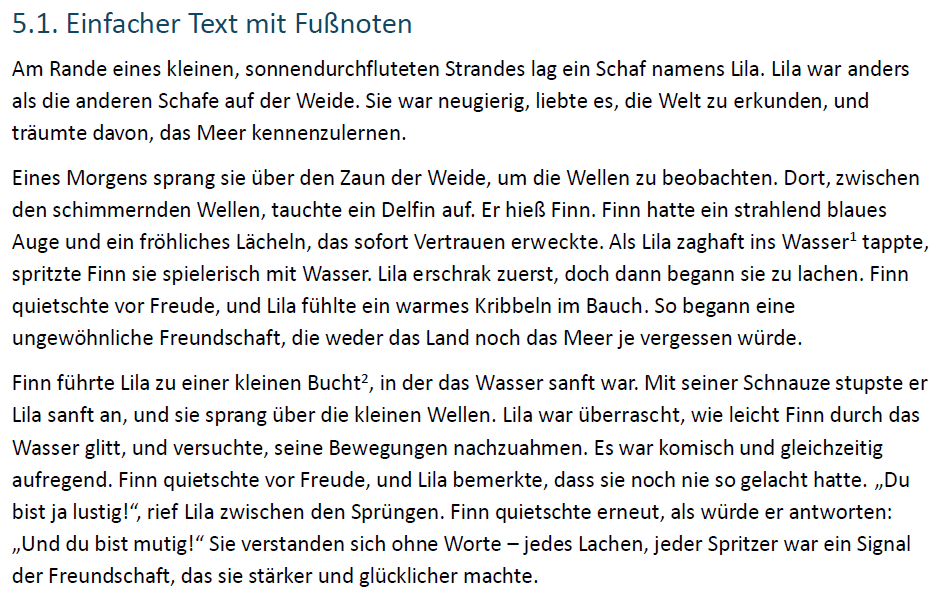

Fig. 9.14 Excerpt from conversion output of ChatGPT Markdown

Poppler/Pandoc and OpenDataLoader are mid-ranked with 200 points each (40 %): both recognize many markers and contents but lose the actual reference relationship. Mistral scores 170 (34 %), recognizing footnotes but only some endnotes and losing all reference links. Gemini XML scores 145 (29 %) and Gemini Markdown 140 (28 %). Both show some correct approaches but lose substantial footnote, endnote or chapter content. ChatGPT XML scores 0, retaining a tiny fragment and virtually none of the relevant structures.
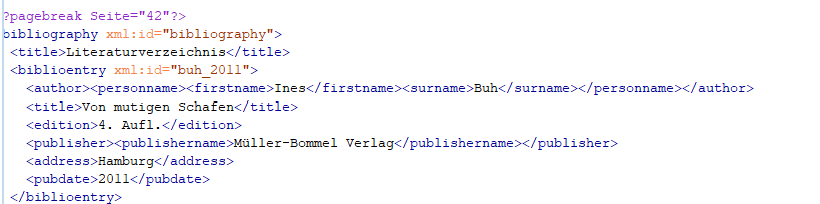
Citations are a recurring problem. Almost all tools retain them merely as body text rather than independent reference elements. Only Octopus and Gemini XML recognize them and link them to bibliography entries. Gemini XML’s positive result is qualified by the simultaneous loss of large parts of the chapter, including many citations.
Fig. 9.15 Excerpt from the test document with a citation
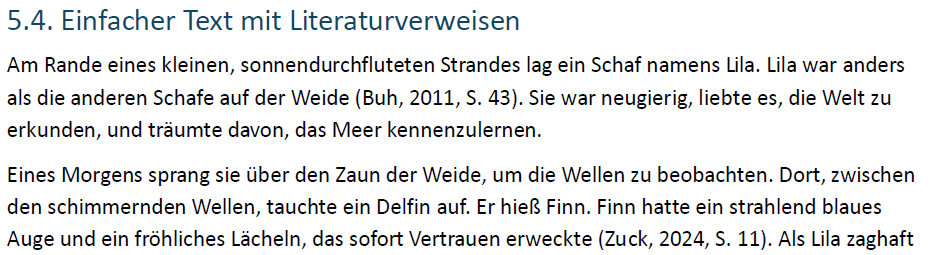
Fig. 9.16 Excerpt from conversion output of Gemini XML

Endnotes also challenge several tools. Mistral recognizes marker positions in body text but changes their original sequence and partly replaces Roman numerals with Arabic ones. Gemini Markdown misses endnotes entirely. OpenDataLoader retains markers without linking content. Endnotes thus prove more complex than footnotes for many converters because they are not immediately at the page bottom and depend more on stable document structure.
Multicolumn text with footnotes adds problems. Poppler/Pandoc places plain-text footnote contents between first- and second-column text, disrupting reading order and partly distorting meaning.
Overall, text recognition alone is insufficient for footnotes, endnotes and citations. Markers and content must remain connected through reference relationships. Tools suitable for structured downstream processing preserve the semantic function of notes as well as extracting text. From this perspective, ChatGPT Markdown and Octopus provide the most balanced results.
Citation markup is a central deficiency. Only Gemini XML and Octopus correctly link textual citations to bibliography entries; all others score 0 here. This is problematic for scholarly documents and RAG applications because sources cannot be directly linked to their passages, losing important connections between argument, evidence and source.
9.6 Multilingual content
In the chapter “Multilingual content”, the test examined reliable recognition and conversion of different writing systems: German, Hebrew, Arabic, Greek and Chinese. It matters that tools process Latin script correctly as well as right-to-left Hebrew and Arabic and non-Latin Greek and Chinese.
Table 9.6 Results and scores of the tools tested for the chapter “Multilingual content”
Criterion | Points | Oct | Mi | GeM | Pop | ChM | Op | GeX | ChX |
German text captured correctly | 100 | 100 | 100 | 100 | 100 | 100 | 100 | 25 | 10 |
Hebrew text captured correctly | 100 | 100 | 100 | 100 | 20 | 100 | 20 | 25 | 10 |
Arabic text captured correctly | 100 | 100 | 100 | 100 | 20 | 100 | 20 | 25 | 10 |
Greek text captured correctly | 100 | 100 | 100 | 100 | 100 | 100 | 100 | 25 | 10 |
Chinese text captured correctly | 100 | 100 | 100 | 100 | 100 | 100 | 100 | 25 | 10 |
Total | 500 | 500 | 500 | 500 | 340 | 500 | 340 | 125 | 50 |
Percentage | 100% | 100% | 100% | 100% | 68% | 100% | 68% | 25% | 10% |
Tool abbreviations in table header: see legend in the chapter “Brief description of this study”
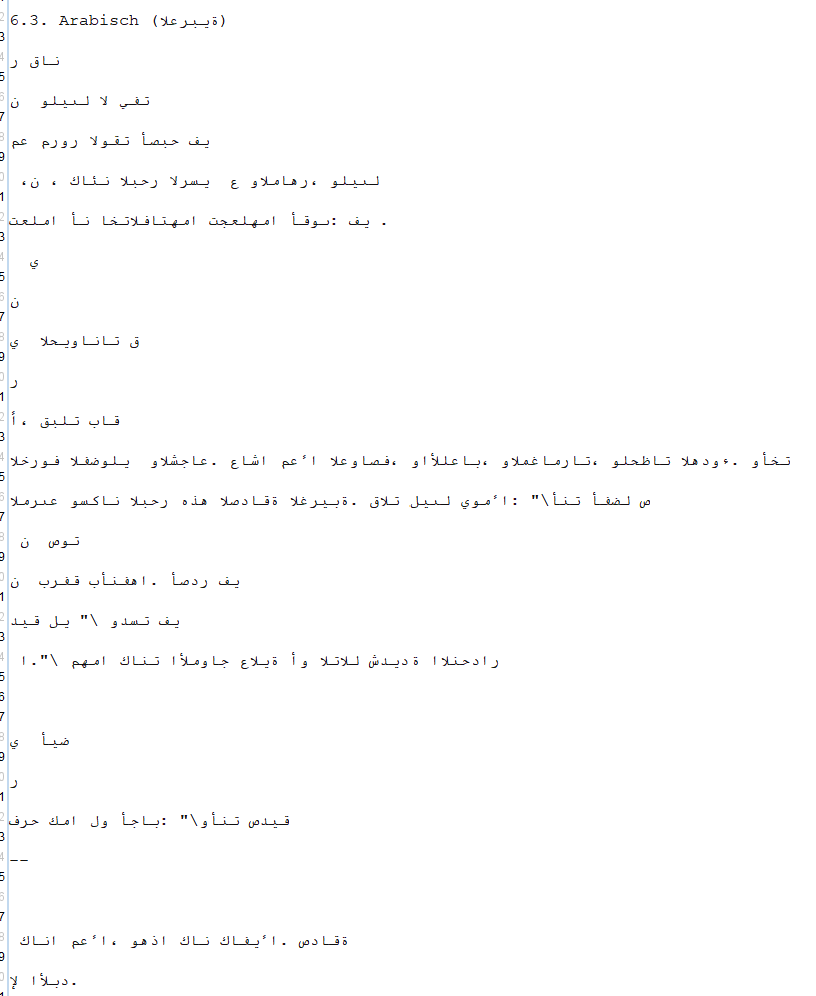
Octopus, Mistral, Gemini Markdown and ChatGPT Markdown each score 500 points (100 %), capturing every language section completely and correctly. Poppler/Pandoc and OpenDataLoader score 340 each (68 %), processing German, Greek and Chinese correctly but struggling significantly with Hebrew and Arabic. Gemini XML scores only 125 (25 %), retaining fragments per language. ChatGPT XML is weakest with 50 (10 %), capturing only the first sentence of each language section correctly.
Right-to-left Hebrew and Arabic reveal a central problem. Poppler/Pandoc and OpenDataLoader process German, Greek and Chinese correctly but fail markedly on Hebrew and Arabic: some characters appear in the wrong order, words are split and reading direction is unreliable. Text retains some original characters but is hardly usable in content terms. This is a serious multilingual error because correct direction and character order are essential for subsequent processing.
Fig. 9.17 Excerpt from the test document with an Arabic passage
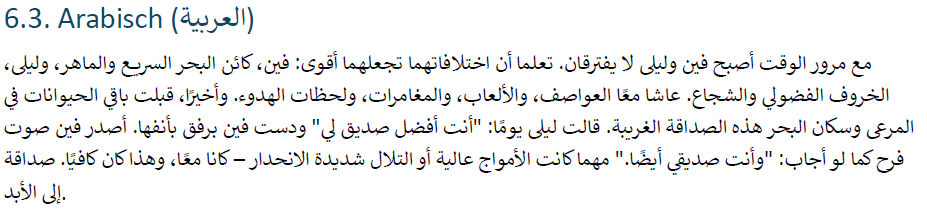
Fig. 9.18 Excerpt from conversion output of Poppler/Pandoc
Both Gemini XML and ChatGPT XML also drastically shorten content. They create recognizable chapter structures with language sections but retain only a small part of the text. Gemini XML preserves several sentences per language; ChatGPT XML outputs only the first. This is especially problematic for XML workflows: output may look formally correct while losing large parts of the chapter.
Most tools capture all languages completely, but Poppler/Pandoc and OpenDataLoader are clearly weak with right-to-left Arabic and Hebrew. Gemini XML and ChatGPT XML create all language sections but lose much content. Practical RAG pipelines and XML workflows therefore require more than checking formal chapter structure: text must be complete, in the correct direction and without character loss.
9.7 Images, charts and diagrams
The chapter “Images, charts and diagrams” tests how reliably the converters capture visual content: images, charts and diagrams, but also embedded text, alternative text, generated image descriptions and tables within graphics. This matters for structured processing because visual information may otherwise be lost or only partly retrievable in RAG systems and XML workflows.
Table 9.7 Results and scores of the tools tested for the chapter “Images, charts and diagrams”
Criterion | Points | Oct | Mi | GeM | Pop | ChM | Op | GeX | ChX |
Images captured | 100 | 100 | 30 | 0 | 0 | 100 | 10 | 10 | 5 |
Charts captured | 100 | 100 | 50 | 0 | 0 | 100 | 10 | 10 | 0 |
Diagrams captured | 100 | 0 | 50 | 0 | 5 | 100 | 10 | 10 | 0 |
Embedded text captured correctly | 100 | 0 | 5 | 5 | 5 | 100 | 5 | 0 | 0 |
Alternative text captured correctly | 100 | 100 | 0 | 0 | 0 | 0 | 0 | 0 | 0 |
Image description generated (based on context) | 100 | 0 | 0 | 0 | 0 | 100 | 5 | 40 | 5 |
Image containing table (table captured separately and correctly) | 100 | 0 | 100 | 80 | 0 | 100 | 0 | 0 | 0 |
Total | 700 | 300 | 235 | 85 | 10 | 600 | 40 | 70 | 10 |
Percentage | 100% | 43% | 34% | 12% | 1% | 86% | 6% | 10% | 1% |
Tool abbreviations in table header: see legend in the chapter “Brief description of this study”
Results differ markedly. ChatGPT Markdown leads at 86 %, correctly capturing all graphics, providing good descriptions and correctly processing the table within an image. Octopus is second at 43 %, reliably capturing images, charts and alternative text. Mistral scores 34 %, capturing several graphics but sometimes unable to display them; correct table-image processing is a positive. Gemini Markdown scores 12 %, Gemini XML 10 % and OpenDataLoader 6 %, capturing content partly, incorrectly or without usable paths. Poppler/Pandoc and ChatGPT XML are weakest at 1 % each, preserving hardly any usable visual information.
Recognizing images does not automatically make their content usable. Several tools create image references but no working paths or semantic descriptions. Gemini XML and ChatGPT XML illustrate this: some XML image references lead nowhere because no images are stored in an image folder. This impairs downstream processing: structure exists formally, but actual content remains unavailable.
Image descriptions are another key difference. Octopus reliably retains existing alternative text; ChatGPT Markdown is especially strong at generating new descriptions from context. This is important for accessibility and retrieval because visual content becomes textually searchable. Mistral, Gemini Markdown, Poppler/Pandoc and OpenDataLoader generate no or barely usable descriptions, leaving visual elements largely invisible to text-based analysis.
Fig. 9.19 Excerpt from the test document with images
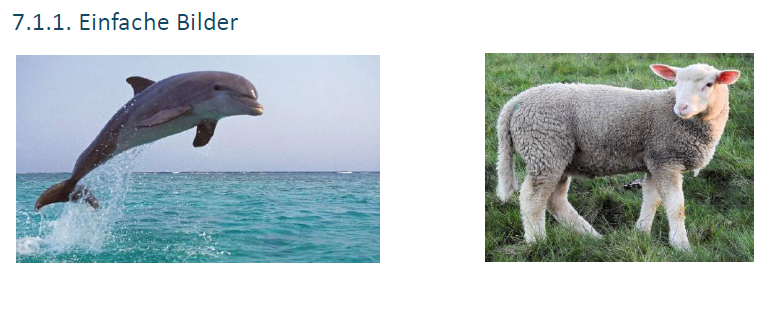
Fig. 9.20 Excerpt from conversion output of ChatGPT Markdown

The image containing a table is particularly revealing. Mistral and ChatGPT Markdown perform strongly, outputting the table as a correct structured table. Gemini Markdown also recognizes it but misassigns some values. Octopus correctly recognizes an image with alternative text but does not additionally process the table as an independent structure. This distinction is central when table values need targeted queries or further processing.
Fig. 9.21 Excerpt from the test document with an image containing a table
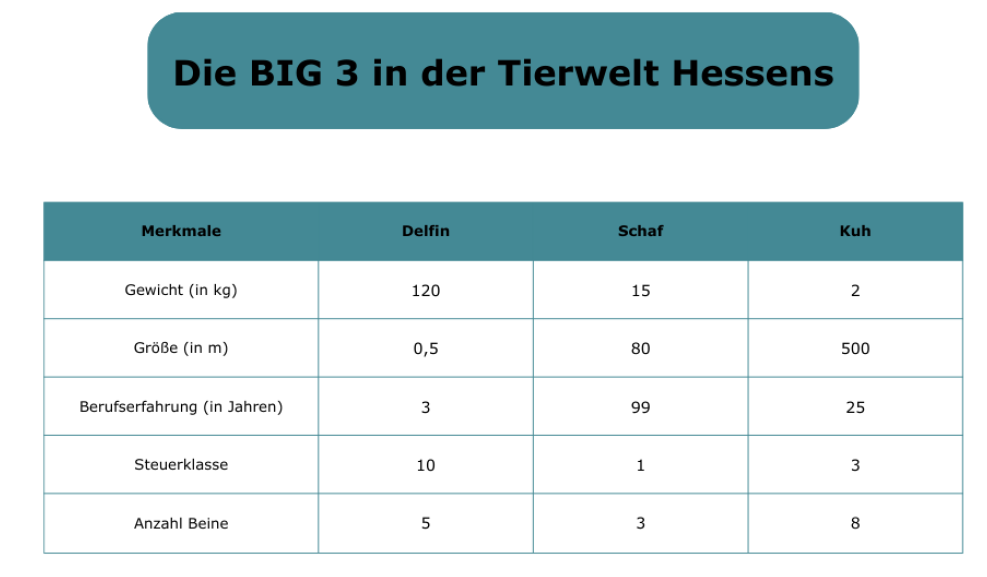
Fig. 9.22 Excerpt from conversion output of Mistral
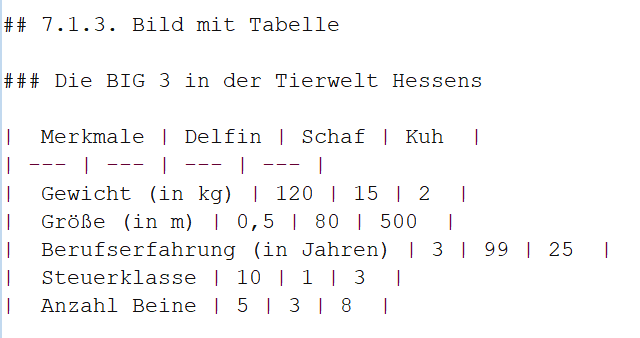
Diagrams reveal another problem: some tools extract only visible text such as titles, axis labels or legends. Poppler/Pandoc and OpenDataLoader, for example, output diagram content as loose plain text without capturing diagram structure or the diagram itself. Some labels survive, but most meaning is lost.
In summary, ChatGPT Markdown and Octopus are most stable at general image capture. Octopus also correctly retains existing alternative text, while ChatGPT excels in informative descriptions and additional structured extraction of the table image.
Other tools lose graphics, generate unusable descriptions or represent visual content only fragmentarily. Visual document components therefore pose a particular conversion challenge and require evaluation of working links, alternative text and structured extraction, beyond image paths alone.
9.8 Tables
The results for the chapter “Tables” show clear differences in recognition and structural preparation of tables. Assessment covered simple tables, complex spanning tables, multipage tables with repeating headers, and borderless tables. The maximum was 400 points.
Table 9.8 Results and scores of the tools tested for the chapter “Tables”
Criterion | Points | Oct | Mi | GeM | Pop | ChM | Op | GeX | ChX |
Simple table captured | 100 | 100 | 100 | 100 | 5 | 100 | 100 | 100 | 50 |
Complex table captured (spans) | 100 | 100 | 25 | 50 | 5 | 100 | 50 | 0 | 0 |
Multipage table captured (repeating header) | 100 | 100 | 100 | 100 | 5 | 100 | 100 | 5 | 0 |
Borderless tables captured | 100 | 95 | 70 | 40 | 5 | 100 | 5 | 0 | 0 |
Total | 400 | 395 | 295 | 290 | 20 | 400 | 255 | 105 | 50 |
Percentage | 100% | 99% | 74% | 73% | 5% | 100% | 64% | 26% | 13% |
Tool abbreviations in table header: see legend in the chapter “Brief description of this study”
ChatGPT (Markdown) leads with 400 points (100 %), followed by Octopus with 395 (99 %). Both capture almost all table structures correctly in structured output. Mistral (74 %) and Gemini Markdown (73 %) also perform well but struggle with complex and borderless tables. OpenDataLoader scores 64 %, capturing many tables but losing semantic structure for certain types. Gemini XML (26 %), ChatGPT XML (13 %) and especially Poppler/Pandoc (5 %) perform much worse.
ChatGPT Markdown and Octopus are notably strong: both capture simple, complex and multipage tables almost completely.
Fig. 9.23 Excerpt from the test document with a spanning table
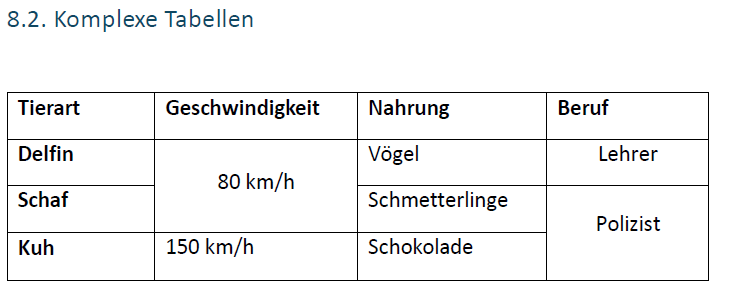
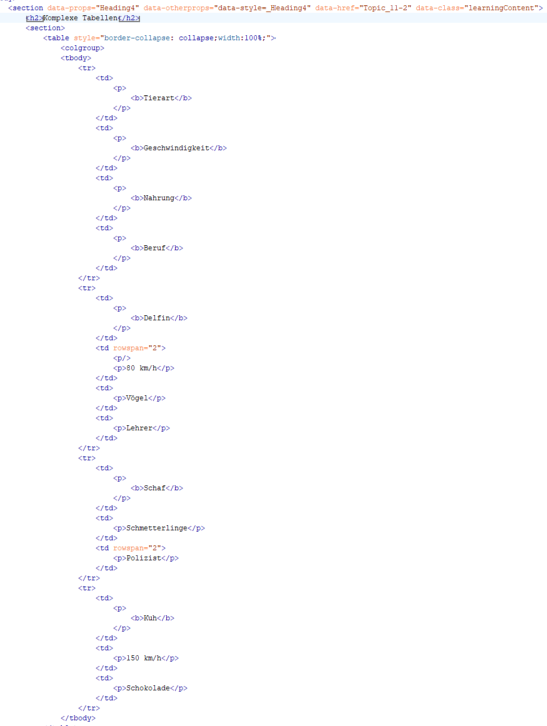
Fig. 9.24 Excerpt from conversion output of Octopus
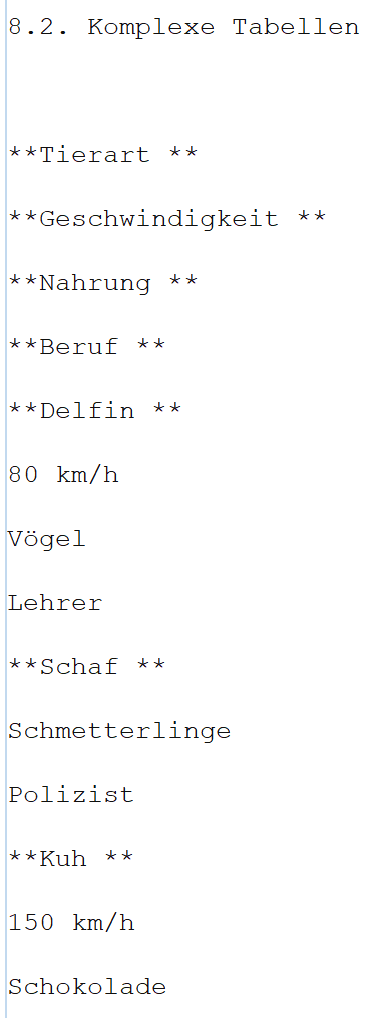
Poppler/Pandoc, however, almost completely dissolves table structure into body text. Data survive, but relationships between rows, columns and headers are lost.
Fig. 9.25 Excerpt from conversion output of Poppler/Pandoc
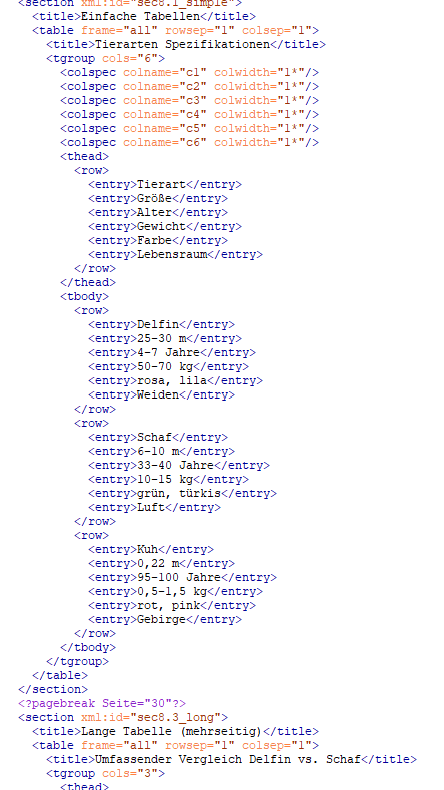
Although XML is well suited to describing complex tables, the tested XML converters captured them inadequately. Gemini XML and ChatGPT XML lost almost all tables apart from simple ones. Gemini XML, for example, captured the simple table and a small part of the multipage table but did not convert complex spanning tables.
Fig. 9.26 Excerpt from the test document’s “Tables” chapter
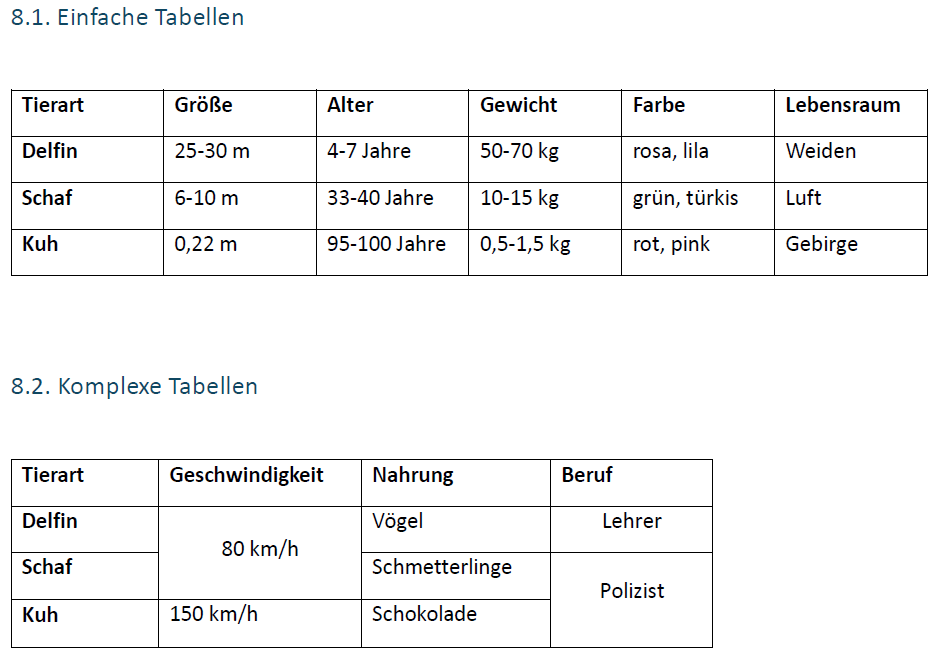
Fig. 9.27 Excerpt from conversion output of Gemini XML
Overall, text recognition alone is insufficient for tables. RAG processing requires correct reconstruction of semantic table structure. Complex spanning tables and borderless tables are particularly suitable tests of actual converter quality. Currently, Octopus and ChatGPT Markdown in particular meet these requirements reliably.
9.9 Lists and enumerations
In the chapter “Lists and enumerations”, the test examined reliable transfer of PDF list forms: simple bullets, numbered, alphabetic, mixed and nested lists, and marginal numbers. Lists matter for structured processing because they visually organize content and express semantic relationships between main items, subitems and accompanying marginal numbers.
Table 9.9 Results and scores of the tools tested for the chapter “Lists and enumerations”
Criterion | Points | Oct | Mi | GeM | Pop | ChM | Op | GeX | ChX |
Simple bulleted list recognized | 100 | 100 | 100 | 100 | 100 | 100 | 85 | 50 | 40 |
Numbered list recognized | 100 | 100 | 100 | 100 | 100 | 100 | 85 | 50 | 0 |
Alphabetic list recognized | 100 | 50 | 100 | 100 | 80 | 100 | 85 | 15 | 0 |
Mixed list recognized | 100 | 100 | 100 | 100 | 100 | 100 | 85 | 0 | 0 |
Nested list recognized | 100 | 100 | 50 | 100 | 70 | 100 | 70 | 0 | 0 |
Marginal numbers marked correctly | 100 | 30 | 0 | 100 | 0 | 100 | 5 | 0 | 0 |
Total | 600 | 480 | 450 | 600 | 450 | 600 | 415 | 115 | 40 |
Percentage | 100% | 80% | 75% | 100% | 75% | 100% | 69% | 19% | 7% |
Tool abbreviations in table header: see legend in the chapter “Brief description of this study”.
Gemini Markdown and ChatGPT Markdown score the full 100 %, correctly transferring every list form. Octopus scores 80 %, with only minor weaknesses in alphabetic lists and marginal numbers. Mistral and Poppler/Pandoc are mid-ranked at 75 %, mainly mishandling nesting and marginal numbers. Poppler/Pandoc also fails to mark simple bullets with standard Markdown syntax. OpenDataLoader scores 69 %, recognizing many lists but outputting untidy structure. XML is much weaker: Gemini XML scores 19 % and ChatGPT XML just 7 %, omitting or incompletely transferring many lists.
The Markdown/XML contrast is particularly clear. Gemini and ChatGPT Markdown represent list structure very stably, preserving simple, numbered, alphabetic and nested lists understandably. This preserves relationships between main and subordinate items for later processing. Marginal numbers also become meaningful numbered sections, remaining usable as textual landmarks.
Fig. 9.28 Excerpt from the test document with marginal numbers
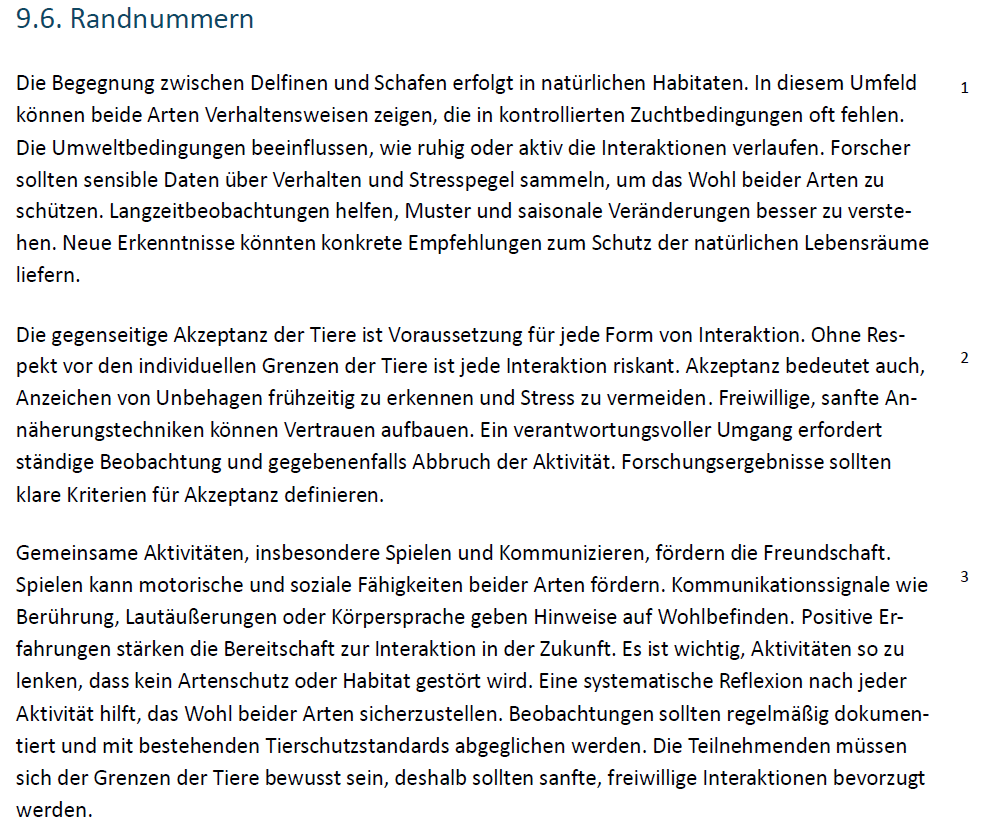
Fig. 9.29 Excerpt from conversion output of Gemini Markdown
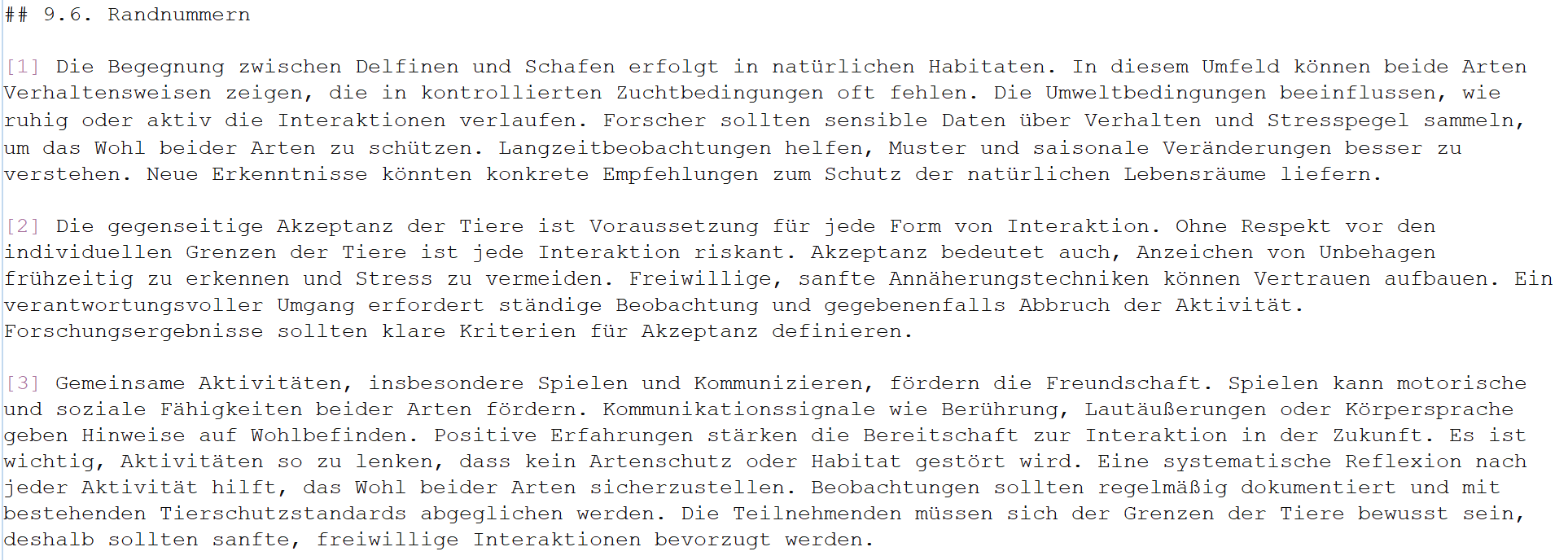
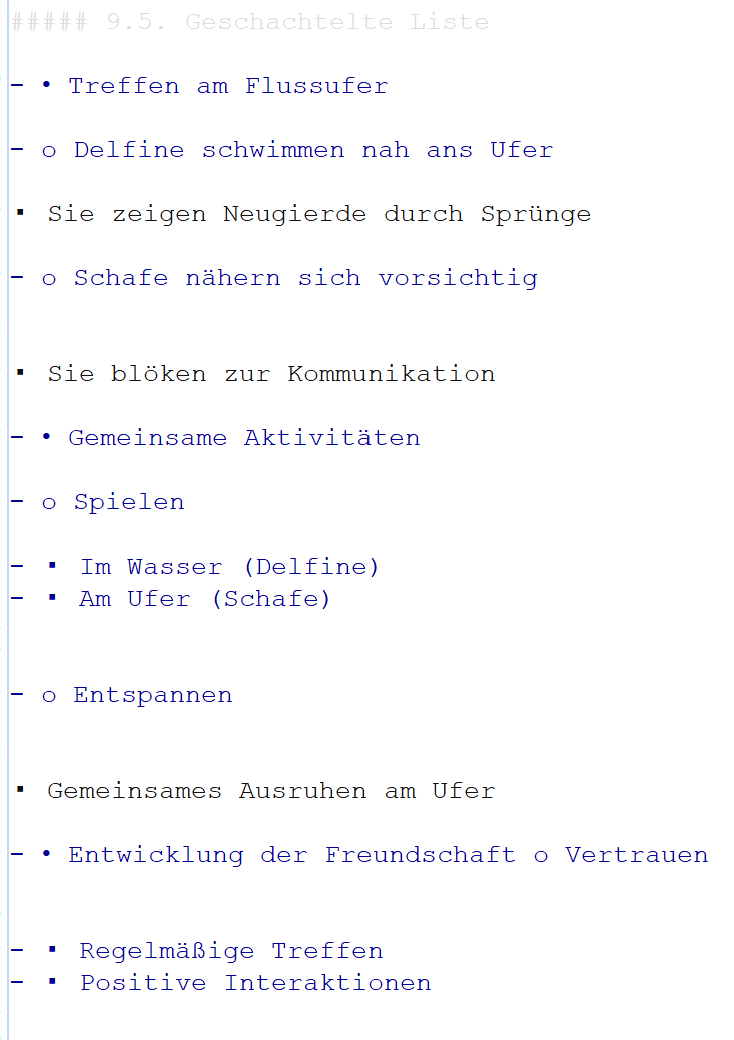
Mid-ranking tools often recognize simple lists reliably but struggle with complexity. Octopus handles most correctly but fails to distinguish alphabetic and numbered lists cleanly. Mistral flattens nesting to simple bullets, losing hierarchy. Poppler/Pandoc retains all content but sometimes omits Markdown syntax, separates letters from alphabetic-list text, and collects marginal numbers at the end, losing their direct textual reference. OpenDataLoader shows that recognizable lists alone are insufficient: items are often double-marked with Markdown and the original symbol, creating overloaded, less clean output. Nested levels in particular are lost or not clearly separated.
Fig. 9.30 Excerpt from the test document with a nested list
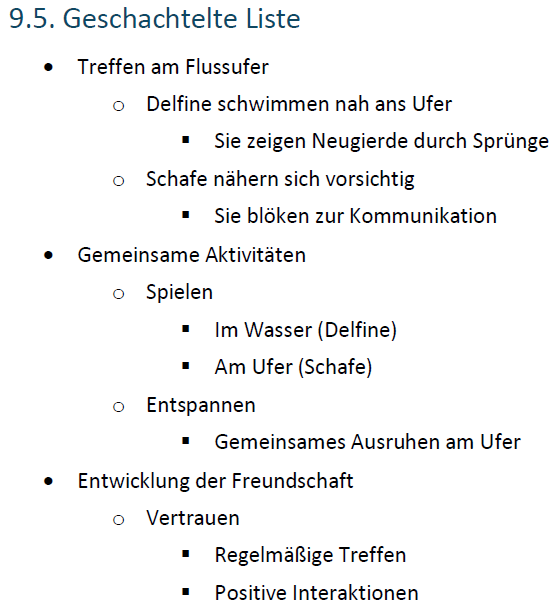
Fig. 9.31 Excerpt from conversion output of OpenDataLoader
XML results are considerably weaker. Gemini XML recognizes only list fragments and omits several forms entirely. ChatGPT XML reduces almost the whole chapter to a few fragments. Structure-oriented workflows lose content and context as well as formatting.
Overall, lists are demanding conversion structures. Many tools handle simple lists well, but nesting and marginal numbers cause the greatest errors. Gemini and ChatGPT Markdown are particularly reliable here. XML outputs are much less stable and only partly suitable where complete, hierarchically correct lists are required.
9.10 Mathematical formulas and content
In the chapter “Mathematical content and formulas”, the test examined reliable capture and reusable representation of mathematical content: correct fractions, roots, inline mathematics, and formulas as LaTeX, inline code or MathML. Results differ markedly: some systems preserve almost all mathematical structure, while others lose internal structure in complex formulas or retain fragments only.
Table 9.10 Results and scores of the tools tested for the chapter “Mathematical formulas and content”
Criterion | Points | Oct | Mi | GeM | Pop | ChM | Op | GeX | ChX |
Fractions correct | 100 | 10 | 100 | 85 | 10 | 100 | 10 | 40 | 0 |
Roots correct | 100 | 15 | 95 | 100 | 10 | 100 | 10 | 30 | 0 |
Inline mathematical content correct | 100 | 100 | 95 | 95 | 100 | 95 | 100 | 30 | 5 |
Formulas represented as LaTeX, inline code or MathML | 100 | 0 | 100 | 100 | 0 | 100 | 0 | 0 | 0 |
Total | 400 | 125 | 390 | 380 | 120 | 395 | 120 | 100 | 5 |
Percentage | 100% | 31% | 98% | 95% | 30% | 99% | 30% | 25% | 1% |
Tool abbreviations in table header: see legend in the chapter “Brief description of this study”
ChatGPT Markdown leads with 395 out of 400 points (99 %), followed by Mistral with 390 (98 %) and Gemini Markdown with 380 (95 %). Octopus scores 125 (31 %). Poppler/Pandoc and OpenDataLoader both score 120 (30 %). Gemini XML scores 100 (25 %). ChatGPT XML is weakest with 5 (1 %).
AI tools reconstruct mathematics relatively reliably in PDF-to-Markdown conversion. Mistral, Gemini Markdown and ChatGPT Markdown output fractions, roots and inline mathematics largely correctly as LaTeX. Some semantic errors remain: Mistral reads “n” in a root as “7”; Gemini Markdown outputs an inline root as “v” and several minus signs in fractions as multiplication dots.
Fig. 9.32 Excerpt from the test document with inline mathematical content
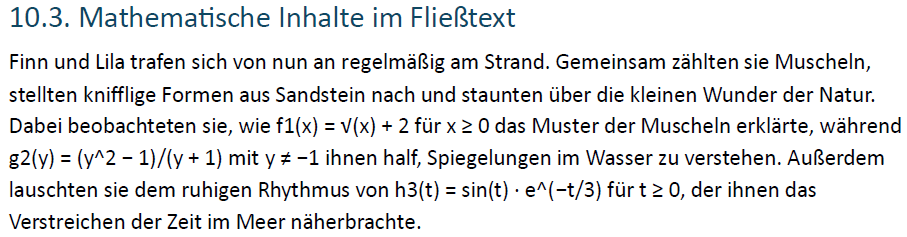
Fig. 9.33 Excerpt from conversion output of Gemini Markdown

Octopus, Poppler/Pandoc and OpenDataLoader are much more problematic. They recognize some numbers, characters and formula components but frequently lose fraction and root structure. In multiline formulas especially, numerators, denominators, radicals, exponents and operators become separate text fragments, making reconstruction difficult or impossible. Inline mathematics works much better because it is embedded linearly in text.
XML outputs have another problem. Gemini XML captures only part of the mathematics and not as LaTeX or MathML. Important chapter components are missing and some content changes. ChatGPT XML is weaker still, losing almost the whole chapter and retaining only small inline-formula fragments.
Fig. 9.34 Excerpt from the test document with fractions and roots
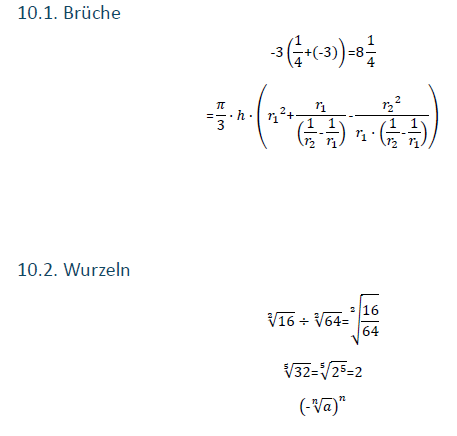
Fig. 9.35 Excerpt from conversion output of Gemini XML
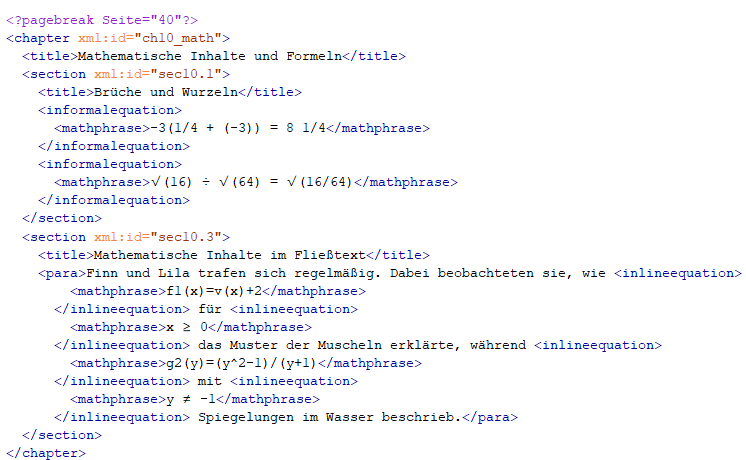
Overall, mathematical content is especially demanding to convert. Preservation of spatial and logical formula structure matters as much as character recognition. Technical documentation, XML workflows and RAG therefore particularly need converters that semantically reconstruct formulas in LaTeX, MathML or comparably structured formats.
9.11 Text boxes
Text boxes often contain supplementary information, examples, notes, definitions or particularly important statements. If a converter misses text boxes, some text may survive but its special document function is lost.
Table 9.11 Results and scores of the tools tested for the chapter “Text boxes”
Criterion | Points | Oct | Mi | GeM | Pop | ChM | Op | GeX | ChX |
Content (text) correct | 100 | 100 | 100 | 100 | 100 | 100 | 100 | 0 | 0 |
Box captured | 100 | 0 | 0 | 0 | 0 | 100 | 0 | 0 | 0 |
Total | 200 | 100 | 100 | 100 | 100 | 200 | 100 | 0 | 0 |
Percentage | 100% | 50% | 50% | 50% | 50% | 100% | 50% | 0% | 0% |
Tool abbreviations in table header: see legend in the chapter “Brief description of this study”
Most tools capture box text correctly but differ in recognizing box structure. Octopus, Mistral, Gemini Markdown, Poppler/Pandoc and OpenDataLoader retain content but do not reliably recognize boxes as design elements, scoring 100 out of 200 (50 %) each. ChatGPT Markdown leads with 200 out of 200 (100 %), correctly capturing content and boxes or frames. Gemini XML and ChatGPT XML score 0 % because content is entirely missing.
Text recognition is generally stable; the difficulty is preserving visual and semantic structure. Octopus, Mistral, Gemini Markdown and Poppler/Pandoc output correct text but lose the box’s original function. Content becomes ordinary body text or at most a separate section. This can impair further processing because original emphasis or framing is no longer unambiguous.
OpenDataLoader is a special case: text is correct and one box is represented like a table, but the box is not actually recognized, merely converted into another structure. This offers some visual separation without reliably reflecting original document structure.
ChatGPT Markdown performs best, recognizing content and frames. Output uses HTML with background color, border, padding and surrounding-spacing information. This preserves both text and the boxes’ design function, particularly relevant when highlighted content, information boxes or framed sections must later be identified or processed specifically.
Fig. 9.36 Excerpt from the test document with text boxes
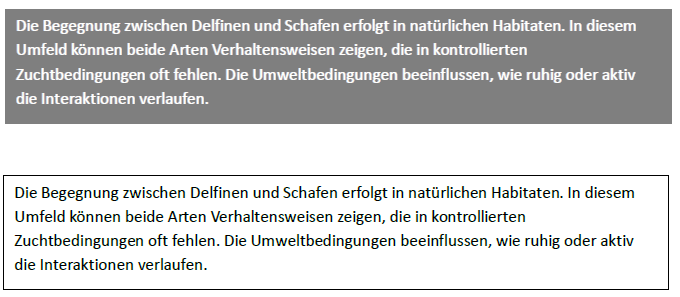
Fig. 9.37 Excerpt from conversion output of ChatGPT Markdown

Gemini XML and ChatGPT XML fail clearly: absent content means complete loss of both text and structure. This is particularly critical for RAG and XML downstream processing because an entire document component is missing.
9.12 bibliography
The chapter “bibliography” shows clear differences between converters. Assessment covered correct bibliography content, clean separation of individual entries and semantic identification as bibliographic entries. The maximum was 300 points.
Table 9.12 Results and scores of the tools tested for the chapter “bibliography”
Criterion | Points | Oct | Mi | GeM | Pop | ChM | Op | GeX | ChX |
Content (text) correct | 100 | 100 | 100 | 100 | 100 | 100 | 100 | 80 | 15 |
Entries captured with clean separation | 100 | 100 | 100 | 100 | 100 | 100 | 0 | 80 | 15 |
Bibliographic information captured semantically | 100 | 0 | 0 | 0 | 0 | 0 | 0 | 80 | 20 |
Total | 300 | 200 | 200 | 200 | 200 | 200 | 100 | 240 | 50 |
Percentage | 100% | 67% | 67% | 67% | 67% | 67% | 33% | 80% | 17% |
Tool abbreviations in table header: see legend in the chapter “Brief description of this study”.
Octopus, Mistral, Gemini Markdown, Poppler/Pandoc and ChatGPT Markdown each score 200 (67 %), retaining correct bibliography content and cleanly separating entries. OpenDataLoader scores 100 (33 %), recognizing text but not reliably separating entries. Gemini XML leads with 240 (80 %), semantically marking several references with bibliographic XML tags. ChatGPT XML scores lowest at 50 (17 %), recognizing and structuring only a small part.
Most tools capture visible bibliography text well. Octopus, Mistral, Poppler/Pandoc and ChatGPT Markdown output largely complete references as separate paragraphs. Gemini Markdown goes further, marking an unordered list. This separation helps simple processing by isolating sources. Structure remains largely formal, however: tools identify entry boundaries without semantically distinguishing author, title, publisher, place, year or pages.
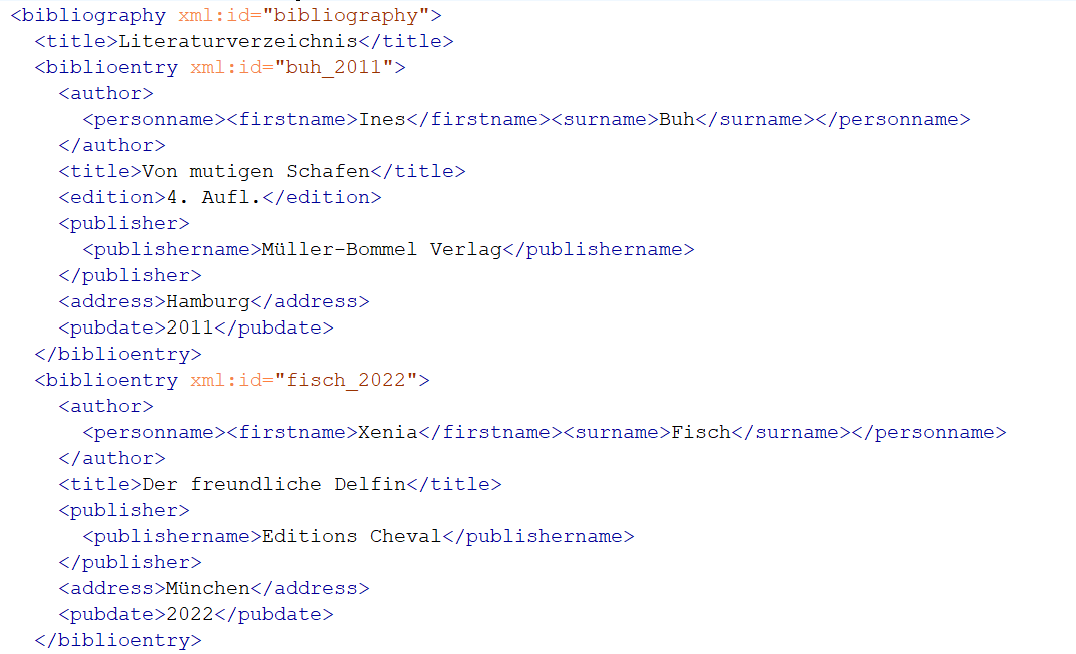
Comparing Gemini XML and ChatGPT XML is revealing. Gemini XML has the strongest semantic processing, marking the first three and fifth entries with author, title, publisher, place and date structures. The fourth entry is entirely missing, however, causing significant content loss despite good semantics. ChatGPT XML captures only two entries and only partly marks them completely, limiting reliability for bibliographic processing.
Fig. 9.38 Excerpt from the test document with the bibliography
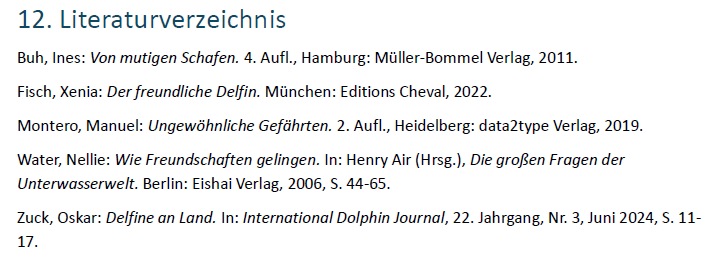
Fig. 9.39 Excerpt from conversion output of Gemini XML
OpenDataLoader is another notable case. Content is basically recognized, but several references merge into body text, preventing clean entry separation. The final entry’s page reference is also wrong. Retrieval and automatic metadata extraction suffer because individual sources cannot be stably isolated and analyzed.
Fig. 9.40 Excerpt from conversion output of OpenDataLoader

Overall, many tools recognize bibliography text, but semantic depth is the main weakness. Gemini XML is most promising for structured XML workflows because it deliberately marks bibliographic components. Its missing fourth entry also shows why richer semantic conversions require especially careful checking: errors affect completeness and citability as well as display.
9.13 Index
In the chapter “Index”, the test examined complete capture and clean separation of index entries and preservation of references to corresponding content passages. For structured processing, an index is a curated access layer to central content as well as a term collection. Losing keywords, page numbers or references leaves it partly readable but no longer reliably usable.
Table 9.13 Results and scores of the tools tested for the chapter “Index”
Criterion | Points | Oct | Mi | GeM | Pop | ChM | Op | GeX | ChX |
Content (keywords and page numbers) correct | 100 | 100 | 100 | 100 | 100 | 100 | 100 | 25 | 0 |
Entries cleanly separated | 100 | 100 | 100 | 100 | 100 | 100 | 60 | 100 | 0 |
Reference to corresponding content location | 100 | 0 | 0 | 0 | 0 | 0 | 0 | 0 | 0 |
Total | 300 | 200 | 200 | 200 | 200 | 200 | 160 | 125 | 0 |
Percentage | 100% | 67% | 67% | 67% | 67% | 67% | 53% | 42% | 0% |
Tool abbreviations in table header: see legend in the chapter “Brief description of this study”
Most tools obtain similar results: Octopus, Mistral, Gemini Markdown, Poppler/Pandoc and ChatGPT Markdown each score 200 out of 300 (67 %). OpenDataLoader scores 160 (53 %), Gemini XML 125 (42 %), and ChatGPT XML is weakest at 0. Markdown conversions thus provide the strongest results, while XML outputs show substantial losses.
Almost all tools can recognize index content. Octopus, Mistral, Gemini Markdown, Poppler/Pandoc, ChatGPT Markdown and OpenDataLoader retain all keywords and page numbers correctly. Gemini XML earns only 25 points here, while ChatGPT XML captures nothing. Text recognition generally works, but structured markup is much more error-prone.
Fig. 9.41 Excerpt from the test document with the index
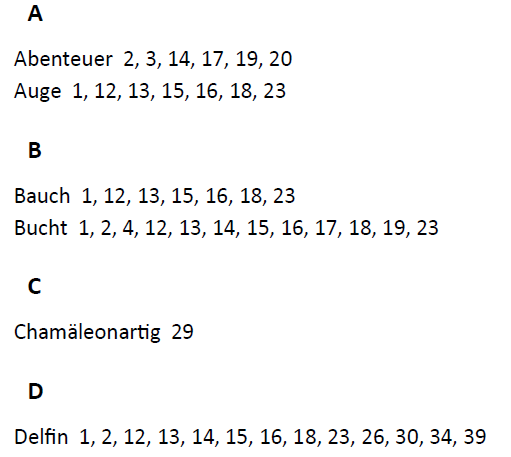
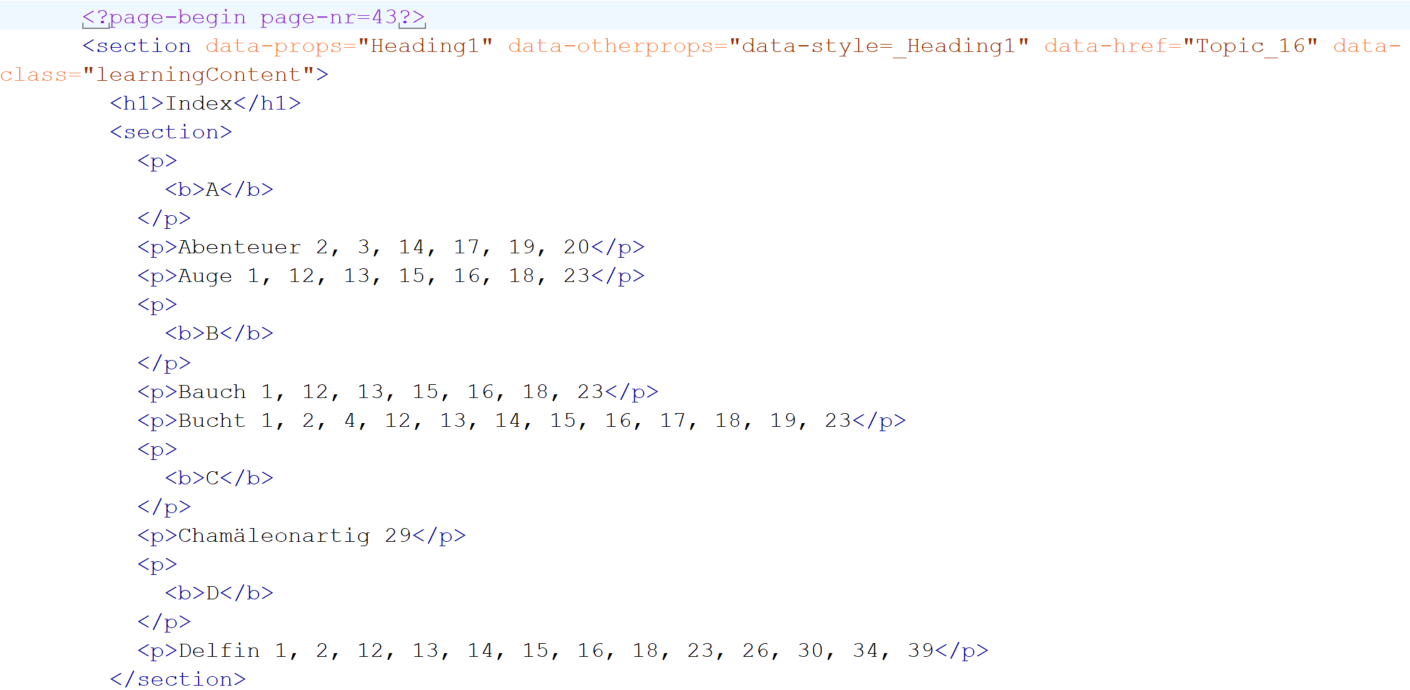
Fig. 9.42 Excerpt from conversion output of Octopus
Entry separation is another difference. Octopus, Mistral, Gemini Markdown, Poppler/Pandoc, ChatGPT Markdown and Gemini XML separate entries cleanly. OpenDataLoader earns only 60 points here because some entries merge or lack clear boundaries.
Referencing the corresponding content location is the greatest weakness: all tools score 0. Some retain visible index terms and page numbers but lose the actual linking function. This may partly suffice for a reading copy, but is problematic for XML processing, navigation, retrieval and semantic references.
Overall, several tools recognize the index superficially well but barely preserve its functional structure. The best stably retain content and entry separation. Complete conversion would additionally preserve links between each entry and its target passage. None of the tested tools meets this requirement.