

XML technologies / XML / XML in a Nutshell / XML on the web / Displaying XML directly in browsers
(Excerpt from “XML in a Nutshell” by Elliotte Rusty Harold & W. Scott Means)
One day browsers will hopefully display not just XHTML documents but all XML. Since browsers cannot provide semantics for every existing and future XML application, documents will have stylesheets explaining how to display each element.
The main stylesheet languages currently are:
Cascading Stylesheets Level 1 (CSS1)
Cascading Stylesheets Level 2 (CSS2)
XSL Transformations 1.0
Further versions will come, including at least CSS 2.1, CSS Level 3 and XSLT 2.0. For now, let us examine how well existing browsers support current languages.
The xml-stylesheet processing instruction
A document’s associated stylesheet is identified by xml-stylesheet, a processing instruction in its prolog, after the XML declaration but before the root start-tag. Pseudo-attributes describe the stylesheet: they resemble attributes but are not attributes, because xml-stylesheet is a processing instruction, not an element.
Required pseudo-attributes href and type
Two pseudo-attributes are required for xml-stylesheet processing instructions. The value of href gives the stylesheet’s possibly relative URL. The pseudo-attribute type gives its MIME type: text/css for Cascading Stylesheets, application/xml for XSLT. In the example, the instruction xml-stylesheet tells browsers to apply the CSS stylesheet person.css before displaying the document.
<?xml version="1.0"?>
<?xml-stylesheet href="person.css" type="text/css"?>
<person>Alan Turing</person>
Example: An XML document associated with a stylesheet
Note: Microsoft Internet Explorer uses type="text/xsl" for XSL stylesheets. The MIME type text/xsl is not registered with IANA, the Internet Assigned Numbers Authority, and never will be: it is Microsoft’s invention. Eventually application/xslt+xml will be registered to identify XSLT stylesheets specifically.
Four optional pseudo-attributes accompany these two required ones:
mediacharsetalternatetitle
The media pseudo-attribute
The pseudo-attribute media identifies the intended medium, such as paper, screen or television, using one name or a comma-separated list. Recognized values include:
-
screen Computer monitors
-
tty Teletypes, terminals, Xterms and other nongraphical devices
-
tv Televisions, WebTV, game consoles and similar devices
-
projection Slides, transparencies and laptop presentations projected to an audience
-
handheld PDAs, mobile phones, GameBoys and similar devices
-
print Paper
-
braille Tactile devices for visually impaired users
-
aural Speech output
-
all All listed media and those not yet invented
For example, this xml-stylesheet instruction selects the CSS stylesheet at "http://www.cafeconleche.org/style/titus.css" for television, projection and printing:
<?xml-stylesheet href="http://www.cafeconleche.org/style/titus.css" type="text/css" media="tv, projection, print"?>The charset pseudo-attribute
The pseudo-attribute charset specifies the stylesheet’s character set using the same values as an encoding declaration. To indicate that the CSS stylesheet koran.css uses character set ISO-8859-6, use this instruction:
<?xml-stylesheet href="koran.css" type="text/css" charset="ISO-8859-6"?> The alternate and title pseudo-attributes
The pseudo-attribute alternate says whether the stylesheet is primary for its medium or an alternative for special cases. The default is no, meaning primary. If alternate equals yes, browsers may, but need not, offer a choice of stylesheets. If offered, the pseudo-attribute title explains their differences. These three xml-stylesheet instructions offer large, small and medium fonts:
<?xml-stylesheet href="big.css" type="text/css" alternate="yes" title="Große Schriften"?>
<?xml-stylesheet href="small.css" type="text/css" alternate="yes" title="Kleine Schriften"?>
<?xml-stylesheet href="medium.css" type="text/css" title="Normale Schriften"?>
Browsers unable to offer that choice use the first non-alternate stylesheet best matching their medium, typically screen for a web browser.
Internet Explorer
Microsoft Internet Explorer 4.0 and later include an XML parser accessible through VBScript or JavaScript, used internally for Channels and Active Desktop. Your scripts can read XML and insert it into web pages. Beyond simple tasks such as displaying XML from a URL, however, IE4’s capabilities are limited, and it supports no XML stylesheet language.
IE5 and IE5.5 understand XML, but their parser has serious bugs, rejecting valid documents—even the XML 1.0 specification. IE6 improves support but is still not fully conformant.
IE5 and later display XML directly with or without stylesheets. Without one, IE5’s built-in XSLT stylesheet shows the tree with DHTML controls to expand or collapse nodes. The figure shows it rendering the example A TEI document.
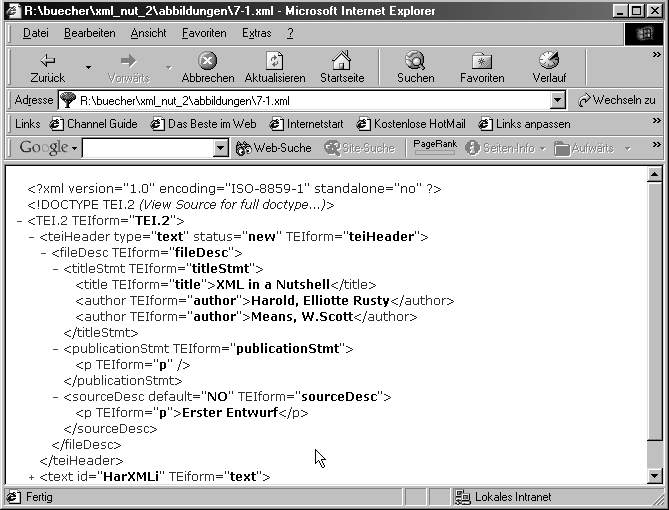
Figure: Document rendered with IE5’s built-in stylesheet
IE5 partially supports CSS1 and a little CSS2, inconsistently. Features working for HTML may fail for XML. IE5.5 and IE6 improve coverage slightly but still lack properties and selectors. Even IE6 has CSS features working for HTML but not XML.
IE5 and IE5.5 support their own XSLT based on an early working draft. They do not support XSLT 1.0. Check the stylesheet’s namespace to tell the difference. IE5 stylesheets use "http://www.w3.org/TR/WD-xsl", while standards-compliant stylesheets use "http://www.w3.org/1999/XSL/Transform". Despite superficial similarities, they are incompatible: IE5 sheets work with no other XSLT processor, and standard XSLT 1.0 does not work in IE. IE6 supports both real XSLT and Microsoft’s dialect.
Netscape and Mozilla
Netscape 4.x and earlier offer no meaningful browser XML display. From 4.0.6, XML is used internally for features such as “What's Related”, but authors cannot access the parser even through JavaScript.
Mozilla 1.0, Netscape 6.0 and later fully display XML, with nearly complete CSS2 and good XSLT support. Mozilla reads XML, downloads the associated CSS, applies it and displays the result automatically, much as XML on the web was intended. It partially supports MathML and SVG. SVG is not enabled by default in Mozilla 1.7; MathML requires extra mathematical fonts. Both are easy to add.
Alternative approaches
Authoring web pages in XML need not mean delivering XML. Fourth-generation and older browsers without real XML support will remain, requiring plain HTML working back to Mosaic 1.0.
A popular approach authors XML but delivers HTML. On request, the server transforms XML automatically and sends HTML instead. Advanced servers cache results and may send raw XML to capable browsers.
Prefer an XSLT stylesheet and a Java servlet for conversion. Most XSLT engines, including Xalan-J and SAXON, include suitable servlets. Other arrangements may use PHP or CGI instead. The trick is to send browsers only what they can read and display.
Copyright © 2005 O'Reilly Verlag GmbH & Co. KG
You may print the online version for your private use.
Otherwise, this chapter from “XML in a Nutshell” is subject to the same conditions as the bound edition: the work, including all its parts, is protected by copyright. All rights reserved, including reproduction, translation, microfilming, and storage and processing in electronic systems.
O’Reilly Verlag GmbH & Co. KG, Balthasarstraße 81, 50670 Köln, kommentar(at)oreilly.de