

XML technologies / XSLT / XSLT 3.0 / XSLT streaming / Elements / xsl:for-each / Extract employee activities
Exercise 10
As a practical example, this exercise performs an XSLT transformation to show which activities men and women perform in a company. Convert the data into an HTML table. Use input file 5-Companies.xml and extract these data:
Gender
Name
Activity
Follow the tip on using xsl:for-each in streaming mode!
Use the XSLT file below, which contains the basic HTML table structure. Select input file 5-Companies.xml and transformation scenario [Übung 10] xsl:for-each - Tätigkeiten der Mitarbeiter (XML >> HTML) (see Exercise explanations) to apply the XSLT instructions to the XML file. Each table must contain either a company’s male employees or its female employees. The figure below shows the output:
Figure: required output for extracting employee activities.
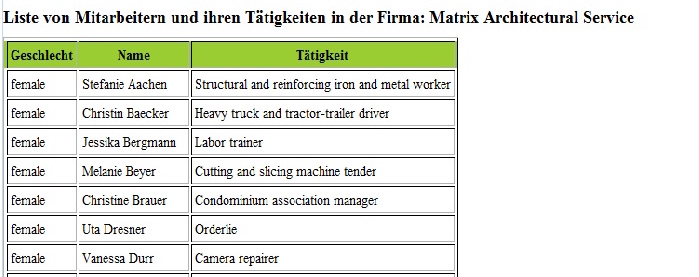
Displaying a company’s female employees.
Tip
Process sequences with streaming
Use <xsl:variable name="copy" select="copy-of(.)"/> to access the child elements of person. More details about streaming’s particularities are available under Streamability rules.
Code example: stylesheet for exercise 10, extracting employee activities.
<?xml version="1.0" encoding="UTF-8"?>
<xsl:stylesheet xmlns:xsl="http://www.w3.org/1999/XSL/Transform" xmlns:xs="http://www.w3.org/2001/XMLSchema" exclude-result-prefixes="xs" version="3.0">
  <xsl:mode streamable="yes" on-no-match="shallow-skip" />
  <xsl:output method="xhtml" />
  <!-- ERWEITERUNG -->
  <!--ACCUMULATOR-->
  <!--Aufgabe: Erstellen Sie 2 Accumulators, um die Anzahl der männlichen oder weiblichen Mitarbeiter zu zählen. -->
  <xsl:template match="html"> </xsl:template>
  <!-- AUFGABE: Erstellen Sie ein Template, das auf eine bestimmte Company anhand des Namens zugreift. -->
  <!-- Vorhandene Unternehmen: Matrix Architectural Service Naugles, Stratapro -->
  <xsl:template match="MATCH-EINTRAGEN">
    <!-- Inhalt des erstellten Templates -->
    <html>
      <head> </head>
      <body>
        <h2>Liste von Mitarbeitern und ihren Tätigkeiten in der Firma: <!-- AUFGABE: Lesen Sie den Namen des aktuellen Knotens aus. --></h2>
        <table border="1">
          <tr bgcolor="#9acd32">
            <!-- ERWEITERUNG: Nummerierung, dafür <th>-Element einkommentieren -->
            <!--<th>Nr.</th>-->
            <th>Geschlecht</th>
            <th>Name</th>
            <th>Tätigkeit</th>
          </tr>
          <!-- AUFGABE: Lassen Sie sich die Sequenz von Personen mit for-each ausgeben. -->
          <!--TIPP: Streaming-Modus und dessen Besonderheiten beachten -->
          <!-- AUFGABE: Schreiben Sie in der for-each die Abfrage männlich oder weiblich und befüllen Sie die Tabelle mit den gewünschten Werten. -->
          <tr>
            <!-- ERWEITERUNG: Counter, dafür <td>-Element einkommentieren und dann den Wert des Counters abfragen. -->
            <!-- <td> </td> -->
            <td> <!-- AUFGABE: Ersetzen durch Ihre Abfrage. --> </td>
            <td> <!-- AUFGABE: Ersetzen durch Ihre Abfrage. --> </td>
            <td> <!-- AUFGABE: Ersetzen durch Ihre Abfrage. --> </td>
          </tr>
        </table>
      </body>
    </html>
  </xsl:template>
</xsl:stylesheet>
Extension
As a small extension, add numbering to the existing information. The result should look like the following figure:
Figure: required output for extracting employee activities (extension).
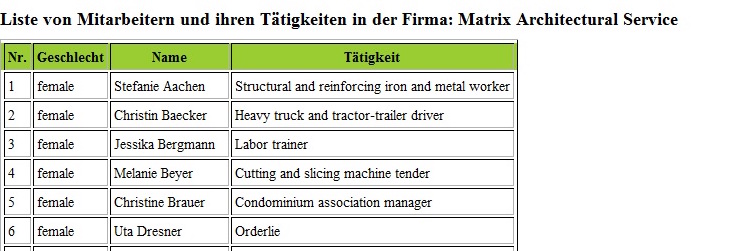
Displaying a company’s female employees in a numbered list.
Tip
Remember that streaming mode does not allow number and count! Use Accumulators when streaming to number the elements. Follow the example under Accumulators.
Solution
The complete HTML output and solution stylesheet are available under Solutions to exercise 10: extract employee activities.