

XML technologies / CSS / Advanced websites with CSS / Fixed-width layouts / Creating the document
(Excerpt from “CSS − Advanced websites with Cascading Stylesheets” by Rachel Andrew & Dan Shafer)
Create another XHTML or HTML document and save it as fixedwidth.html. Make sure all content is correctly marked up in HTML, then check the document with the W3C validator. This ensures it contains no HTML errors that could cause problems later when you add CSS rules.
A table-based layout
Although we advise against using tables for layouts, using tables in itself is perfectly acceptable. They are the recommended way to display tabular data, such as a worksheet. The tournament schedule shown in the figure The formatted table completes the layout contains tabular data, so tables are the best way to encode it.
<!DOCTYPE html PUBLIC "-//W3C//DTD XHTML 1.0 Strict//EN" "http://www.w3.org/TR/xhtml1/DTD/xhtml1-strict.dtd">
<html xmlns="http://www.w3.org/1999/xhtml">
  <head>
    <title>Footbag Freaks</title>
    <meta http-equiv="Content-Type" content="text/html; charset=iso-8859-1" />
    <link rel="stylesheet" type="text/css" href="fixedwidth.css" />
  </head>
  <body>
    <div id="header">
      <img src="img/logo.gif" alt="Footbag Freaks" height="77" width="203" />
      <p>The Home of the Hack</p>
    </div> <!-- header -->
    <div id="content">
      <img src="img/player.gif" height="272" width="111" alt="World Cup 06 Melbourne" />
      <h1>Announcement</h1>
      <h2>2006 FOOTBAG WORLD CUP DRAW</h2>
      <p>Melbourne, Australia. July 21st - 27th</p>
      <p>Footbag Freaks is pleased to announce that the draw for the biggest and most prestigious event in global footbag is coming to Melbourne in July, 2006 with the staging of the Footbag World Cup.</p>
      <p>Seen as the pinnacle of achievement in the sport, the 2006 World Cup will bring together over 200 of the world's premier footbag experts, with representative teams expected from over 40 nations. Entries will close on March 2, 2006. Tickets to the event will go on sale from January 1, 2006.</p>
      <table class="schedule" summary="Schedule of matches for the Footbag 2006 World Cup">
        <caption>Event Schedule</caption>
        <thead>
          <tr>
            <th scope="col">Match</th>
            <th scope="col">Scheduled</th>
            <th scope="col">Country</th>
            <th scope="col">Vs.</th>
            <th scope="col">Country</th>
            <th scope="col">Winner plays..</th>
          </tr>
        </thead>
        <tbody>
          <tr>
            <th scope="row"><a href="#">Match 1</a></th>
            <td><a href="#">July 21st :12:00pm</a></td>
            <td>England</td>
            <td>vs.</td>
            <td>New Zealand</td>
            <td>Winner of Match 12</td>
          </tr>
          <tr>
           ...
            <th scope="row"><a href="#">Match 12</a></th>
            <td><a href="#">July 24th :7:00pm</a></td>
            <td>Mexico</td>
            <td>vs.</td>
            <td>Iceland</td>
            <td>Winner of Match 1</td>
          </tr>
        </tbody>
      </table>
    </div> <!-- content -->
  </body>
</html>
Pay particular attention to the table’s HTML markup. The top row and first column on the left (the tournament names) are marked as headings with the tag <th>, while the remaining cells are enclosed in tags <td>. The headings also use the attribute scope to indicate whether a heading applies to a column (scope="col") or a row (scope="row") of the table. The table header is enclosed in the tag <thead>, while the tag <tbody> encloses the table body. These tags are very useful for describing a table correctly and are also extremely practical when applying CSS rules.
The document has two areas div: the first contains the page header and is named #header. The second element <div>, #content, holds the page content. The following figure shows how the page currently looks in the browser.
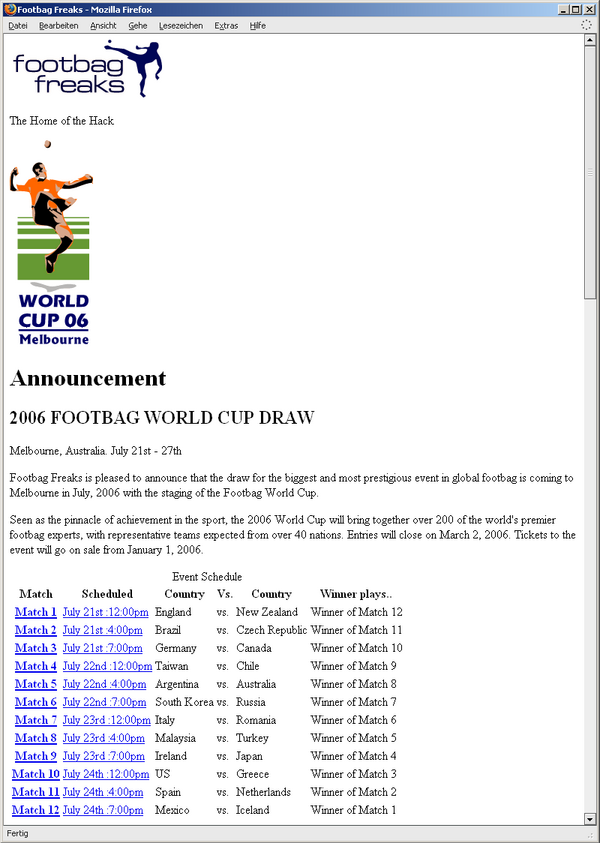
Figure: The document without CSS formatting.
Pay particular attention to the table’s HTML markup. The top row and first column on the left (the tournament names) are marked as headings with the tag <th>, while the remaining cells are enclosed in tags <td>. The headings also use the attribute scope to indicate whether a heading applies to a column (scope="col") or a row (scope="row") of the table. The table header is enclosed in the tag <thead>, while the tag <tbody> encloses the table body. These tags are very useful for describing a table correctly and are also extremely practical when applying CSS rules.
The document has two areas div: the first contains the page header and is named #header. The second element <div>, #content, holds the page content. For its current appearance in the browser, see
Figure: The document without CSS formatting
Figure: The document without CSS formatting
<< back | next >> |
Copyright © 2006 of the German translation, dpunkt.verlag GmbH
You may print the online version for your private use.
Otherwise, this chapter from “CSS − Anspruchsvolle Websites mit Cascading Stylesheets” is subject to the same conditions as the bound edition: the work, including all its parts, is protected by copyright. All rights reserved, including reproduction, translation, microfilming, and storage and processing in electronic systems.
dpunkt.verlag GmbH, Ringstraße 19, 69115 Heidelberg
back to top