

XML technologies / DocBook / Conditional elements (profiling) / Processing steps
(Excerpt from "DocBook-XML: Media-neutral and platform-independent publishing" by Thomas Schraitle)
Jiří Kosek developed DocBook stylesheets for document profiling. The following figure shows how profiling works:
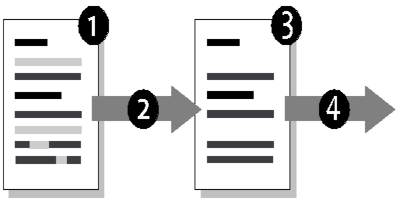
Figure: Processing a DocBook document with profiling
The profiling mechanism shown above has two steps:
Profiling: Transform the document with a profiling stylesheet, passing parameters that define the conditions for each variant.
Transformation: Convert the profiling result into the output format.
Two documents participate in this process:
Original document: Write the text in DocBook and add profiling attributes where appropriate. Criteria can apply to a chapter, paragraph or even a command. Such elements are retained only if their criterion is met.
Profiling result: Profiling produces a document containing only elements with no criterion or with a matching criterion. If an original element’s condition is not met, profiling removes it.
These steps did not describe document validation. This is explained in Profiling and validation more detail.
Copyright © 2009 Millin Verlag
You may print the online version for your private use.
Otherwise, this chapter from "DocBook-XML: Medienneutrales und plattformunabhängiges Publizieren" is subject to the same provisions as the printed edition: the work, including all its parts, is protected by copyright. All rights are reserved, including reproduction, translation, microfilming, and storage and processing in electronic systems.
Millin Verlag, Siebengebirgsring 36, 53797 Lohmar, info(at)millin.de
back to top